Standard Usage
tip
The usage and maintenance requirements in this chapter are also the basis for warranty determinations — device failures caused by not using or maintaining the device as required here are not covered by warranty. See Warranty and Service Policy - Non-warranty Coverage.
1. Usage Requirements
VR Device
- Do not subject the device to severe collisions, compression, or abnormal external forces;
- When wearing or adjusting the device, it is not recommended to hold the side arms with one hand, and excessive flipping or pulling of the side straps should be avoided;
- It is recommended to use third-party accessories (such as ear covers) without affecting the working state of the device's side arms. Please use third-party accessories reasonably, as improper use and excessive accessory weight may affect the weight distribution of the side arms and interfere with normal strap force, which may cause side arm breakage in severe cases.
TeleSuit
- When connecting aviation plugs, ensure the plug and socket are aligned, and avoid excessive force to prevent interface damage.
- Avoid violently pulling the motion capture suit cables and connection points to prevent internal circuit breakage.
- During use, ensure that the ventilation holes on the main control module housing are unobstructed, and avoid clothing or accessories blocking the vents to ensure effective heat dissipation and prevent overheating damage to the main control module.
- After use, hang the TeleSuit or fold it flat, avoid heavy pressure and high-temperature environments to prevent material aging.
TeleBox
- When connecting the TeleBox, use the original power adapter to ensure stable voltage and avoid device damage due to voltage instability.
- During use, avoid long-term high-load operation. It is recommended to take appropriate breaks to extend device lifespan.
Debug Computer
- System: Ubuntu 22.04 or 24.04.
- ROS2 Humble version.
2. Daily Maintenance
- Before and after use, check the device housing, connection points, and cables. If cracks, abnormal sounds, or other abnormalities are found, stop using immediately.
- When storing devices, keep them naturally extended and do not fold or compress connection points.
- Avoid exposing devices to high temperature, humidity, or strong magnetic field environments to prevent affecting device performance.
- Regularly clean the device surface using a soft dry cloth, and avoid using chemical cleaners.
3. Device Shutdown
After use, shut down the devices by following the steps below before disconnecting the power; do not leave them powered on and idle for long periods. Never cut the power directly. Doing so may damage the storage card and file system, leading to data loss, service errors, or failure to boot.
TeleBox Shutdown
- Connect to the TeleXperience Wi-Fi and open http://10.42.0.3:7876.
- Click the power icon at the top right of the page and select Device shutdown (设备关机).
- After the page shows "设备关机成功" (shutdown succeeded), wait for the device indicator lights to turn off, then disconnect the power.

TeleSuit Main Controller Shutdown
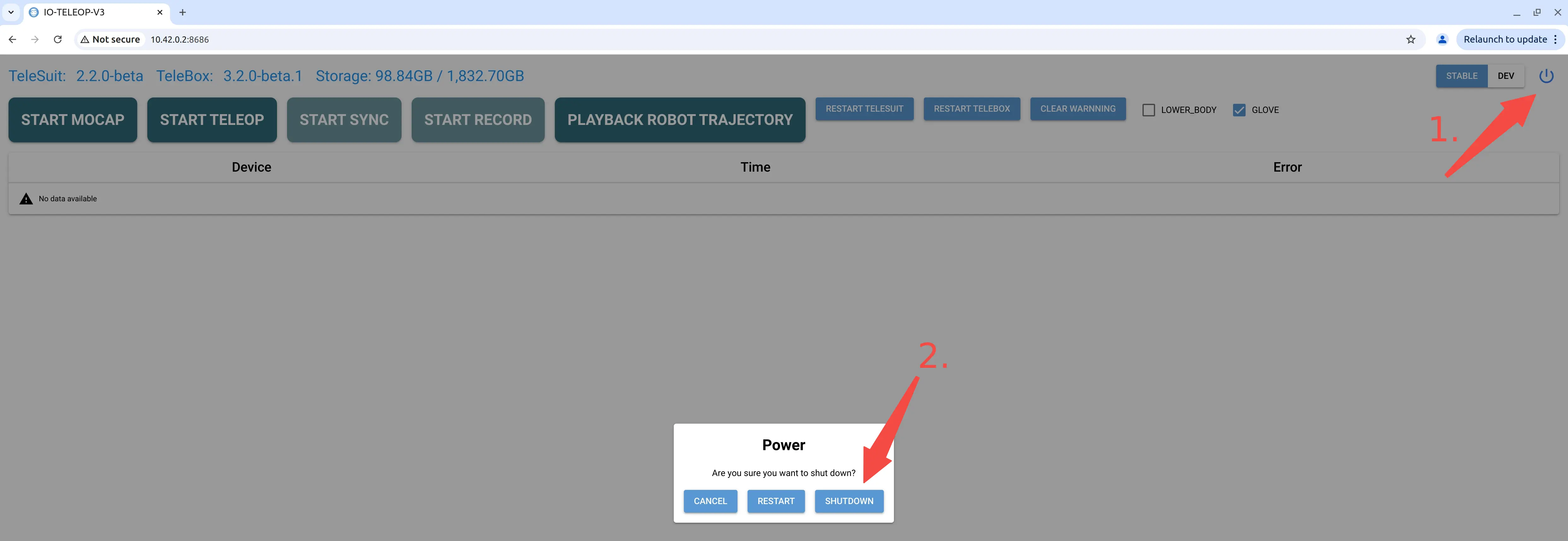
- Connect to the TeleXperience Wi-Fi and open http://10.42.0.2:8686. You can also shut it down from the button panel on the left side of the VR app.
- Click the power icon and select SHUTDOWN.
- Wait for the main controller indicator light to turn red, then disconnect the power or remove the battery.