Embodied AI Data Platform
Embodiflow is an enterprise-grade data management platform for embodied intelligence R&D. It covers the full chain of data collection, upload, annotation, quality control, export, model training, and inference deployment, and turns heterogeneous data collected from multiple robots and sensors into standard datasets ready for direct training.
Problems Addressed
Most R&D bottlenecks in embodied intelligence teams appear at the data stage, not the model stage. Three classes of problems are the most common:
- A broken data chain: Collection, annotation, review, and format conversion run on separate tools. Data moves repeatedly between systems, quality standards cannot be unified, and a problem cannot be traced back to a specific stage.
- Fragmented formats and robot models: Robots from different vendors and different collection methods each produce proprietary formats, so every new robot model requires rewriting the data processing code once more.
- No process management for multi-person collaboration: Annotation and review run in parallel across multiple people, task status, progress, and quality have no observable measurement, and delivery quality depends on individual experience.
Embodiflow consolidates these stages into one platform. It unifies formats on the ROS data model, constrains the scope of operations through roles and module permissions, and carries the annotation and review process on a task state machine.
Use Cases
| User type | Typical roles | Core needs | Platform capabilities |
|---|---|---|---|
| Robot OEMs | Algorithm engineers, embedded engineers | Device integration, operation data collection, model training, and on-robot deployment | Device Management, Collection task, Model Training, Model Inference |
| Data service providers | Annotation project managers, annotators, auditors | Annotation task management, multi-role collaboration, quality control, and delivery | Annotation Tasks, Dictionary Management, Data QC, Dataset Export |
| Universities and research institutions | Graduate students, researchers | Dataset building, multi-model training, experiment reproduction | Data Upload, format conversion, LeRobot Studio, Model Training |
| Manufacturers and integrators | IT engineers, operations engineers | Private deployment, data kept off the network, permissions and audit | Private deployment, Module Permissions, access audit, Operations Monitoring |
Core Capabilities
| Capability | Description |
|---|---|
| Data standardization | Uses ROS as the baseline and converts data from collection systems such as AgiBot, AgileX, and Realman into the standard MCAP format for unified management |
| Robot model adaptation | Built-in visualization models for 23 robot models, covering dual-arm, humanoid, collaborative-arm, and mobile platforms |
| Data QC | Automatically detects frame rate, Topic continuity, time synchronization, and frame drops, then outputs a visual diagnostic report |
| Annotation and review | Natural-language semantic annotation and camera-view object annotation, with a task state machine, manual second review, and rework after rejection |
| Format export | Exports to 12 target formats, including LeRobot, HDF5, RLDS, MCAP, JSON, and CSV |
| Model training | Built-in 11 policy models, with PyTorch and JAX framework families and single-machine or multi-GPU training |
| Model inference | A trained checkpoint can be deployed as an inference service, with simulation inference, MCAP data testing, and offline edge deployment |
| Permissions and audit | 6 role types combined with 50 module permission keys, plus IP whitelist and operation audit |
| Private deployment | Data resides in the customer's own object storage or local storage; the platform runs fully offline and sends no data back |
Feature Overview
The sidebar organizes functions into four groups. This documentation covers 25 entries.
| Group | Entry | Main functions |
|---|---|---|
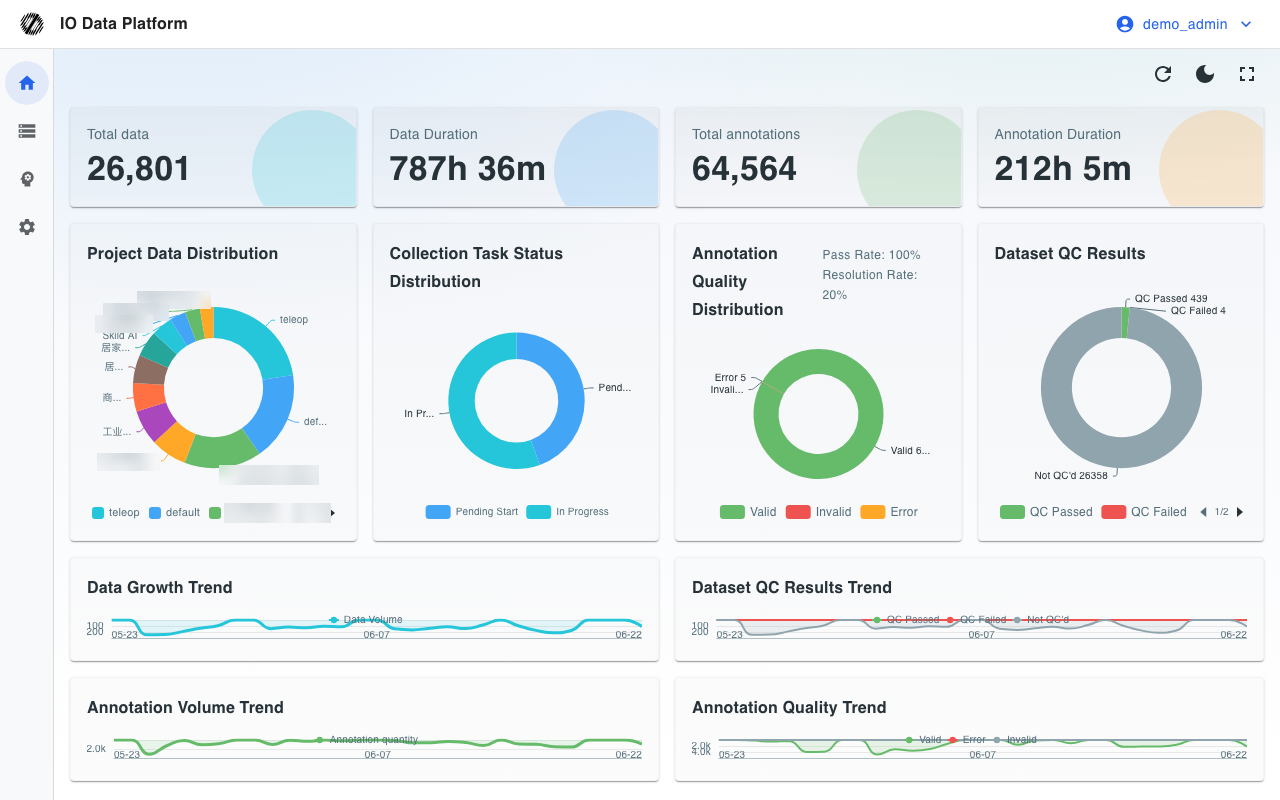
| Overview | Overview | Data volume, annotation volume, quality distribution, project progress, and recent activity |
| Data | Data | Dataset search, filter, preview, and batch actions |
| Data | Upload | Local upload, video and audio conversion to MCAP, and LeRobot dataset import |
| Data | Collect | Collection task creation, assignment, and progress tracking |
| Data | Annotation | Annotation tasks, task status transitions, batch annotation, and problem annotations |
| Data | Quality Control | ROS recording QC rules, execution, and reports |
| Data | Dictionary | Unified definitions for skills, objects, targets, adverbials, annotation labels, and data tags |
| Data | Chart | Motion planning, action relationships, duration distribution, dependency relationships, and the annotation calendar |
| Data | Skills | Robot skill library and version management |
| Data | Export | Export to 12 target formats, export history, and quota management |
| Data | LeRobot | In-browser preview and playback of LeRobot datasets |
| Model | Training | Training task creation, parameter configuration, metric monitoring, and checkpoint management |
| Model | Inference | Inference service deployment, simulation tests, MCAP tests, and offline edge deployment |
| Model | Action | Motion Retargeting and motion data management |
| Manage | Project | Project creation, visibility scope, members, and lifecycle |
| Manage | Users | Account management, role assignment, module permissions, and CSV batch import |
| Manage | Robots | Robot model registration, parameters, and maintenance records |
| Manage | Devices | Device registration, Agent installation, resource monitoring, video stream integration, and remote takeover |
| Manage | Cloud | Integration and credential management for 8 types of object storage |
| Manage | Workflow | Matching rules, action rules, and workflow orchestration |
| Manage | Plugins | Plugin installation, enablement, disabling, and development |
| Manage | Trash | Unified view and restore of logically deleted data across modules |
| Manage | Quotas | Quotas and usage for export, training, and inference resources |
| Manage | System | System parameters, task queues, theme and layout, and license |
| Manage | Operations | System logs, task queues, WebRTC status, and permission audit |
Prerequisites
| Item | Requirement |
|---|---|
| Browser | The latest version of Chrome or Edge. Video and audio conversion to MCAP depends on MediaStreamTrackProcessor, which only these two browsers support |
| Account | Created by an administrator, with a role assigned. The platform does not offer self-service registration |
| Permissions | The role determines the visible menus, and module permissions determine specific operations. Modules without configuration are denied |
| Network | A cloud instance requires access to the platform address; a private deployment opens ports according to the on-site network policy |
| Object storage | Upload and export require at least one available cloud storage connection, configured by an administrator |
Platform Architecture
The platform consists of a web application and background services, with the following boundaries of responsibility.
| Level | Components | Responsibilities |
|---|---|---|
| Client | Browser, robot-side Agent | The web client handles management, annotation, and preview; the Agent packages, compresses, and quality-checks data locally before batch ingestion |
| Application | Web application, RESTful API | Accounts and permissions, data and task orchestration, and page interaction; all server-side capabilities are exposed through the RESTful API |
| Task | Task queue and background Worker | Long-running tasks such as data import parsing, video transcoding, format conversion, QC, and export run asynchronously and report progress |
| Compute | Training service, inference service | Scheduling, execution, and checkpoint management for training tasks; deployment and invocation of inference services |
| Storage | Database, object storage, or local storage | Metadata is stored in the database; raw data and artifacts reside in the customer's own object storage or local disks |
| Real-time | WebRTC gateway | Device video stream integration and remote takeover |
The platform is deployed with storage and programs separated: data can reside in the customer's own object storage, and access permissions remain under the customer's control.
Roles
| Role | Scope of responsibility | Default visible menus |
|---|---|---|
| Administrator | Projects, accounts and permissions, cloud storage, system configuration, and audit | All |
| Project Manager | Creating projects, selecting data to build tasks, assignment and follow-up, and export | Data, Model, Manage (except Cloud, Trash, Quotas, System, and Operations) |
| Collector | Claiming and executing collection tasks, uploading data, and viewing devices | Overview, Data, Upload, Collect, Quality Control, Devices |
| Auditor | Reviewing annotation results and marking them Qualified or rejected | Overview, Collect, Annotation, Dictionary, Chart |
| Annotator | Performing annotation and submitting for review | Overview, Collect, Annotation, Dictionary, Chart |
| Guest | Read-only access | Overview |
The role determines the range of visible menus, and module permissions narrow that range further at the feature level. See Permissions and Module Permissions for the relationship and configuration of the two.
The platform supports centralized monitoring and remote takeover of robot devices:
Deployment Forms
The platform supports two deployment forms. Operation is identical, and the differences are the data location and the upgrade method.
| Deployment form | Data location | Upgrade method |
|---|---|---|
| Cloud instance | A dedicated cloud environment provided by the platform | Upgraded centrally by the platform |
| Private deployment | The customer's private cloud or local data center, which can connect to the customer's own object storage | Upgraded with the help of a delivery engineer |
Private deployment comes in a workstation edition and a cluster edition. The two editions have identical features, and differ in compute and capacity: the workstation edition is a single tower server, and the cluster edition is based on Kubernetes, so a whole-node failure does not interrupt services or data. Sizing is determined by the number of robots collecting data at the same time, not by the number of users. See the Deployment Requirements Checklist delivered with the contract for hardware and environment conditions.
Reading Paths
Reading Order by Role
Reading in role order reduces cross-page navigation.
| Role | Reading order |
|---|---|
| Administrator | Permissions → Module Permissions → Projects and Users → Cloud → Operations Monitoring → Backup and Upgrade |
| Project Manager | Data Management → Create Annotation Task → Annotation Tasks → Dataset Export → Analytics Charts |
| Annotator | Getting Started → Annotation task status → Annotator Guide → Dictionary Management |
| Auditor | Auditor Guide → Permissions → Data QC |
| Collector | Collector Guide → Device Management → Data Upload |
| Algorithm engineer | Data format → Dataset Export → Model Training → Model Inference → LeRobot Datasets and Training |
Entry Points by Role
Entry pages for each role:
| Role | Entry |
|---|---|
| All roles | Getting Started |
| Administrator | Permissions, Module Permissions |
| Project Manager | Create Annotation Task, Data Management |
| Annotator | Annotator Guide |
| Auditor | Auditor Guide |
| Collector | Collector Guide |
| Algorithm engineer | Data format, Model Training |
Next Steps
After the overall platform structure and prerequisites are clear, start the first operation flow with Getting Started.
| Page | Purpose |
|---|---|
| Getting Started | Sign-in, interface layout, and the minimal end-to-end operation |