LeRobot Datasets and Training
LeRobot is a robot learning data and policy training framework maintained by Hugging Face. The platform exports annotated recordings as LeRobot datasets for use by the platform training service or an external LeRobot training stack.
Supported Models and Dataset Versions
Applicable Scenarios
| Reader | Concern | Entry |
|---|---|---|
| Algorithm engineer | Dataset fields, version compatibility, and the model and training entry points | Dataset Export, Model Training |
| Training operations | Training images, GPUs and mounts, logs and checkpoints | Model Training |
| Project Manager | Data format for delivery and the range of available models | Dataset Export |
Core Capabilities
| Capability | Description | Entry |
|---|---|---|
| Dataset export | Export LeRobot v3.0 or v2.1 with configurable image format, sampling rate, and subtasks | Data → Export |
| Online preview | Play ingested LeRobot data in the browser | Data → LeRobot |
| Format validation | Load with LeRobotDataset, or check the directory and metadata through LeRobot Studio | See "Dataset validation" |
| In-platform training | Start training with a selected model and framework, and view logs and checkpoints | Model → Training |
For the Data → LeRobot preview entry, see LeRobot Studio.
Models and Frameworks
The platform training service registers 11 policy models. The model IDs, training frameworks, and dataset versions are listed below.
| Model ID | Training framework | Dataset version | Dedicated page |
|---|---|---|---|
act | act, lerobot | v2, v3 | ACT model training |
diffusion | lerobot | v2, v3 | Diffusion Policy model training |
groot | lerobot | v2, v3 | — |
pi0 | lerobot, jax | v2, v3 | π0 and π0.5 model fine-tuning |
pi05 | lerobot, jax | v2, v3 | π0 and π0.5 model fine-tuning |
reward_classifier | lerobot | v2, v3 | — |
sac | lerobot | v2, v3 | — |
smolvla | lerobot | v2, v3 | SmolVLA model fine-tuning |
spirit-v1.5 | spirit | robochallenge, v2, v3 | Spirit-v1.5 model fine-tuning |
tdmpc | lerobot | v2, v3 | — |
vqbet | lerobot | v2, v3 | — |
A dash (—) means no dedicated page exists yet; use the official LeRobot documentation for the parameters and limits.
Dataset Versions
The LeRobot dataset version follows the export option and is independent of the Python package version.
| Export option | Data format version | Description |
|---|---|---|
| v3.0 (default) | v3.0 | Supports subtask mode; not all models support it yet |
| v2.1 | v2.1 | Best compatibility; does not support subtask mode |
The interface option v3.0 maps to the export parameter version=latest, and v2.1 maps to version=v2.1. The training service uses the two dataset version identifiers v2 and v3. For the differences, see LeRobot v2 vs. v3 format differences.
Training Preparation
Training Images
The platform training service selects a LeRobot training image by dataset version. The defaults below can be overridden by the deployment environment.
| Dataset version | Default image | Training entry |
|---|---|---|
| v2 | lerobot:v0.3.3 | /lerobot/.venv/bin/lerobot-train |
| v3 | lerobot:v0.4.4 | /lerobot/.venv/bin/lerobot-train |
| Unspecified | lerobot:latest | /lerobot/.venv/bin/lerobot-train |
When a training job converts v2 data to v3, it uses the v3 default image. Runs with more than one GPU use accelerate launch to enter the same entry point. The following models use dedicated images.
| Model | Default image |
|---|---|
pi0 | ioaitech/train_openpi:pi0 |
pi05 | ioaitech/train_openpi:pi05 |
act | ioaitech/train_act:cuda |
spirit-v1.5 | ioaitech/train_spirit:1.5 |
Training Pipeline
Dataset Validation
Validate the export once before connecting it to training. Prefer opening the archive or extracted directory with LeRobot Studio; for scripted validation, load the dataset directly.
from lerobot.datasets import LeRobotDataset

dataset = LeRobotDataset("local/my_dataset", root="/path/to/lerobot_dataset")
print(dataset.num_frames, dataset.num_episodes)
A successful load does not guarantee suitability for training, but it rules out a wrong directory hierarchy, missing metadata, and gaps in file numbering.
Dataset Export Essentials
Export Configuration
The data selection and parameter panels appear below.
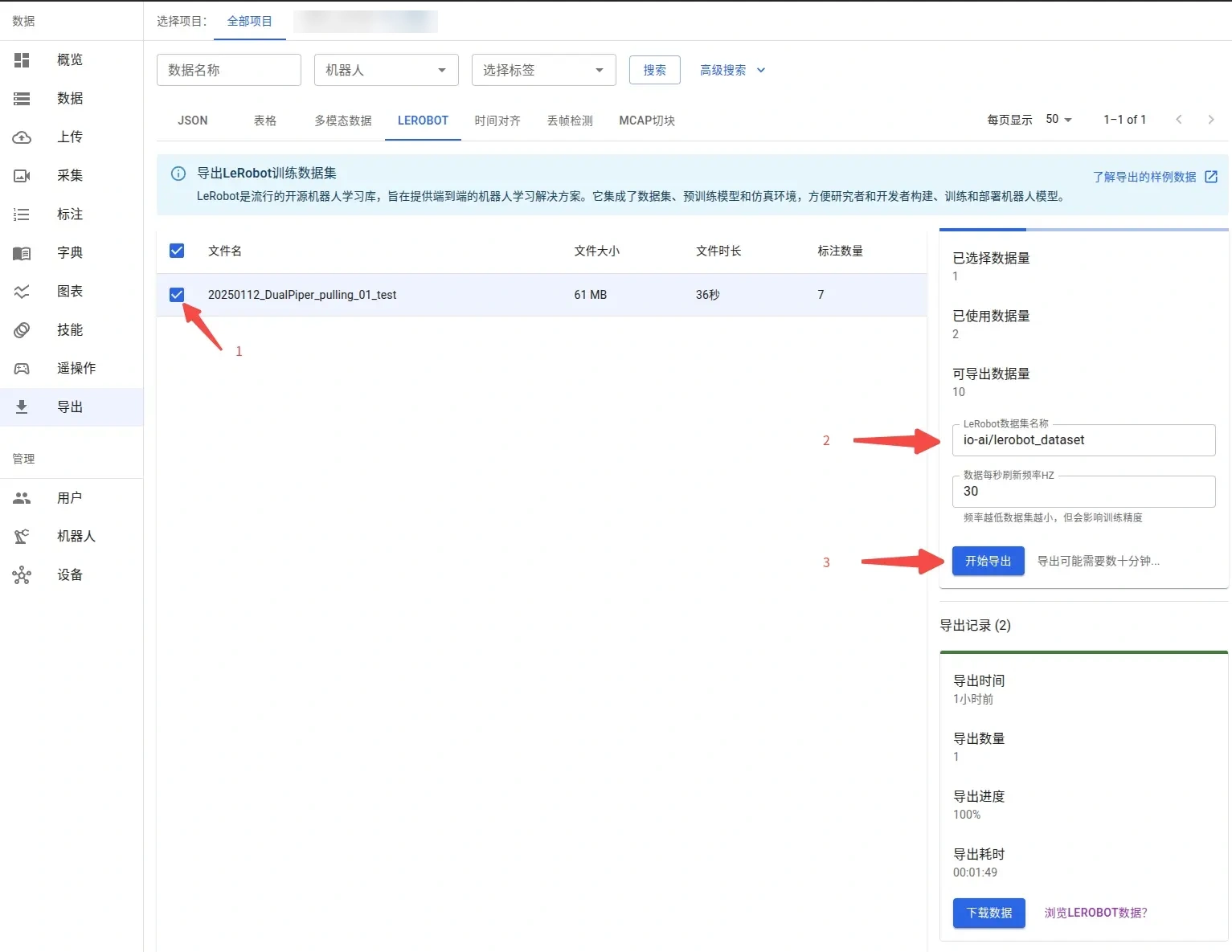
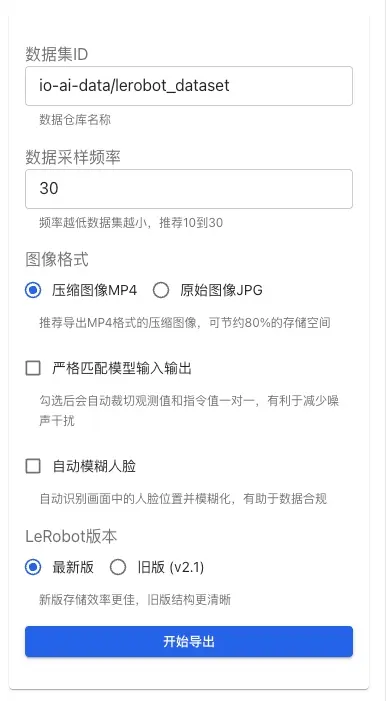
| Parameter | Value | Description |
|---|---|---|
| Data sampling rate | 1–60 Hz, default 30 | Lower values make the dataset smaller; 10–30 is recommended |
| Image format | MP4, JPG | MP4 by default; MP4 saves about 80% storage compared with JPG |
| Strict match of model inputs and outputs | Allow / Deny | When enabled, crops make observations and instructions correspond one to one, reducing noise |
| Automatic face blur | Allow / Deny | When enabled, blurs faces in the footage for data compliance |
| Enable subtasks | Allow / Deny | When enabled, each annotation becomes a subtask within an episode; v3.0 only |
| Adaptation mapping | Allow / Deny | When configured, fields are generated from the mapping and strict_match is ignored |
| LeRobot version | v3.0, v2.1 | See the previous section for the version differences |
For the full format and quota details, see Dataset Export.
Field Mapping
The platform infers state and action fields from ROS topic name suffixes. When topic naming differs, standardize the names during recording; when existing data cannot be renamed, fill the gap with adaptation mapping.
| Dataset field | Topic name suffix | Basis |
|---|---|---|
observation.state | /joint_state, /joint_states, /arm_joint_state | tools/mcap2lerobot/mcap2lerobot.py |
action | /joint_command | tools/mcap2lerobot/mcap2lerobot.py |
Export Results
After the export finishes, download the archive and extract it to a separate directory. --dataset.root points to the directory that contains meta/info.json.


your_dataset/
├── meta/
│   └── info.json
├── data/
└── videos/
Limitations
Export and training are subject to the existing limits below.
| Item | Limit | Description |
|---|---|---|
| Export format version | v3.0, v2.1 | The interface option v3.0 maps to version=latest, and v2.1 to version=v2.1 |
| Subtask mode | v3.0 only | After subtasks are enabled, only v3.0 can be selected; selecting v2.1 when creating a job is also rejected |
| Data sampling rate | 1–60 Hz, default 30 | 10–30 is recommended; lower rates make the dataset smaller |
| Image format | MP4, JPG | MP4 by default |
| Strict match | Ignored after adaptation mapping is configured | The two settings are mutually exclusive, and adaptation mapping takes precedence |
| Adaptation mapping size | Within 256 KiB | An export job is rejected when the limit is exceeded |
| Model image input | vqbet and tdmpc keep only one image | Extra images are ignored during training and logged |
| QC gate | Enabled by default | Datasets that fail QC cannot be exported |
| Face blur | Depends on the SCRFD model and uses CPU only | A failed blur aborts the export |
| Training dataset version | v2, v3 | spirit-v1.5 also supports robochallenge; see "Supported models and dataset versions" |
Reading Order
- Export the dataset: Dataset Export
- Validate the data: LeRobot Studio
- Install the environment: Install LeRobot
- Choose a model: ACT, Diffusion Policy, π0 and π0.5, SmolVLA, Spirit-v1.5
- Start training: Model Training