Modules
This section targets the roles that operate specific modules. It lists the entry, responsibility, and authoritative page of each functional module by sidebar group. The corresponding module page covers the fields, permissions, and failure handling within a module.
Feature Overview
The table is arranged by sidebar group: Overview, Data, Model, and Manage. The entry path is the module's access address on the platform, and the authoritative page is the corresponding reference page.
| Module | Entry path | Responsibility | Authoritative page |
|---|---|---|---|
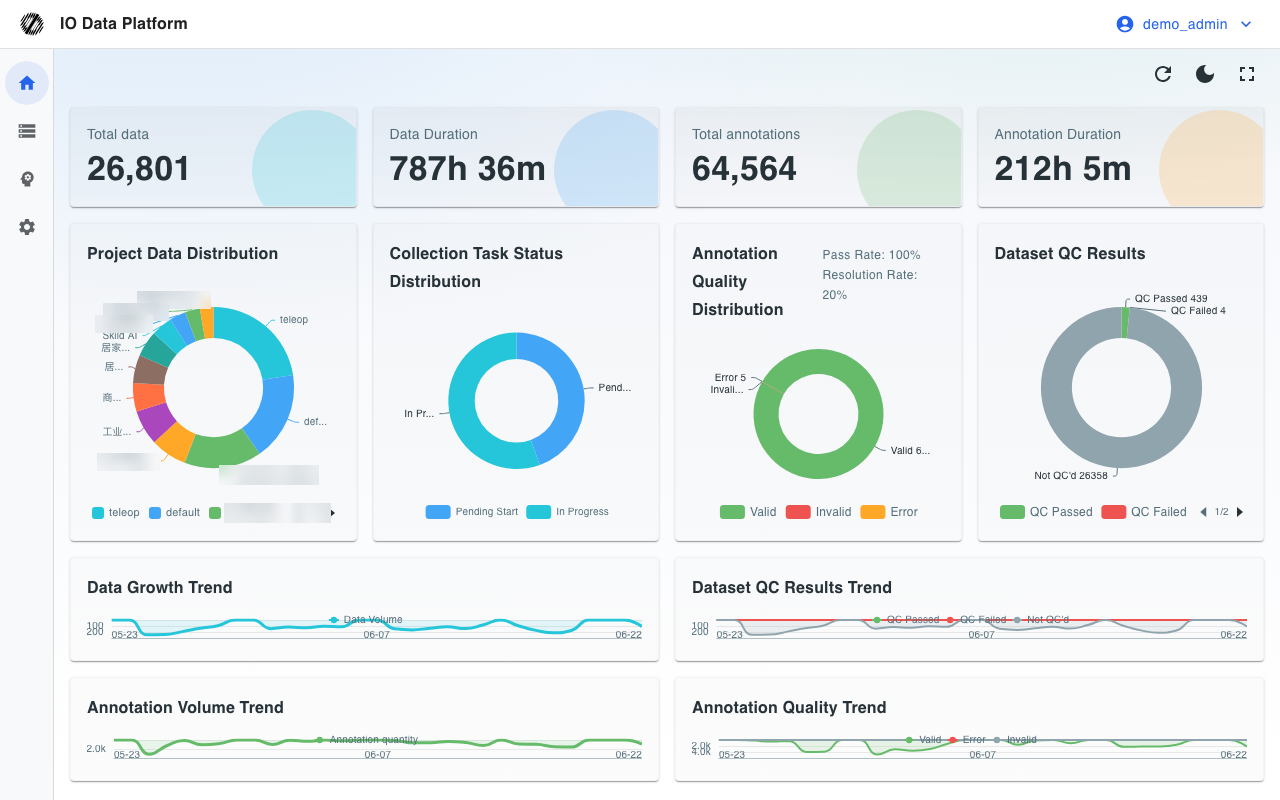
| Overview | /dashboard | Aggregates overall metrics such as data volume, annotation volume, and quality distribution | Overview |
| Data Management | /dataset | Searches, previews, and batch-maintains all datasets | Data Management |
| Data Upload | /upload | Uploads local files and external datasets to a specified project and cloud storage | Data Upload |
| Collection task | /collections | Creates collection tasks and tracks execution by collectors and devices | Collection task |
| Annotation Tasks | /tasks | Carries the task state transitions for annotation and review | Annotation Tasks |
| Data QC | /qc | Detects frame rate, Topic, and time synchronization of ROS recordings by rule | Data QC |
| Dictionary Management | /dicts | Maintains annotation standards such as skills, objects, and labels | Dictionary Management |
| Analytics Charts | /charts | Presents motion planning, dependencies, and the annotation calendar as charts | Analytics Charts |
| Skill Library | /skills | Manages robot skills and their versions | Skill Library |
| Dataset Export | /export | Exports annotation results to the target formats required for training | Dataset Export |
| LeRobot Studio | /lerobot | Previews and plays back LeRobot datasets in the browser | LeRobot Studio |
| Model Training | /train | Configures and runs policy model training tasks | Model Training |
| Model Inference | /inference | Deploys checkpoints as inference services | Model Inference |
| Motion Retargeting | /retargeting | Transfers motion data between different robots | Motion Retargeting |
| Project Management | /projects | Manages projects, members, and visibility scope | Project Management |
| User Management | /users | Manages accounts, roles, and module permissions | User Management |
| Robot | /robots | Registers robot models, parameters, and maintenance records | Robot |
| Device Management | /devices | Registers devices, installs the Agent, monitors resources, and enables remote takeover | Device Management |
| Cloud | /clouds | Configures object storage connections and credentials | Cloud |
| Workflow management | /workflows | Configures matching rules, action rules, and workflows | Workflow management |
| Plugin Management | /plugins | Installs, enables, and disables plugins | Plugin Management |
| Algorithm Management | /algorithms | Registers custom container algorithms for workflow invocation | Algorithm Management |
| Trash | /trash | Views and restores logically deleted data | Trash |
| Quota Management | /quotas | Manages quotas and usage for export, training, and inference | Quota Management |
| System Settings | /system | Configures branding, interface, and system parameters | System Settings |
| Operations Monitoring | /monitor | Views system logs, task queues, and permission audit | Operations Monitoring |
Prerequisites
The role determines the entries visible in the sidebar, and module permissions determine whether the page and API behind an entry are available. Modules without configuration are denied; administrators are not restricted by module permissions; user-level overrides take precedence over the role default template. Sidebar entries are filtered by role and by hidden items in System Settings, and do not change with module permissions.
| Role | Visible sidebar groups |
|---|---|
| Guest | Overview |
| Collector | Overview, Data, Manage |
| Annotator | Overview, Data |
| Auditor | Overview, Data |
| Project Manager | Overview, Data, Model, Manage |
| Administrator | All |
See the "role × menu permission matrix" in Permissions for the visible roles of each entry; an entry being visible does not mean that operations are available, and specific operations also require the corresponding module permission key not to be Deny. See Module Permissions for how roles and module permissions combine, and for the configuration steps.
Reading Paths
The recommended reading order for module pages is given by role, to reduce cross-page navigation.
| Role | Recommended reading order |
|---|---|
| Administrator | Module Permissions → User Management → Project Management → Cloud → System Settings → Operations Monitoring |
| Project Manager | Data Management → Create Annotation Task → Annotation Tasks → Dataset Export → Analytics Charts |
| Collector | Collection task → Device Management → Data Upload |
| Annotator | Annotation Tasks → Dictionary Management → Analytics Charts |
| Auditor | Annotation Tasks → Data QC |
| IT, Operations | Operations Monitoring → System Settings → Cloud → Device Management |
Related Pages
| Page | Purpose |
|---|---|
| Data Management | Search, preview, and batch operations for datasets |
| Annotation Tasks | Task state machine, task details, and batch actions |
| Dataset Export | Export to 12 target formats |
| Model Training | Creation, monitoring, and quotas of training tasks |
| Module Permissions | Grouping and configuration steps of module permission keys |
| Permissions | Roles and permission levels |