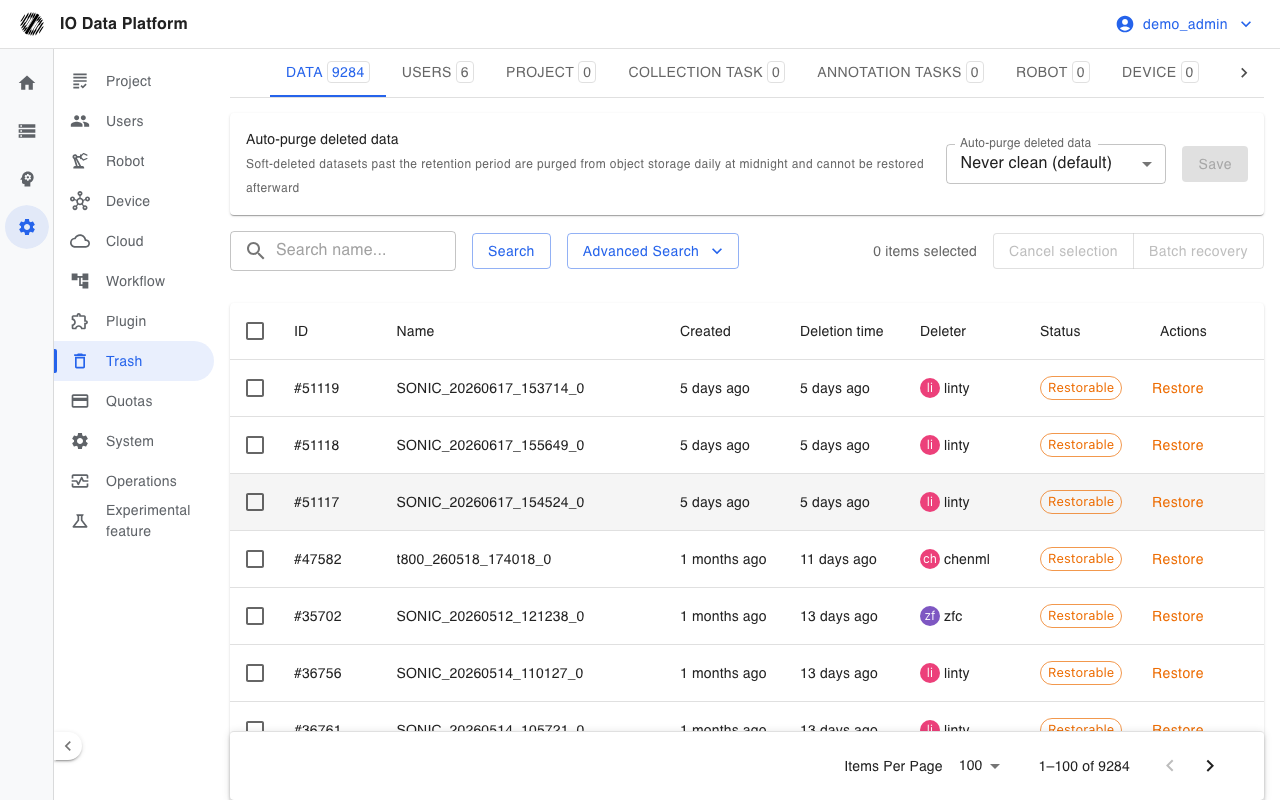
Trash consolidates the logically deleted data of each module and supports search and restore. Every deletion is a soft delete: the record stays in the system and can be restored from Trash, except data that has been permanently purged.
Prerequisites
| Item | Content |
|---|
| Menu entry | Manage → Trash |
| Route | /trash, redirects to /trash/dataset by default |
| View permission | "View Trash" |
| Restore permission | "Restore / Empty Trash" |
| Role scope | The menu is visible to Administrators only, and category counts can also be read by Administrators only |
| Restore scope for datasets | A dataset in Personal Space requires an Administrator; a dataset in a project requires edit permission on that project |
Browsing and Restoring
Data Types
Tabs at the top of the page switch between data types, and each tab shows the number of pending items in that category.
| Tab | Data type |
|---|
| Data | Dataset |
| Users | Account |
| Project | Project |
| Collection task | Collection task |
| Annotation Tasks | Annotation task |
| Robot | Robot |
| Device | Device |
| Cloud | Cloud connection |
| Plugin | Plugin |
Lists and Search
The list is sorted by deletion time in descending order, and search conditions are written into URL query parameters.
| Column | Description |
|---|
| ID | Data number |
| Name | Data name |
| Created | Data creation time |
| Deletion time | Soft deletion time |
| Deleter | Account that performed the deletion |
| Status | Shown on the "Data" tab only: restorable, or permanently purged |
| Actions | Restore; for permanently purged data, the purge time is shown |
| Search condition | Description |
|---|
| Search name | Fuzzy match on name |
| Deleter | Filter by the account that performed the deletion |
| Deletion time start / end | Filter by soft deletion time range; the start must not be later than the end |
Restore Operations
- Click "Restore" in the "Actions" column, or select the target rows and click "Batch recovery".
- Confirm in the confirmation dialog.
- Verify the result in the original location of the data.
Permanently purged datasets cannot be selected and offer no restore action.
Automatic Purge
The top of the "Data" tab provides automatic purge settings, which apply to datasets only.
| Value | Meaning |
|---|
| Never purge (default) | No automatic purge |
| 7 / 30 / 90 / 180 / 365 days | Deleted datasets beyond the retention period are purged |
Purges run every day in the early morning, removing the object storage content of the datasets; purged content cannot be restored.
Constraints and Limits
| Item | Description |
|---|
| Deletion method | Deletion in each module is a soft delete, and the data enters Trash |
| Scope of permanent purge | Only the object storage content of datasets is permanently purged |
| Manual purge | The interface provides no manual permanent purge entry |
| Automatic purge default | Never purge |
| Permanently purged | The dataset cannot be restored and its status shows "Permanently purged" |
| Restoring users or projects | Related permission caches are rebuilt after the restore |
| Visibility after restore | A dataset returns to its original project and Personal Space, and project membership is unchanged |
Troubleshooting
| Symptom | Possible cause | Action | Owner |
|---|
| Message "Data has been permanently purged and cannot be restored" | The dataset passed its retention period and was purged automatically | Cannot be restored; collect or upload again | Administrator |
| Message "Data does not exist or has been restored." | The data was restored, or the record changed | Confirm in the original location of the data | Administrator |
| Permission error on restore | The dataset belongs to a project and the operator lacks edit permission on that project | Restore as a project member or an Administrator | Administrator |
| The current page is empty after restore | No data remains on the current page | The system redirects to the previous page, or switch tabs manually | Administrator |
| Tab count does not match the list | The count is the total pending items of each category | Refresh the page | Administrator |
Related Pages