Cloud Storage
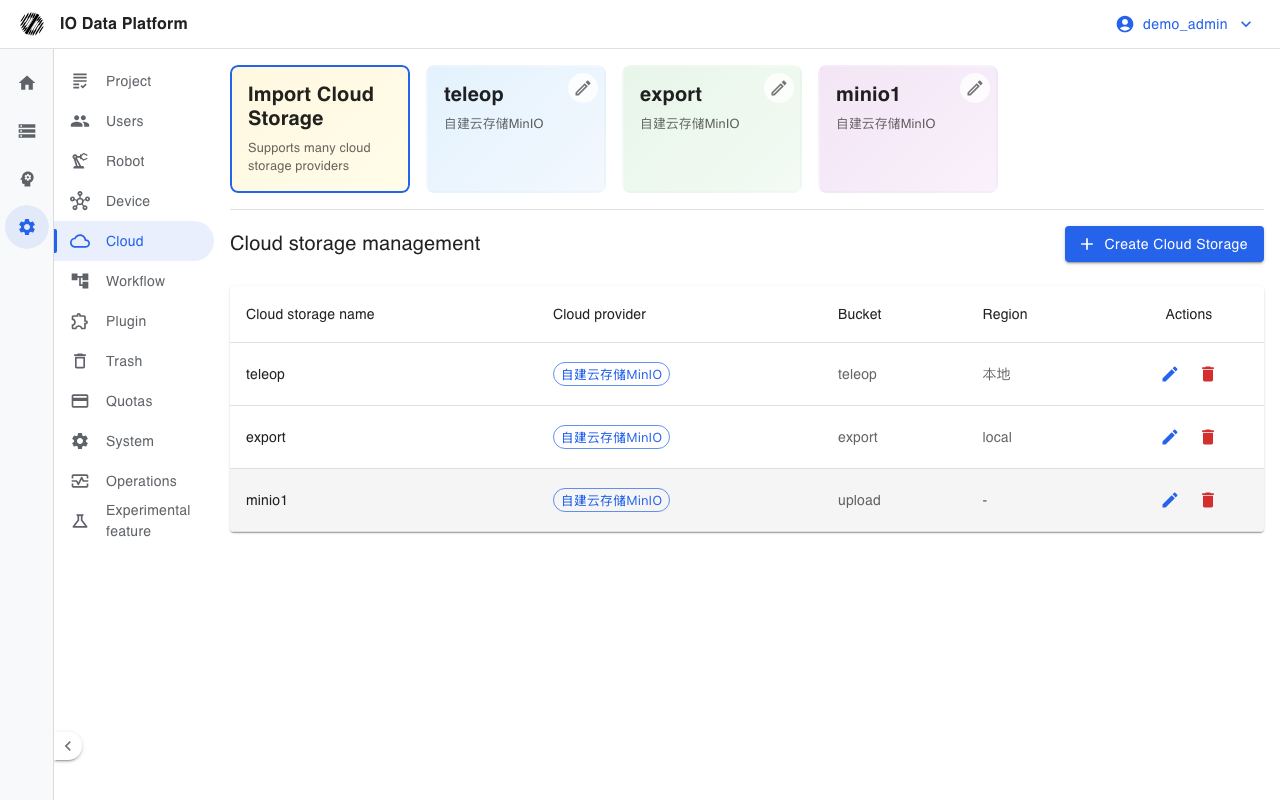
A cloud storage connection is the location where the platform reads and writes object data. Connections are used for data upload, cloud import, export artifact storage, and data collection upload. They are either global or project-level, and direct browser upload relies on the cross-origin rules of the bucket.
Prerequisites
| Item | Content |
|---|---|
| Menu entry | Manage → Cloud |
| Route | /clouds |
| Roles | The Cloud page requires the Administrator role; Project Managers can also create project-level connections |
| Permissions | View Cloud Storage, Manage Cloud Storage |
| Dependencies | A bucket is created; access keys are available; direct browser upload requires cross-origin rules on the bucket |
Connection Configuration
Storage Types
A new connection can use one of 8 object storage types. MinIO no longer accepts new connections: existing connections keep working, but new ones cannot be created.
| Type | Provider |
|---|---|
| Tencent Cloud COS | Tencent Cloud object storage |
| Alibaba Cloud OSS | Alibaba Cloud object storage |
| Huawei Cloud OBS | Huawei Cloud object storage |
| Volcengine TOS | Volcengine object storage |
| Amazon S3 | Amazon Web Services object storage |
| Azure Blob Storage | Microsoft cloud object storage |
| Cloudflare R2 | Cloudflare object storage |
| Self-built Cloud Storage MinIO | Self-hosted object storage (no longer accepts new connections; only existing connections work) |
| RustFS object storage | Self-hosted object storage |
Connection Scope
The visibility of a connection is determined by the Is Open and Project fields together.
| Scope | Field values | Visible to | Creatable by |
|---|---|---|---|
| Global connection | Is Open = Yes | All projects | Administrator |
| Project-level connection | Is Open = No, with a project selected | Only the selected project | Administrator, Project Manager |
The Cloud page requires the Administrator role; see Permissions for the project-level connection capability of Project Managers.
Connection Fields
| Field | Type | Required | Description |
|---|---|---|---|
| Cloud Storage Name | Text | No | Starts with a lowercase letter and contains lowercase letters and digits only; generated automatically when empty |
| Storage Region | Text | No | Region of the bucket |
| Is Open | Enum | Yes | All Users Can Upload / Only System or Admin Can Upload |
| Read-only mode | Enum | Yes | Read Only (writes and deletes blocked) / Read and write |
| Cloud Provider | Enum | Yes | One of the 8 creatable types above; existing MinIO connections remain editable |
| Access Configuration | Text | Depends on provider | Key, region, bucket, endpoint, and similar fields, which vary by type |
| Project | Multi-select | No | Associated projects; the platform uses projects to control connection visibility |
Access Configuration Fields
The Access Configuration area collects different fields for each type, depending on the cloud provider.
| Type | Required fields | Optional fields |
|---|---|---|
| Tencent Cloud COS | Key ID, Key, Region, Bucket | None |
| Alibaba Cloud OSS | Key ID, Key, Region, Bucket | Endpoint, Internal endpoint |
| Huawei Cloud OBS | Key ID, Key, Region, Bucket | Endpoint |
| Volcengine TOS | Key ID, Key, Region, Bucket | Endpoint, Internal endpoint |
| Amazon S3 | Key ID, Key, Region, Bucket | Accelerate Endpoint |
| Azure Blob Storage | Storage Endpoint, Bucket, Access Key, Secret Key | None |
| Cloudflare R2 | Storage Endpoint, Bucket, Access Key ID, Access Key | None |
| Self-built Cloud Storage MinIO | Host address, Port, Bucket, Access Key ID, Access Key | Access protocol, External HTTPS proxy address, Internal endpoint |
| RustFS object storage | Host address, Port, Bucket, Access Key ID, Access Key | Access protocol |
Connection Management
List Fields
| Field | Description |
|---|---|
| Cloud storage name | Connection name; select to open object browsing |
| Cloud provider | Cloud storage type tag |
| Bucket | Bucket name extracted from the access configuration |
| Region | Extracted from the access configuration or the region field |
| Actions | Edit, Delete |
Object Browsing
Open object browsing in the connection details to view objects in the bucket by prefix. It is reachable from the connection row or the object browsing entry.
| Prefix | Meaning |
|---|---|
| All | No prefix restriction |
| System Import | dataset/ |
| User upload | users/ |
| Export Time Alignment | aligns/ |
| Export Frame Drop Detection | framedrops/ |
| Export MCap Segmentation | splits/ |
| List field | Description |
|---|---|
| Data name | Object key; select to download |
| Upload Time | Last modified time of the object |
| File Size | Object size |
| Import Data | Shows an entry link when already stored; importable when not stored and the extension is supported |
| File operation | Delete the remote object |
| Action | Effect | Constraint |
|---|---|---|
| Import | Imports the object as a platform dataset | Only .mcap, .bag, .db3 |
| Delete | Deletes the remote object | Blocked in read-only mode |
| Batch download | Downloads the selected objects | Up to 10 per run |
| Batch delete | Deletes the selected objects | Blocked in read-only mode |
| Export download links | Exports a list of download links for objects under the current prefix | Read only |
Constraints and Limits
| Item | Value | Description |
|---|---|---|
| Name uniqueness | A connection with the same name cannot be created twice | Validated on save |
| Name format | Starts with a lowercase letter and contains lowercase letters and digits only | Saving is rejected on a format error |
| Read-only mode | Writes and deletes are blocked at the storage layer | Suited to third-party data sources |
| Non-administrator visibility | Only connections with ispublic=true | Private connections are visible to administrators only |
| Batch download | Up to 10 objects per run | Any excess is not downloaded |
| Import formats | .mcap, .bag, .db3 | Other extensions have no import entry |
| Connection deletion | An administrator action; cannot be restored after deletion | Associated projects are detached |
| Direct browser upload | Requires the bucket to allow cross-origin requests from the platform origin | Uploads fail when it is not configured |
Troubleshooting
| Symptom | Possible cause | Action | Owner |
|---|---|---|---|
| Test connection fails | Wrong key, region, endpoint, or bucket; the network is unreachable | Check the required fields for the provider and confirm network connectivity | Administrator, Platform Operations |
| Reported as connected but cross-origin checks are incomplete | The bucket has no cross-origin rules | Add the allowed origins, methods, request headers, and response headers as prompted | Administrator, Platform Operations |
| Cloud storage list is empty | The current account is not an administrator and no public connection exists | Ask an administrator to create a connection or open it to all users | Administrator |
| Object upload fails | Read-only mode, missing cross-origin configuration, or insufficient storage permissions | Check the read-only switch and the write permission of the bucket | Administrator |
| The import entry is not shown | The object extension is outside the supported range | Only .mcap, .bag, and .db3 can be imported | Administrator |
| Object deletion fails | Read-only mode blocks writes and deletes | Turn off read-only mode and retry | Administrator |
Related Pages
| Page | Purpose |
|---|---|
| Data Upload | Upload data to a configured connection |
| Dataset Export | Store export artifacts in a bucket |
| Data Management | View datasets that are already stored |
| Operations Monitoring | View export and import task queues |
| System Settings | Storage-related system parameters |