Quota Management
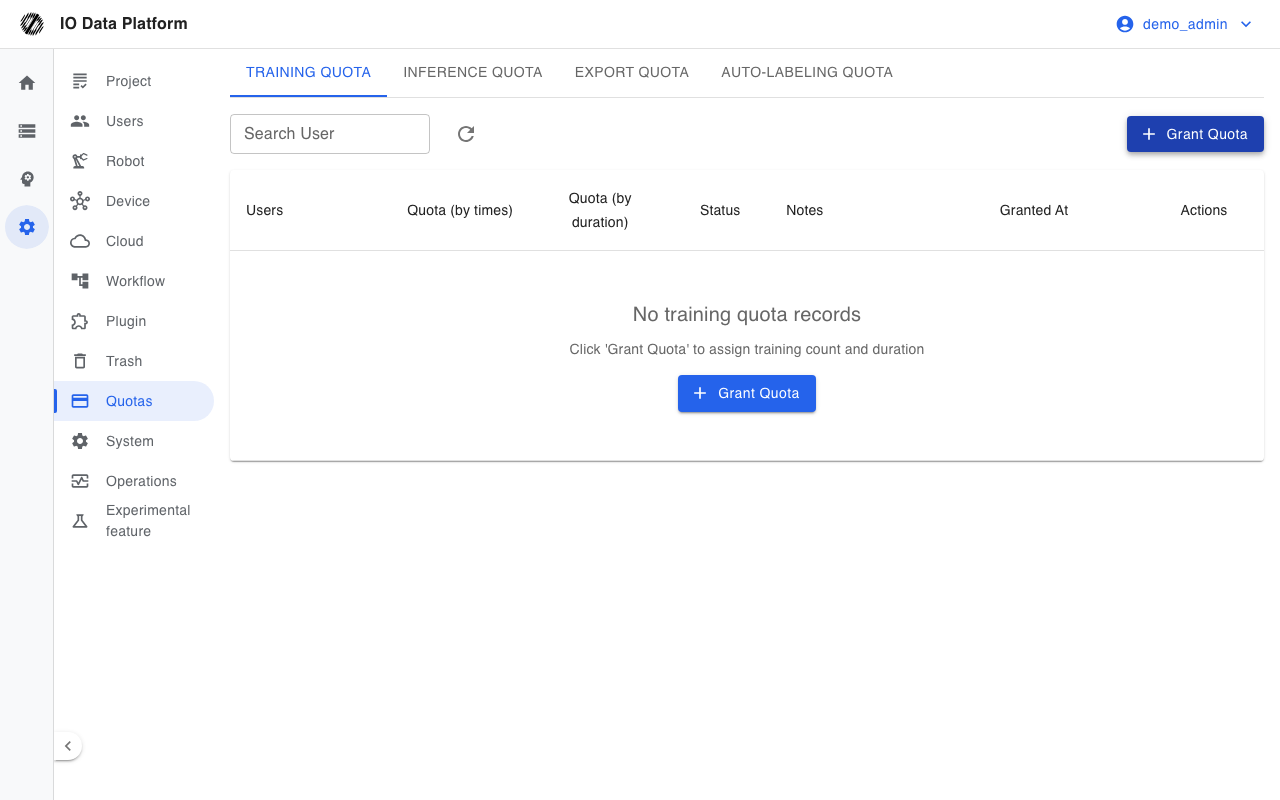
Quota Management grants users quotas for training, inference, export, and auto-labeling, and shows the total, used, and remaining amount of each quota type. When a quota runs out, the corresponding user cannot start that operation again; Administrators are exempt from quota limits.
Prerequisites
| Item | Content |
|---|---|
| Menu entry | Manage → Quotas |
| Route | /quotas, redirects to /quotas/training by default |
| Page permission | "Manage Quotas" (to enter the page) |
| List view | The training and inference quota lists require "View Quotas"; the export and auto-labeling quota lists require an Administrator |
| Grant and adjustment | Performed by Administrators |
| Administrator exception | Administrators are exempt from quota limits, and training and export quotas are not granted to Administrator accounts |
Quotas and Usage
Quota Types
Four tabs at the top of the page manage one quota type each.
| Tab | Measure | Value range | Description |
|---|---|---|---|
| Training Quota | Runs and duration | -1 or 0–2147483647 | -1 means unlimited; the duration is entered in minutes and measured in seconds |
| Inference Quota | Runs | 0–2147483647 | Number of inference services a user can create |
| Export Quota | Runs | Greater than 0 at creation | Accumulated by the number of exported datasets |
| Auto-Labeling Quota | Runs | 0–2147483647 | Number of times a user can use auto-labeling |
List Fields
| Column | Description |
|---|---|
| User | Account and role |
| Quota | For training, shows "Used / Total Quota" and the remaining amount, with the duration quota in a separate column; other types show the total, used, and remaining |
| Status | Normal, Low Balance, Exhausted; training shows "Unlimited" when both runs and duration are unlimited |
| Notes | Description entered when the quota was granted |
| Granted At | Creation time of the quota record |
| Actions | Edit, Delete |
Status rules: the status shows "Exhausted" when the remaining quota is 0, "Low Balance" when the remaining amount is at most 20% of the total quota, and "Normal" otherwise.
Grant and Adjustment
To grant a quota:
- Select the target tab.
- Click "Grant Quota".
- Select a user, and enter the quota and notes.
- Confirm.
Edit: click "Edit" in the row actions, change the quota and notes, and save. The training quota allows adjusting runs and duration at the same time, and the new total quota must not be smaller than the used quota.
Delete: after the quota record is deleted, the user is no longer subject to that quota type; used quota is not returned.
Consumption Rules
| Quota type | Counted when | Basis |
|---|---|---|
| Training runs | When a training task is created | Accumulated by the number of tasks created |
| Training duration | When a training task ends | Actual training duration × number of GPUs |
| Inference Quota | When an inference service is created | Accumulated by the number of inference services the user creates |
| Export Quota | After an export task produces an export record | Accumulated by the number of exported datasets |
| Auto-Labeling Quota | After auto-labeling is used | Accumulated by the number of successful uses |
Constraints and Limits
| Item | Description |
|---|---|
| Record uniqueness | Each user has exactly one record per quota type |
| Training quota values | Runs and duration can each be -1 (unlimited) or a non-negative integer |
| Export quota minimum | The total quota must be greater than 0 at creation |
| Quota ceiling | 2147483647 |
| Training duration billing | Multi-GPU tasks are counted as "actual training duration × number of GPUs" |
| Edit minimum | The new total quota of a training quota must not be smaller than the used quota |
| Administrator target | Training and export quotas are not granted to Administrator accounts |
| Default quotas | The site-wide default values for export and auto-labeling are maintained in System Settings |
| Quota return | Deleting a quota record or a task does not return used quota |
Troubleshooting
| Symptom | Possible cause | Action | Owner |
|---|---|---|---|
| Cannot create a training task | The runs or duration quota is insufficient | An Administrator raises the quota | Administrator |
| Cannot create an inference service | Inference Quota is exhausted | An Administrator raises the quota | Administrator |
| Cannot perform an export | Export Quota is exhausted | An Administrator raises the quota | Administrator |
| Cannot use auto-labeling | Auto-Labeling Quota is 0 or exhausted | An Administrator grants a quota and confirms that auto-labeling is enabled | Administrator |
| Granting a quota reports that an Administrator does not need a quota limit | The target is an Administrator account | Use a non-Administrator account | Administrator |
| Granting an inference or auto-labeling quota reports that it already exists | The user already has a quota record | Use "Edit" to adjust | Administrator |
| Editing a training quota reports that the total quota cannot be less than the used quota | The new total quota is lower than the used amount | Raise it to at least the used quota | Administrator |
| The quota shows "Unlimited" and never decreases | The total quota is set to -1 | Set a specific value if a limit is required | Administrator |
Related Pages
| Page | Purpose |
|---|---|
| Model Training | Training tasks and training quota consumption |
| Model Inference | Inference services and inference quota consumption |
| Dataset Export | Export tasks and export quota consumption |
| Annotation Tasks | Annotation flow and auto-labeling |
| System Settings | Site-wide default quotas for export and auto-labeling |
| User Management | Accounts and roles |