Annotation Tasks
Annotation tasks carry the full path from data through annotation and review to submission, and they are the basic unit of annotation and review work on the platform. This page defines task fields, statuses, and operations; for creating and assigning tasks, see Create Annotation Task.
Prerequisites
| Item | Description |
|---|---|
| Menu entry | Data → Annotation |
| Route | Task list /tasks; new /tasks/new; task details /tasks/{id} |
| Required permission | “View Annotation Tasks” |
| Related permissions | “Perform Annotation”, “Review Annotation”, “Manage Annotation Tasks” |
| Visible roles | Administrator, Project Manager, Auditor, Annotator. The Collector role is not in the menu allowlist |
| Effective rules | Administrators are not limited by module permissions and have Read & write on everything; other roles follow the role default template, and user-level overrides take precedence over role defaults; modules with no configuration are set to Deny |
See Module Permissions for how to configure module permissions. The module defaults per role are:
| Role | “View Annotation Tasks” | “Perform Annotation” | “Review Annotation” | “Manage Annotation Tasks” |
|---|---|---|---|---|
| Project Manager | Read & write | Read & write | Read & write | Read & write |
| Auditor | Read Only | Deny | Read & write | Deny |
| Annotator | Read Only | Read & write | Deny | Deny |
| Collector | Read Only | Deny | Deny | Deny |
Task Definition
Task Fields
Task fields are defined in the tasks table.
| Field | Meaning | Constraint |
|---|---|---|
| Task Name | Task name | Unique across the platform |
| Project | Owning project | Selected in the creation form |
| Annotator | Account that performs annotation | Required, one person |
| Auditor | Account that reviews annotation | May be left empty; when empty, the task has no reviewer |
| Creator | Account that created the task | Recorded as the related user when a task status changes |
| Status | Current task status | One of six values; see “Task Status” |
| Reason | Reason entered when review sends the task back | Saved when the status is “Unqualified”, up to 1000 characters |
| Created | Task creation time | Used for list sorting and filtering by date |
Task Status
There are six task statuses, matching the names shown in the interface one to one.
| Status | Allowed next statuses |
|---|---|
| Pending Start | In Progress |
| In Progress | Pending Check |
| Pending Check | Qualified, Unqualified, In Progress |
| Unqualified | Pending Check, Qualified |
| Qualified | Unqualified, Submit Data |
| Submit Data | None; terminal |
The allowed next statuses determine the action items under “Current Workflow” in the task detail sidebar; they are the intersection of the current status and the statuses the role can set, plus a “Previous Step” entry for rolling back.
Status Change Permissions
Status changes are limited by both role and identity. The role layer determines who can set a task to a given status:
| Status | Roles that can set this status |
|---|---|
| Pending Start | Administrator, Project Manager, Auditor, Annotator, Collector |
| In Progress | Administrator, Project Manager, Auditor, Annotator, Collector |
| Pending Check | Administrator, Project Manager, Auditor, Annotator, Collector |
| Unqualified | Administrator, Project Manager, Auditor |
| Qualified | Administrator, Project Manager, Auditor |
| Submit Data | Administrator, Project Manager |
The identity layer applies on top of the role layer. Administrators and project managers are not restricted by identity; other roles must be related to the task:
| Actor | Statuses that can be set | Notes |
|---|---|---|
| Task annotator | Pending Start, In Progress, Pending Check | Cannot set Qualified or any later status |
| Task auditor | Qualified, Unqualified | Cannot set any other status |
| Task creator | The statuses allowed for the creator's role | Lets the creator manage the task on behalf of others |
| Other accounts | None | The API returns 403 |
When a task is Qualified, the annotator cannot change its status, so the review conclusion cannot be overwritten.
Datasets and Check Results
A task links datasets through dataset_tasks, and each link record carries a check result.
| Field | Meaning | Constraint |
|---|---|---|
| Dataset | Dataset linked to the task | A dataset belongs to only one task at a time |
| Check results | Qualified (VALID) or Unqualified (INVALID) | Empty until a decision is made |
| Data reason | Reason entered when the check is Unqualified | Up to 1000 characters |
When an annotator marks a data check result as Qualified, the server does not record it (it writes back an empty value). Qualified and Unqualified results for data are set by the task's auditor, an administrator, or a project manager.
Task Operations
List and Filtering
| Dimension | Description |
|---|---|
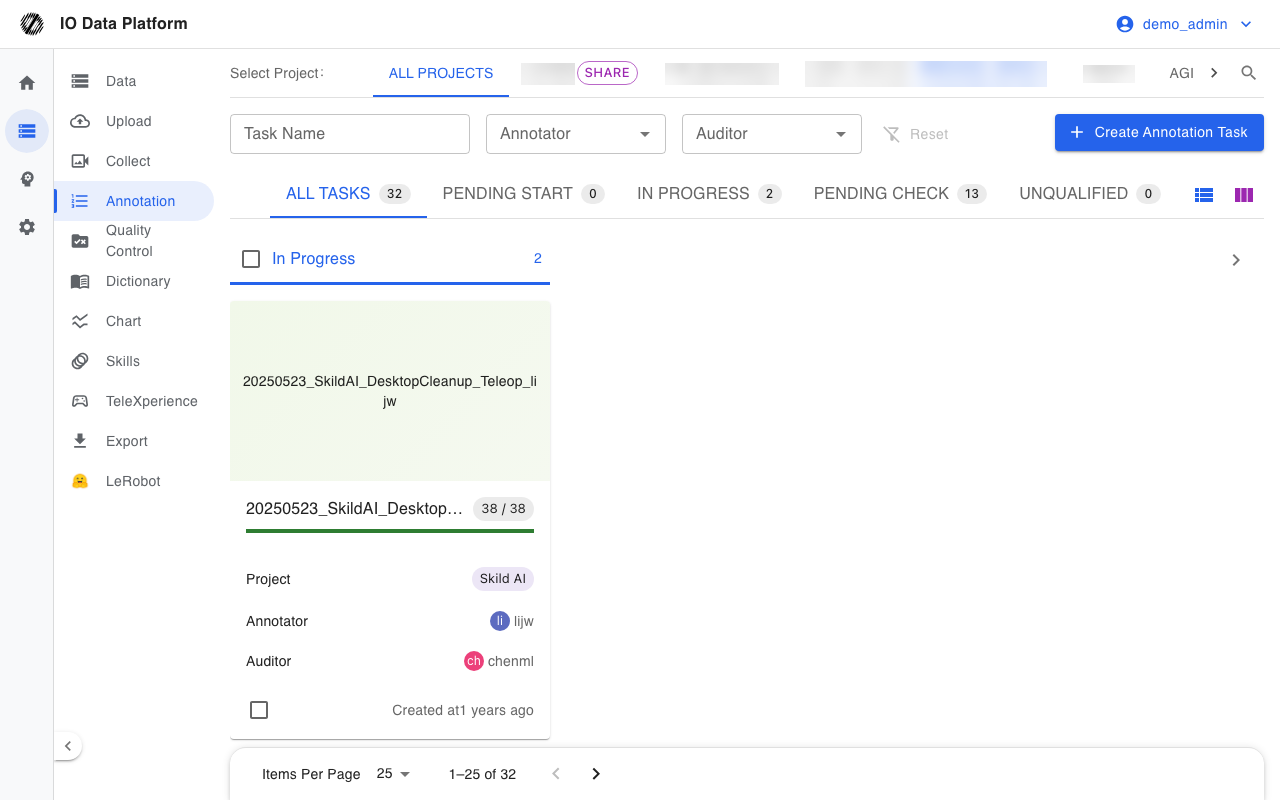
| Status grouping | Top tabs group by status and show the task count per status; “All Tasks” shows the total |
| View | The All Tasks view offers a Horizontal View (columns by status) and a Vertical View (a single list) |
| Task Name | Fuzzy match by name |
| Project | Filters by project |
| Annotator | Filters by annotator account |
| Auditor | Filters by auditor account |
| Created | Filters by creation date in YYYY-MM-DD format |
| Pagination | The bottom shows the page size and total count |
Filter conditions are written to URL query parameters, so a link that carries filters can be shared directly.
Task Details
The task details page consists of a sidebar and four tabs.
| Tab | Route | Content |
|---|---|---|
| Annotation Data | /tasks/{id}/dataset | List of datasets linked to the task, check results, and per-item actions |
| Batch Annotation | /tasks/{id}/repeats | Batch annotation workspace |
| Problem annotation | /tasks/{id}/invalids | Annotation entries marked invalid |
| Annotation Statistics | /tasks/{id}/analysis | Annotation descriptions and statistics within the task |
The sidebar shows the task cover, task name, project, annotator, auditor, and progress, and provides the following actions:
| Action | Effect | Constraint |
|---|---|---|
| Edit task | Changes the task name, project, annotator, and auditor | Requires “Manage Annotation Tasks” |
| Delete Task | Logically deletes the task | Requires “Manage Annotation Tasks”; deleted tasks can be restored from Trash |
| Current Workflow | Shows the current status and the available next and previous steps | Filtered by role and identity |
Batch Actions
After selecting tasks in the task list, the bottom action bar offers batch delete. Deletion runs per task as a logical delete and does not affect the datasets themselves; deleted tasks go to Trash and can be restored.
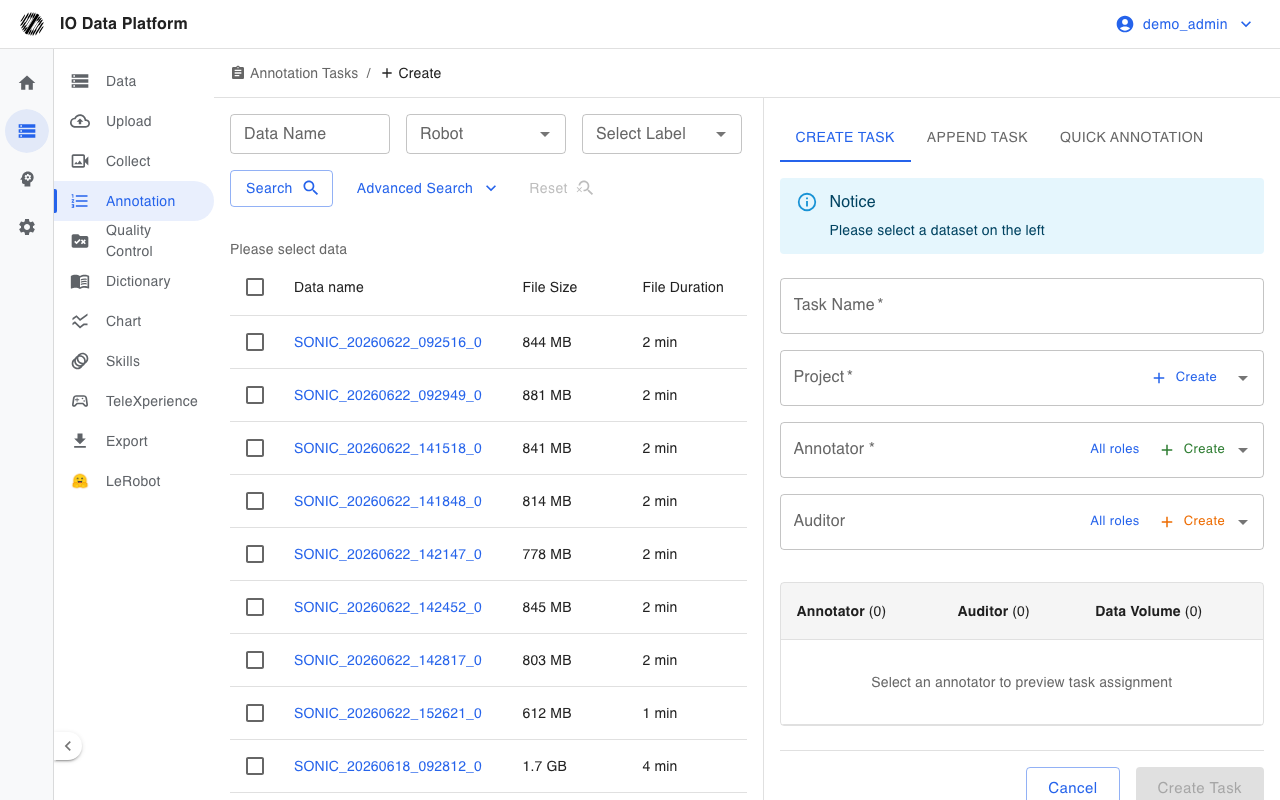
The “Create Annotation Task” button in the upper-right corner of the task list appears when the account has write permission for “Manage Annotation Tasks” and opens the form in Create Annotation Task.
Batch Annotation
The batch annotation workspace offers three modes. All three modes act within the dataset scope of the same task.
| Mode | Effect |
|---|---|
| Quick Annotation | Appends the same description to every dataset in the task and keeps existing annotations |
| Batch Copy Annotations | Copies a sample annotation to other datasets proportionally along the timeline |
| Batch Replace Annotations | Replaces text such as descriptions, objects, and targets in bulk by rule |
The workspace includes a sample selector, an annotation progress bar, and an annotation mode selector.
Constraints and Limits
| Item | Value | Notes |
|---|---|---|
| Task name | Unique across the platform | On creation, the system appends a sequence number when the name exists (for example, “Task (2)”); editing to an existing name makes the API return 400 |
| Dataset ownership | A dataset belongs to only one task at a time | Adding a dataset to a task automatically removes it from other tasks |
| Reason length | Up to 1000 characters | Extra characters are truncated |
| Check result marking | Qualified is set only by the task auditor, an administrator, or a project manager | When an annotator marks Qualified, the server writes back an empty value |
| Status changes | Only the task annotator, auditor, or creator, or an administrator or project manager | Other accounts get a 403 |
| Qualified tasks | The annotator can no longer change the status | The auditor or an administrator or project manager performs the change |
| Batch actions | Batch delete only | No other batch actions |
Troubleshooting
| Symptom | Possible cause | Action | Owner |
|---|---|---|---|
| Shows “Task name already exists” | When editing, the name duplicates another task | Use a different task name | Project Manager, Administrator |
| Shows “Task does not exist” | The task was deleted, or the task ID is invalid | Return to the list and check whether the task exists | Annotator, Auditor, Project Manager |
| Shows no access to the task | The account is not in the task's project, is not related to the task, or the task's project is not public | A project member or an administrator adds the account to the project and assigns it | Project Manager, Administrator |
| Shows “Task has been reviewed, cannot modify” | The annotator tries to change a Qualified task | The auditor or an administrator or project manager makes the change | Auditor, Administrator |
| Shows “Annotators can only set status as 'In progress' or 'To be checked'” | The annotator chose an unauthorized status | Choose an allowed status | Annotator |
| Shows “Reviewers can only set status as 'Passed' or 'Not passed'” | The auditor chose an unauthorized status | Choose an allowed status | Auditor |
| Shows “Your role cannot set the task to this status” | The account's role is not in the allowlist for that status | A role with permission performs the action | Project Manager, Administrator |
| Shows “Status parameter cannot be empty” or “Invalid task status” | The request carries no status, or the status value is invalid | Select a status from the task detail sidebar | Annotator, Auditor |
| Shows “No permission” | The task is created in a public project, but the account is not a project member | Have a project member create it, or ask an administrator to join the account to the project | Project Manager, Administrator |
| Shows “Only admins can change the project of public tasks.” | A project manager changes the project of a public-project task | An administrator performs the action | Administrator |
| Shows no permission to move the task to the project | The target project is outside the account's manageable scope | Select a project with permission | Project Manager |
| Shows “Non-members cannot modify results.” | A non-member changes the data check result | A project member or an administrator performs the action | Project Manager, Administrator |
| The list is empty | Filters are too narrow, the project scope is wrong, or the account has no task visibility | Reset the filters, switch the project scope, or confirm project membership | Annotator, Auditor, Project Manager |
Related Pages
| Page | Purpose |
|---|---|
| Create Annotation Task | How to create tasks and assign annotators and auditors |
| Data Management | Filter and select datasets to annotate |
| Data QC | Automatic quality check rules for ROS recordings |
| Dataset Export | Export annotation results for training |
| Trash | Restore deleted tasks and data |
| Module Permissions | How to configure module permissions |
| Annotator Guide | The annotator's execution flow |
| Auditor Guide | Review and send-back flow |