System Settings
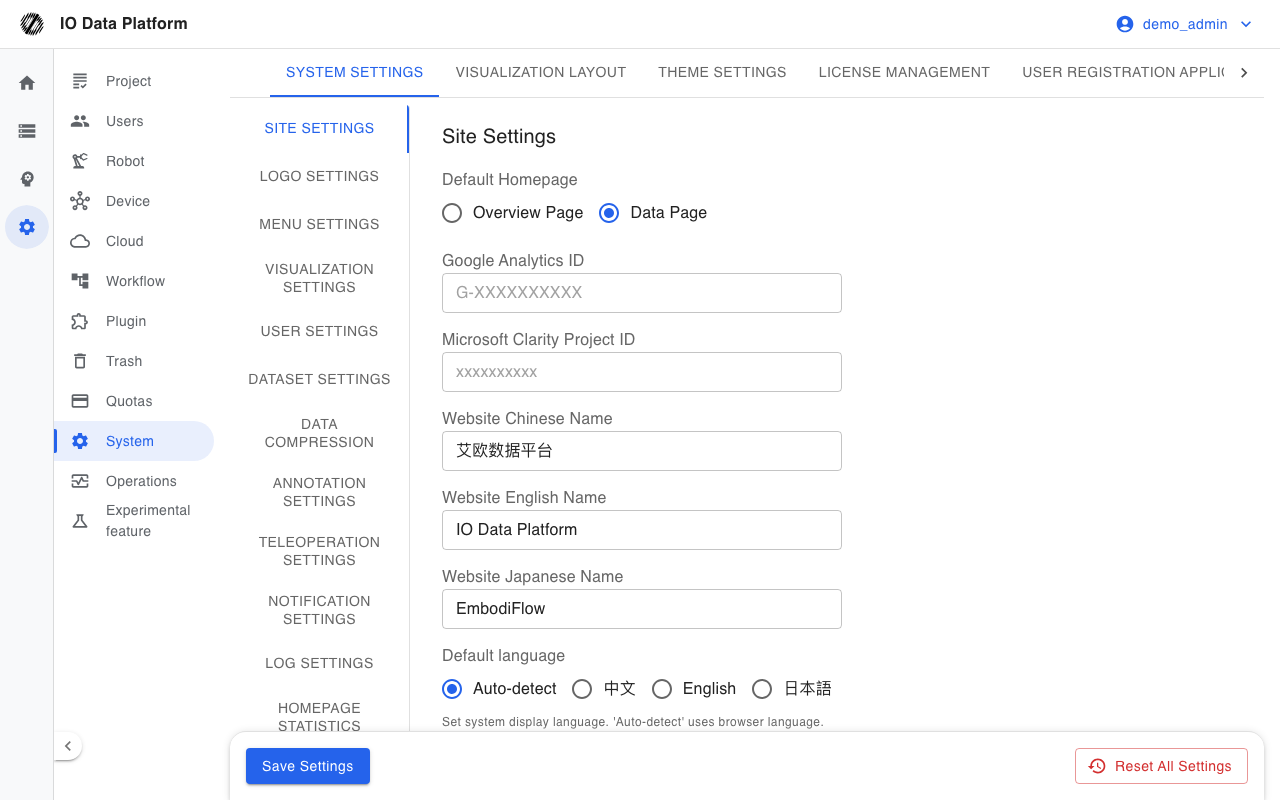
The System Settings page maintains the platform appearance, registration access, visualization layouts, and license information, and consolidates system parameters. System parameters are stored as key-value pairs and take effect immediately after saving.
Prerequisites
| Item | Content |
|---|---|
| Menu entry | Manage → System |
| Route | /system, redirects to /system/configs |
| Page permission | "View System Settings" |
| Edit permission | "Edit System Settings" (saving and resetting system parameters) |
| Visible roles | Administrator |
Pages and Configuration
Subpages
| Subpage | Route | Content |
|---|---|---|
| System Settings | /system/configs | Grouped system parameter forms, Logo and Favicon, menu hiding |
| Visualization Layout | /system/layouts | Creation, download, and deletion of visualization layout templates |
| Theme Settings | /system/themes | Enabling, default setting, editing, and deletion of themes |
| License Management | /system/licenses | Maximum number of users allowed by the license |
| User Registration Application | /system/signup-applications | Self-service registration application list and approval |
| User Registration Channels | /system/registration-channels | Creation, start/stop, and QR codes of registration channels |
System Parameters
Parameters are displayed by group, and save and reset entries are provided at the bottom of the page.
| Group | Main parameters |
|---|---|
| Site Settings | Default Homepage, site name in Chinese/English/Japanese, Default language, site description, Organization Name and website, ICP filing number, hide brand introduction, user manual and Feedback links |
| Logo Settings | Custom logo, logo height, custom favicon |
| Menu settings | Hide menu items, menu display style |
| Dataset Settings | Restore deleted datasets on re-upload, automatically link uploads to a collection task, frame drop detection, annotation visualization GIF, topic column switch, generate TF data, block export when the quality check fails |
| Annotation Settings | Skill dictionary placeholder validation, Default Annotation Score, auto-labeling provider (off / Doubao / Tencent Cloud CI) with matching credentials, and default quota |
| User Settings | Password autofill, Cookie security attributes, multi-device login, IP whitelist, self-registration switch, registration review, email domain whitelist and blacklist, Feishu and WeCom login, Privacy Policy |
| Teleoperation Settings | Teleoperation RTC communication node, Tencent Cloud real-time interaction key, device monitoring data retention time |
| Notification settings | Email SMTP, Feishu message push and registration application push |
| Visualization Settings | Visualization program version, Autoplay, integration mode, resource upstream address |
| Homepage Statistics Settings | Statistics multiplier, whether statistics include deleted data |
| Export Settings | Asynchronous export artifact format, maximum number of exported datasets, whether subtasks are enabled by default on export, LeRobot and HDF5 documentation links |
| Shared Project Permission Settings | Shared project task visibility, shared data export, label editing, delete permission |
| Data Pipeline | Auto-import file extension, preprocess action, preprocess method, MCAP health scan switch |
| Data Compression | Preview compression switch, output format, frame rate, resolution, Topic include and exclude rules |
| Log Settings | CLS access domain, SecretId, SecretKey, log topic TopicID |
| Training Service | Training service API address, JWT key and token expiry, maximum selectable GPUs per task, Checkpoint download method and object storage |
| WebRTC Service | WebRTC service API address and JWT key, TURN server and credentials |
Brand and Menu
| Item | Supported format | Limit | Effect |
|---|---|---|---|
| Custom logo | PNG, JPEG, SVG | Render height 12–40 pixels, default 24 | Takes effect immediately after upload |
| Custom favicon | PNG, JPEG, SVG | Recommended size 32×32 pixels | Takes effect immediately after upload |
| Menu display style | Split levels, Expand all | Default Split levels | Takes effect immediately after saving |
| Hide menu items | Checkbox list | The System Settings page cannot be hidden | Takes effect immediately after saving |
Themes and Layouts
| Item | Description |
|---|---|
| Theme configuration | JSON; must contain both a light and a dark configuration object |
| Built-in themes | Cannot be edited or deleted |
| Enable and disable | The default theme and the theme in use cannot be disabled |
| Default theme | Set with a star; a disabled theme cannot be set as default |
| Edit | A custom theme allows changing its name, description, and configuration |
| Delete | Custom themes only |
The fields and actions of a visualization layout are as follows.
| Column and field | Description |
|---|---|
| Layout Name | Optional; when filled in, the layout appears in the layout selector |
| Match Name Rule | Applied when a file name contains any of the strings; enter * as the system default layout |
| Associated User | A layout created by the system shows "System" |
| Layout | Panel composition |
| Actions | Download, Delete |
Registration and License
| Item | Description |
|---|---|
| Allow users to self-register | System parameter, denied by default |
| Require review of registration applications | System parameter, manual review by default |
| Allowed and denied email domains | System parameter, whitelist and blacklist |
| User Registration Application | The list shows email, organization, interests, request IP, application time, and status; applications can be approved or rejected |
| User Registration Channels | The list shows channel ID, name, description, status, Expiration Days, and registered user count; the registration link can be copied and the QR code viewed; an empty Expiration Days means the channel never expires |
The maximum number of users allowed by the license and the upgrade method are as follows.
| Item | Description |
|---|---|
| Maximum Number of Users | Maximum number of users allowed by the license |
| Upgrade | Contact a sales representative to update the license certificate |
Constraints and Limits
| Item | Value | Description |
|---|---|---|
| Logo height | 12–40 pixels | Default 24 |
| Theme configuration file | Must contain light and dark | Built-in themes cannot be edited or deleted |
| Layout matching rule | File name substring, case-insensitive | * is the system default layout |
| Registration switch default | Self-registration denied | Registration review defaults to manual review |
| Reset action | Factory reset | Cannot be undone |
Troubleshooting
| Symptom | Possible cause | Action | Owner |
|---|---|---|---|
| Logo or favicon upload is rejected | Unsupported format, or the file exceeds the limit | Convert to PNG, JPEG, or SVG and upload again | Administrator |
| Theme upload fails | A light or dark configuration object is missing, or the JSON is malformed | Add both configuration objects and upload again | Administrator |
| Theme cannot be disabled | The theme is the default theme or the theme in use | Switch the default theme or switch to another theme first | Administrator |
| Configuration does not take effect after saving | Browser cache, or a page refresh is required for part of the configuration | Refresh the page, or confirm after logging in again | Administrator |
| Configuration is lost after reset | Reset performs a factory reset that cannot be undone | Record key parameter values before resetting | Administrator |
| Cannot log in after setting an IP whitelist | The whitelist does not include the current source address | An operations engineer with server-side access clears the parameter | Administrator, Operations |
Related Pages
| Page | Purpose |
|---|---|
| Module Permissions | Configuration of module permissions and role default templates |
| User Management | Account creation, role assignment, and registration application handling |
| Cloud Storage | Onboarding of object storage connections and credential management |
| Operations Monitoring | System logs and background tasks |
| Data Upload | Dataset settings related to upload |