Plugin Management
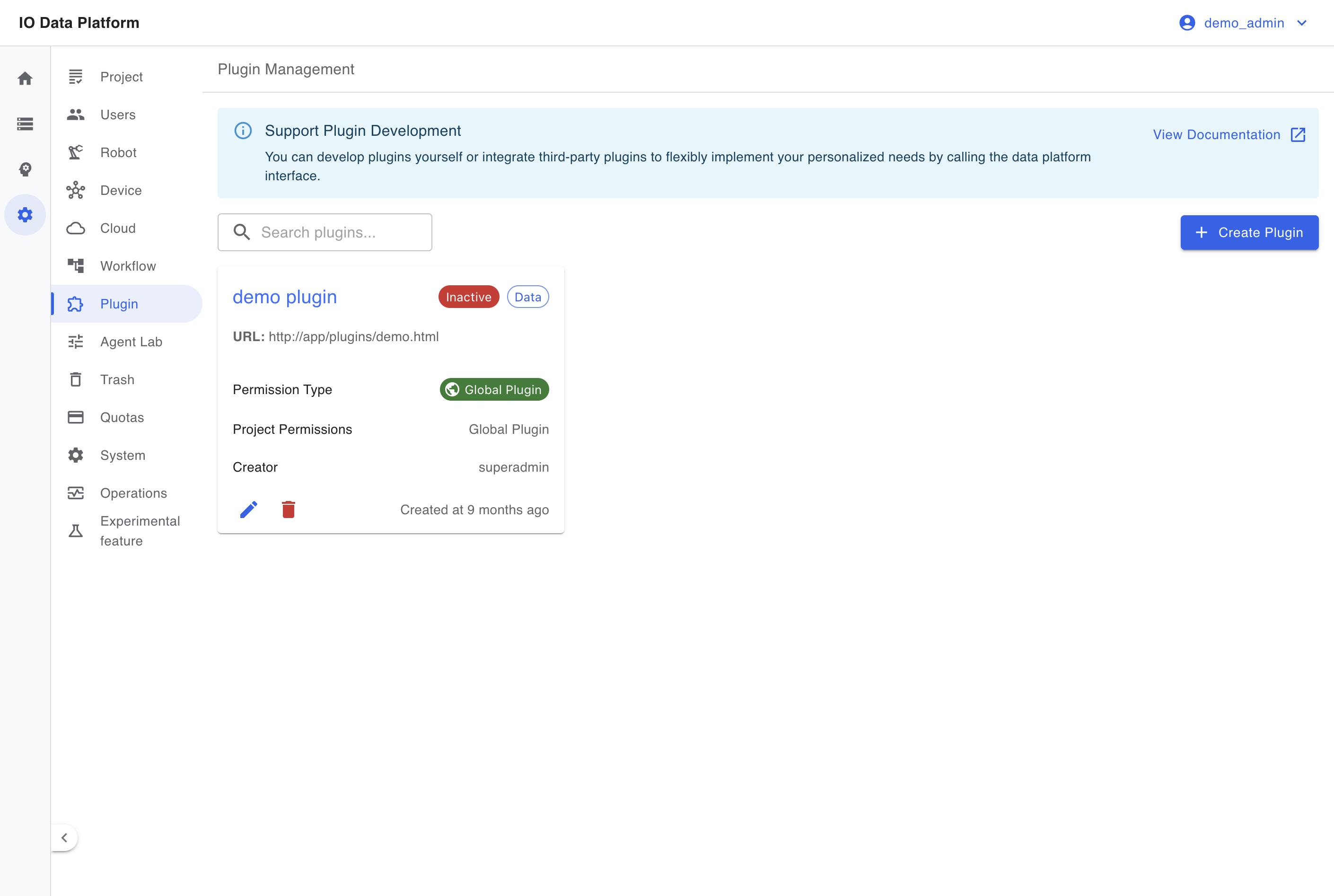
Plugins bring Web pages outside the platform into the sidebar as entries. The platform loads the plugin URL in an iframe and appends an api query parameter (the platform's own address) to the URL; the plugin page uses it to call platform APIs. The plugin page implements its own authentication and data access, and the platform controls the visibility of the entry by role and project.
Prerequisites
| Item | Content |
|---|---|
| Menu entry | Manage → Plugin |
| Route | /plugins |
| Page permission | "View Plugins" |
| API permissions | "View Plugins" (list and detail), "Manage Plugins" (create, edit, delete) |
| Roles | Administrators and project managers can create and edit; the delete button is visible only to administrators |
| Dependency | The plugin page is deployed as a standalone page reachable by URL |
Plugin Configuration and Behavior
Plugin Fields
| Field | Type | Required | Default | Description |
|---|---|---|---|---|
| Plugin Name | Text | Yes | None | Unique; used as the sidebar entry name |
| Plugin Description | Text | No | Empty | Up to 500 characters |
| Plugin URL | Text | Yes | None | Full URL, such as https://example.com/plugin |
| Menu Group | Enum | Yes | Data | Three groups: Data, Model, Manage |
| Activate | Switch | No | On | When off, the entry is removed from the sidebar and the page shows a disabled message |
| Open to All Projects | Switch | No | Off | When on, the plugin is visible in all projects |
| Project Permissions | Multi-select | Conditional | Empty | Required when the global option is off; visible only in the selected projects |
| Role Permissions | Multi-select | No | Empty | The entry is shown only to the selected roles; when empty, no role can see the entry |
Plugin Types
Plugins are classified along two dimensions.
| Dimension | Values | Scope |
|---|---|---|
| Menu Group | Data, Model, Manage | Determines which sidebar group holds the entry |
| Project scope | Global, Project | Global opens the plugin to all projects; Project shows it only in the selected projects |
Plugin Behavior
| Step | Behavior |
|---|---|
| Entry generation | The entry appears in the matching menu group when the plugin is "Activated", "the roles include the current user", and "Global or its projects fall within the user's visible projects" at the same time |
| Opening | Clicking the sidebar entry opens /plugins/{id}, and the platform loads the plugin URL in an iframe |
| Parameter passing | The platform appends api=<platform address> to the plugin URL, and the plugin page reads it as the API base |
| Disabling | After the plugin is disabled, the entry is removed from the sidebar and an open page shows "This plugin has been disabled" |
Developing a Plugin
A plugin is a separately deployed Web page; development and release happen outside the platform.
- Build a page reachable over HTTPS to serve as the plugin page.
- Read the
apiquery parameter from the address bar and use it as the platform API base. - Call the platform RESTful APIs on that base and send session credentials on cross-origin requests.
- Create a plugin in Plugin Management, fill in the page URL, menu group, roles, and project scope, then save and enable it.
Constraints and Limits
| Item | Value | Description |
|---|---|---|
| Unique name | A plugin with the same name cannot be created again | Checked on save |
| Description length | ≤ 500 characters | Saving is rejected when too long |
| URL format | Must be a valid full URL | Saving is rejected when validation fails |
| Empty role permissions | The entry is shown to no role | Select at least one role |
| Project scope | A non-global plugin needs at least one project | Otherwise no user can see the entry |
| Deletion | Soft delete | Administrator action |
| Menu updates | Changes take effect in the current session after a refresh, and for other users after they sign in again | Entries are generated per session |
Troubleshooting
| Symptom | Possible cause | Resolution | Owner |
|---|---|---|---|
| Plugin list is empty | There are no plugins, or the current account has no visible project | Create a plugin, or set the plugin to Open to All Projects | Administrator, project manager |
| Save reports that the name already exists | The plugin name is duplicated | Use a different name | Administrator, project manager |
| Save reports an invalid URL format | The URL is incomplete or lacks a scheme | Enter a full URL that includes the scheme | Administrator, project manager |
| No entry appears in the sidebar after creation | The plugin is not activated, role permissions are empty, or the project scope does not include the current project | Check the activation state, role permissions, and project permissions | Administrator, project manager |
| Opening shows "This plugin has been disabled" | The plugin is disabled | Enable the plugin | Administrator, project manager |
| Blank page or load failure | The plugin page is unreachable, or the page forbids iframe embedding | Confirm the plugin page is reachable and allows embedding | Plugin developer, administrator |
Related Pages
| Page | Purpose |
|---|---|
| Module Permissions | Configure "View Plugins" and "Manage Plugins" |
| Project | Maintain the projects where the plugin is visible |
| Users | Assign roles and module permissions |
| System Settings | System parameters and menu-related settings |