Motion Retargeting
Motion Retargeting maps human motion capture trajectories to the reference trajectory of a specified robot and maintains Robot Skill Models from them. The page maintains three databases: Human Motion, Robot Reference Trajectory, and Robot Skill Model, organized by their upstream-to-downstream relationships. The sidebar entry is Model → Action.
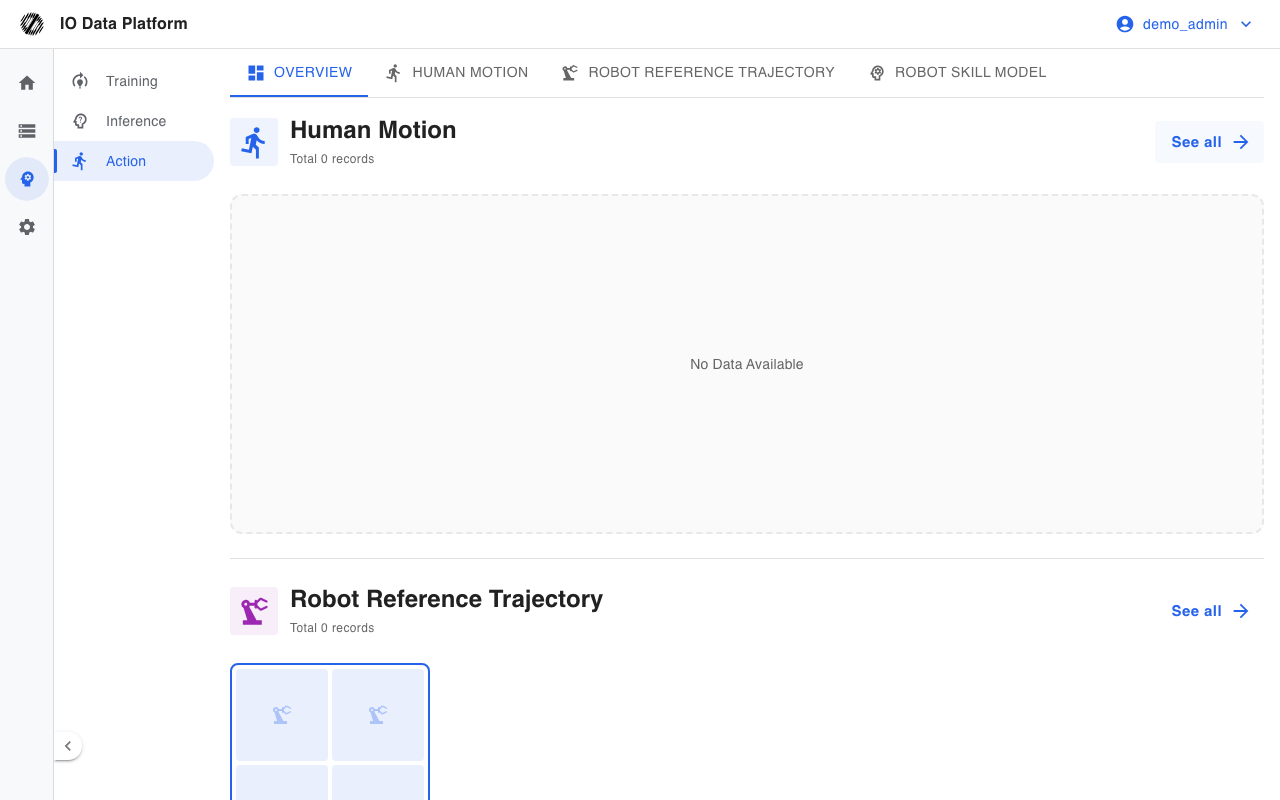
Prerequisites
| Item | Content |
|---|---|
| Menu entry | Model → Action |
| Route | Overview /retargeting; Human Motion /retargeting/human-motions; Robot Reference Trajectory /retargeting/robot-references; Robot Skill Model /retargeting/robot-skills |
| Required permission | "View Skills / Actions" |
| Related permission | "Manage Skills / Actions" |
| Visible roles | Administrator, Project Manager |
| Effective rules | Administrators are exempt from module permissions; other roles follow the role default template, and a user-level override takes precedence over the role default; an unconfigured module is denied |
The default level of the Skills module for each role is as follows.
| Role | "View Skills / Actions" | "Manage Skills / Actions" |
|---|---|---|
| Project Manager | Read Only | Read & write |
| Collector | Read Only | Deny |
| Annotator | Read Only | Deny |
| Auditor | Read Only | Deny |
The "Model → Action" menu is shown to Administrators and Project Managers only. For how to configure module permissions, see Module Permissions.
Data and Operations
Human Motion
Records the human joint motion trajectories collected by a motion capture system.
| Field | Required | Description |
|---|---|---|
| Chinese Name | Yes | Trajectory name, up to 255 characters |
| English Name | No | Name used in non-Chinese interfaces |
| Chinese Description | No | Trajectory description |
| English Description | No | Description used in non-Chinese interfaces |
| Project | Yes | Owning project |
| Difficulty | No | Easy, Medium, Hard; default Medium |
| Label | No | Custom label; press Enter after typing to add |
| Sort Order | No | Non-negative integer; a larger value sorts earlier; default 0 |
| Human Motion Video | Yes | MP4, recommended 9:16 portrait |
| Motion data | No | File collected by the motion capture device |
The overview and lists show the difficulty label for Human Motion only.
Robot Reference Trajectory
Records the reference trajectories of a specified robot performing actions in simulation, as the target of motion mapping.
| Field | Required | Description |
|---|---|---|
| Chinese Name | Yes | Trajectory name, up to 255 characters |
| English Name | No | Name used in non-Chinese interfaces |
| Chinese Description | No | Trajectory description |
| English Description | No | Description used in non-Chinese interfaces |
| Project | Yes | Owning project |
| Related human motion | Yes | Links one Human Motion |
| Robot Model | Yes | Links one registered robot |
| Difficulty | No | Easy, Medium, Hard; default Medium |
| Label | No | Custom label |
| Sort Order | No | Non-negative integer; a larger value sorts earlier; default 0 |
| Robot Simulation Video | Yes | MP4, recommended 16:9 landscape |
| Reference trajectory data | No | Robot simulation file |
Robot Skill Model
Records the Robot Skill Models trained from Robot Reference Trajectories.
| Field | Required | Description |
|---|---|---|
| Chinese Name | Yes | Skill name, up to 255 characters |
| English Name | No | Name used in non-Chinese interfaces |
| Chinese Description | No | Skill description |
| English Description | No | Description used in non-Chinese interfaces |
| Project | Yes | Owning project |
| Based on robot reference trajectory | Yes | Links one Robot Reference Trajectory |
| Robot Model | — | Inherited from the Robot Reference Trajectory; read-only in the form |
| Difficulty | No | Easy, Medium, Hard; default Medium |
| Label | No | Custom label |
| Sort Order | No | Non-negative integer; a larger value sorts earlier; default 0 |
| Real Robot Video | Yes | MP4, recommended 9:16 portrait |
| Skill model data | No | Skill model file |
Data Relationships
| Relationship | Cardinality | Description |
|---|---|---|
| Human Motion → Robot Reference Trajectory | 1:N | One Human Motion can be linked by multiple Robot Reference Trajectories |
| Robot Reference Trajectory → Robot Skill Model | 1:N | One Robot Reference Trajectory can generate multiple Robot Skill Models |
| Human Motion → Robot Skill Model | Indirect | A Robot Skill Model is linked to a Human Motion indirectly through a Robot Reference Trajectory |
The full chain across the three databases is: Human Motion → Robot Reference Trajectory → Robot Skill Model.
Search and Maintenance
| Dimension | Applicable databases | Description |
|---|---|---|
| Keyword | All three | Matches Chinese and English names and descriptions |
| Project | All three | Filter by owning project |
| Difficulty | All three | Easy, Medium, Hard |
| Robot | Robot Reference Trajectory, Robot Skill Model | Filter by Robot Model |
The list shows 12 cards per page. A card shows the video preview, name, description, and labels, and a Human Motion card also shows the difficulty; videos support replay, enlarged playback, and download.
The entries and constraints for creating, editing, and deleting are as follows.
| Action | Entry | Allowed roles | Constraint |
|---|---|---|---|
| Upload | "Upload" on the list page | Administrator, Project Manager | Requires "Manage Skills / Actions" |
| Edit | "Edit" on the detail page | Administrator; Project Manager only for data they created | Requires "Manage Skills / Actions" |
| Delete | "Delete" on the detail page | Administrator; Project Manager only for data they created | Soft delete; can be restored from Trash |
Upload and edit use the same form, which shows the corresponding data file, video, and relationship fields by type. The video file is required at creation; when editing, leaving it empty keeps the original video.
Constraints and Limits
| Item | Value | Description |
|---|---|---|
| Video format | MP4 | 9:16 portrait recommended for Human Motion and Robot Skill Model, 16:9 landscape recommended for Robot Reference Trajectory |
| Difficulty | Easy, Medium, Hard | Default Medium |
| Sort Order | Non-negative integer; a larger value sorts earlier | Default 0 |
| Relationship requirements | A Robot Reference Trajectory must select a Human Motion and a robot; a Robot Skill Model must select a Robot Reference Trajectory | Validation fails when missing |
| Skill model robot | Inherited from the Robot Reference Trajectory | Cannot be specified separately in the form |
| Data visibility | Data of the owning project, shared projects, and data the user created | Non-Administrators see only the above ranges |
| Edit and delete | The creator or an Administrator | A Project Manager cannot operate on data created by others |
| Delete | Soft delete | Can be restored from Trash after deletion |
Troubleshooting
| Symptom | Possible cause | Action | Owner |
|---|---|---|---|
| Message "Enter Chinese name" | Chinese Name is empty | Enter the Chinese Name | Project Manager |
| Message "Please select a project" | No project is selected | Select a project | Project Manager |
| Message "Select a video file" | No video is selected, or the selected file is not a video | Select an MP4 video file | Project Manager |
| Message "Select related human motion" | The Robot Reference Trajectory has no linked Human Motion | Select one Human Motion | Project Manager |
| Message "Select robot" | The Robot Reference Trajectory has no Robot Model selected | Select a Robot Model | Project Manager |
| Message "Select related reference trajectory" | The Robot Skill Model has no linked Robot Reference Trajectory | Select one Robot Reference Trajectory | Project Manager |
| Load messages such as "Failed to load human motion data" | API error, or no visibility permission | Refresh the page; confirm the account's visibility scope for the owning project | Project Manager, Administrator |
| Upload fails | The cloud connection is unavailable or the file cannot be read | An Administrator checks the cloud connection and retries | Administrator |
| The list is empty | No data under the current project and filters | Switch the project or clear the filters | Project Manager |
| Detail shows "No data found" | The data was deleted, or the account lacks visibility permission | Confirm in Trash, or have a project member view it | Administrator |
Related Pages
| Page | Purpose |
|---|---|
| Robots | Robot model registration |
| Skill Library | Robot skill library and version management |
| Model Training | Policy model training |
| Model Inference | Deploying checkpoints as inference services |
| Trash | Restoring deleted data |
| Module Permissions | How to configure module permissions |