HDF5 Datasets
HDF5 (Hierarchical Data Format version 5) organizes hierarchical data in groups and datasets. The platform exports annotated recording data as HDF5 for training frameworks outside the platform to read.
Definitions
| Item | Description |
|---|---|
| Storage unit | A single .hdf5 file; inside the file is a tree of groups and datasets |
| Chunking | Raw files are grouped by the export parameters, and each group is written to one chunk_NNN.hdf5 |
| episode | An annotation task corresponds to one group under /data |
| Frame alignment | Datasets within the same episode correspond one to one by frame index |
Rules and Workflow
Ingestion and Import
During preprocessing, the platform converts HDF5 recordings from the following sources to MCAP and then ingests them. After ingestion, the data can be viewed and annotated in the platform and exported as HDF5 again.
| Source | Preprocessing action |
|---|---|
| Agilex | io_hdf5agilex2mcap |
| Realman | io_hdf5realman2mcap |
| Dobot | io_hdf5dobot2mcap |
| Limx | io_hdf5limx2mcap |
| Unix | io_hdf5unix2mcap |
| Lwlab | io_lwlab2mcap |
Export Rules
| Rule | Description |
|---|---|
| Chunking | Every chunk_size raw files go into one chunk file; chunk numbering starts at 1 and is zero-padded to three digits |
| Sampling | Before writing, each message channel is sampled at equal intervals by hz |
| episode division | Each subtasks entry in the sidecar JSON is written to one data/episode_NNN group; without a sidecar JSON, the whole recording is written as one episode |
| Conversion source | MCAP input goes through io_mcap2hdf5; the Agibot extracted directory goes through io_agibot2hdf5 |
| Merging | The conversion output is merged by merge_chunks.py according to chunk_size, and chunk numbering stays continuous |
| Archiving | All chunk files are packed into one archive, tar.gz by default |
Export Result
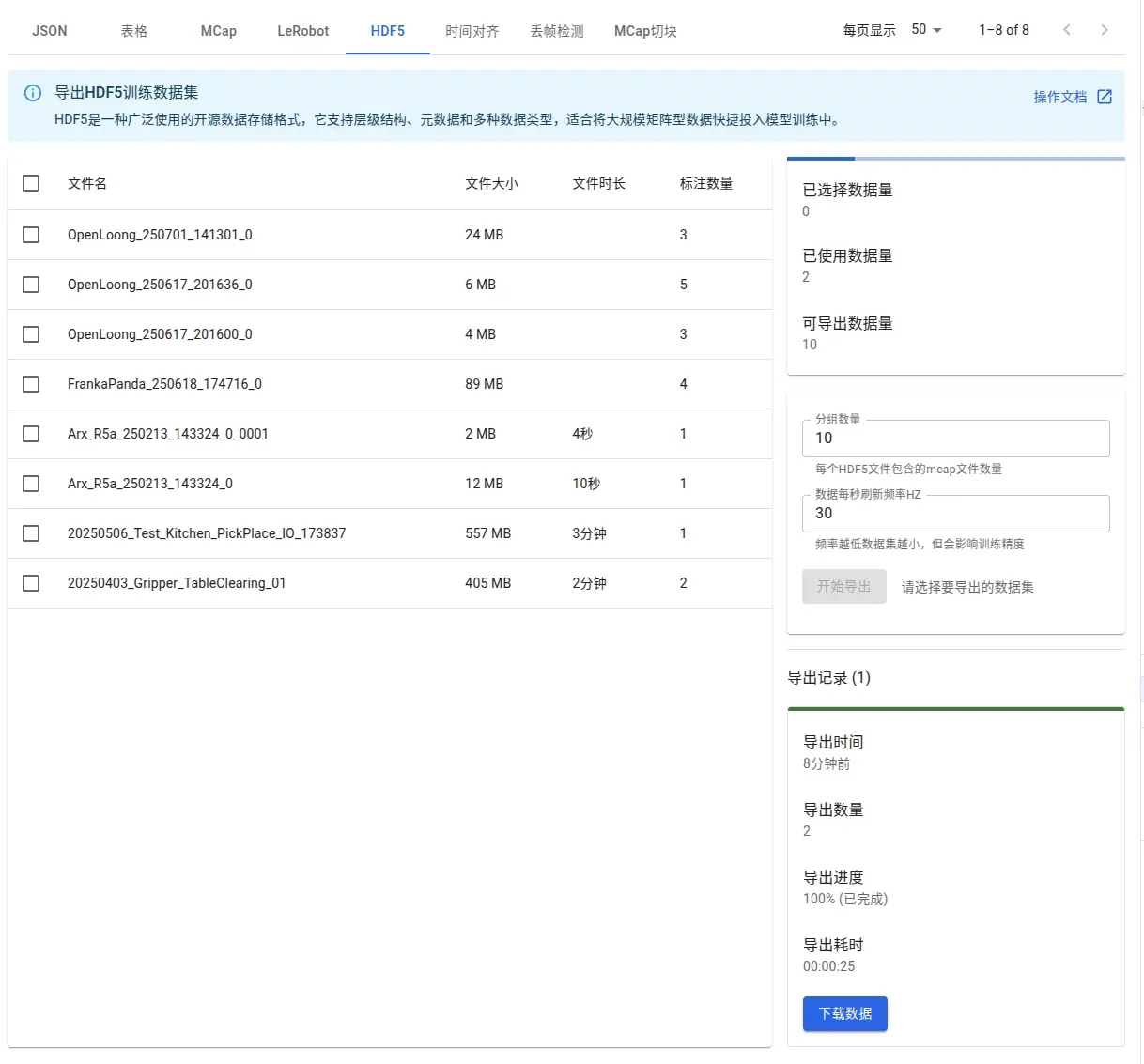
After an export task finishes, the status can be viewed and the archive downloaded in the export records.

Parameters and Fields
Export Parameters
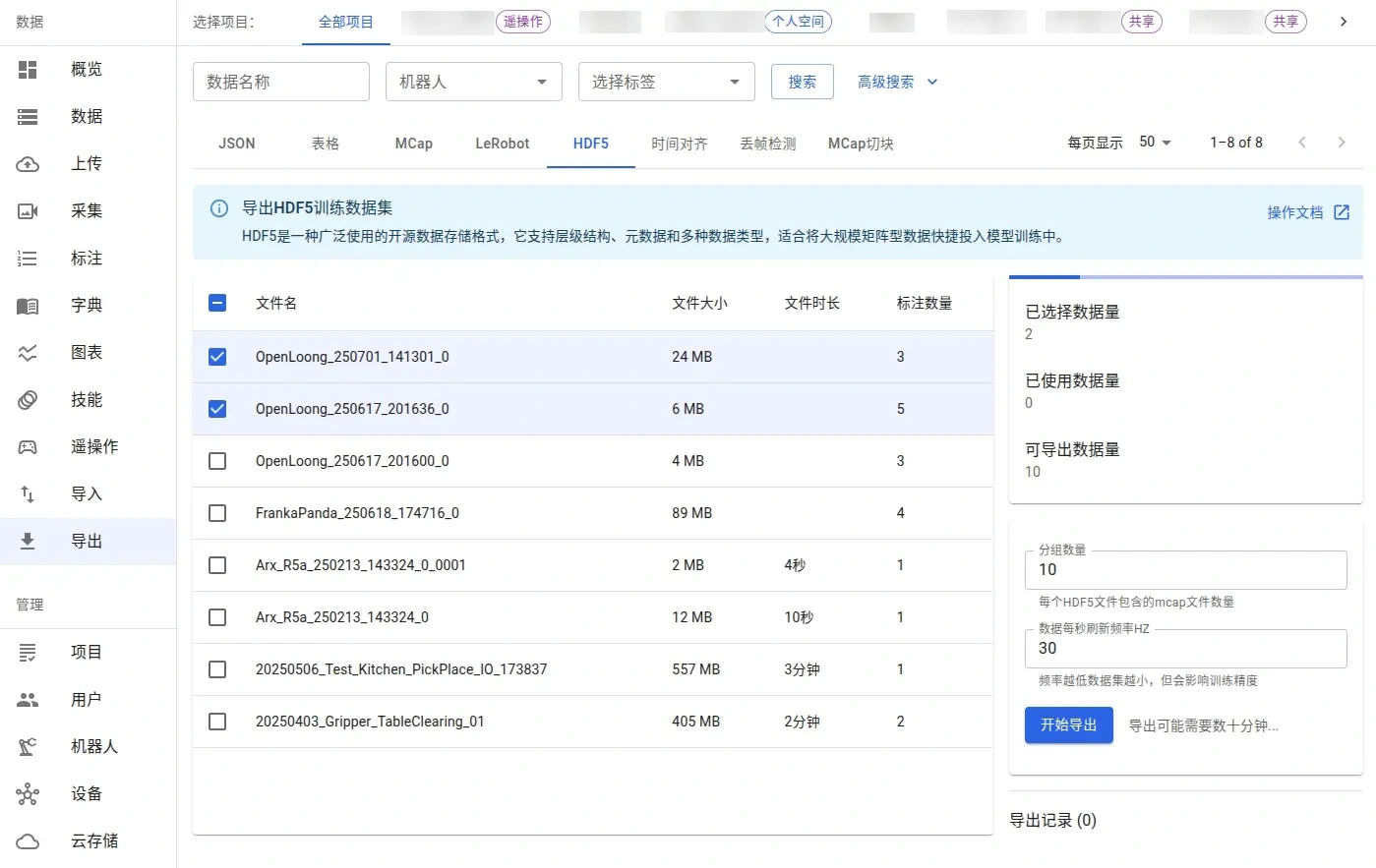
The export page provides the following parameters, written according to the --chunk_size and --hz options of the conversion command.
| Parameter | Type | Required | Default | Value range | Description |
|---|---|---|---|---|---|
chunk_size (group count) | Integer | Yes | 10 | 1–100 | Number of raw files each HDF5 file contains; when set to 1, raw files and chunk files correspond one to one |
hz (data refresh rate per second) | Integer | Yes | 30 | 1–60 | Each message channel is sampled at equal intervals before writing; the sampling frame grid is fixed at 30 Hz, and the sampling rate only changes the message taken for each frame |
The figure below shows the data selection and parameter panel.
Directory Structure
chunk_001.hdf5
├── data/
│   ├── episode_001/
│   │   ├── action
│   │   ├── observation.gripper
│   │   ├── observation.images.<camera>
│   │   └── observation.state
│   └── episode_002/
└── meta/
Under each episode group, datasets are written by field, and the shape starts with the frame count T.
| Dataset | Shape | Content |
|---|---|---|
action | (T, D) | Issued joint command |
observation.state | (T, D) | Joint observation values |
observation.gripper | (T, 2) | Gripper observation values, by convention [right_gripper, left_gripper] |
observation.images.<camera> | (T,) | One JPEG-encoded image per frame, with elements as uint8 variable-length arrays |
Each episode group carries the following attributes.
| Attribute | Type | Description |
|---|---|---|
task | String | Annotated natural language task description |
task_zh | String | Chinese text of the task description |
score | Number | Action quality score, -1 by default |
The content of the /meta group differs by input source.
| meta content | Source | Description |
|---|---|---|
| Feature metadata | io_mcap2hdf5 | The dtype, shape, and names of each field are written to the meta group attributes |
| Robot model and URDF | io_agibot2hdf5 | The meta.robot_type attribute and meta/urdf |
| Camera intrinsics and extrinsics | io_agibot2hdf5 | meta/camera/<camera>/intrinsic and extrinsic (JSON text) |
Reading Method
h5py can read chunk files directly.
import h5py

with h5py.File("chunk_001.hdf5", "r") as f:
    episodes = list(f["data"].keys())          # episode_001, episode_002, ...
    episode = f["data/episode_001"]
    task = episode.attrs["task"].decode()      # natural language task
    score = episode.attrs["score"]             # action quality score
    actions = episode["action"][:]             # (T, D)
    state = episode["observation.state"][:]    # (T, D)
    frames = episode["observation.images.camera_01"][:]  # JPEG bytes per frame
Basis and Sources
| Item | Value | Source |
|---|---|---|
| Chunk naming | chunk_NNN.hdf5 | tools/mcap2hdf5/mcap2hdf5.py, tools/agibot2hdf5/convert_to_hdf5.py |
chunk_size default | 10 | tools/mcap2hdf5/mcap2hdf5.py (--chunk_size) |
hz default | 30 | tools/mcap2hdf5/mcap2hdf5.py (--hz) |
| UI value range | chunk_size 1–100, hz 1–60 | app/app/(dashboard)/(data)/export/hdf5/HDF5ExportClient.tsx |
| episode naming and attributes | episode_NNN, attributes task, task_zh, score | tools/mcap2hdf5/mcap2hdf5.py, tools/agibot2hdf5/convert_to_hdf5.py |
| Image encoding | JPEG, uint8 variable-length array | tools/mcap2hdf5/mcap2hdf5.py, tools/agibot2hdf5/convert_to_hdf5.py |
| Archive format | tar.gz | worker/src/workers/export.ts |
| Conversion images | io_mcap2hdf5, io_agibot2hdf5 | conversion service |
Limitations
The import and export of HDF5 data are constrained by the existing boundaries below.
| Item | Limit | Description |
|---|---|---|
| Ingestion sources | Agilex, Realman, Dobot, Limx, Unix | Only these sources have an HDF5-to-MCAP converter; other HDF5 recordings cannot be imported |
| Group count | 1–100 | Number of raw files each chunk file contains, as provided by the UI value range |
| Sampling rate | 1–60 Hz | The sampling frame grid is fixed at 30 Hz, and sampling only changes the message taken for each frame |
| episode division | One episode per subtasks entry | Without a sidecar JSON, the whole recording is a single episode |
| Missing decodable messages | File conversion fails | When both image and joint messages are missing, the file reports an error and is skipped |
| Image encoding | JPEG only | Each frame is written as JPEG, and the encoding cannot be changed |
| Archive format | tar.gz | All chunks are packed into one archive |