Model Training
The Training page creates policy-model training jobs in the browser, configures parameters, monitors progress, and manages checkpoints. The training service schedules job execution and produces checkpoints that can be deployed as inference services.
Roles and Prerequisites
Roles and Permissions
| Role | Allowed actions | Required permissions |
|---|---|---|
| Administrator | Create, view, stop, and delete training jobs; manage training quotas | View Training, Create Training Job |
| Project Manager | Create, view, stop, and delete training jobs | View Training, Create Training Job |
The menu entry is Model → Training. For how to configure module permissions, see Module Permissions.
Prerequisites
| Item | Requirement |
|---|---|
| Training service | The training service is deployed and reachable |
| Training data | One of: an exported LeRobot export record, an uploaded LeRobot dataset, an accessible download link, or a HuggingFace dataset |
| Dataset version | LeRobot v2 or v3; spirit-v1.5 also supports robochallenge |
| Training location | An administrator has configured a local GPU server or a remote training node |
| GPU resources | Local training requires an available GPU; groot supports only Nvidia Ampere and later models |
| Training quota | The count and duration quotas are not exhausted; an administrator grants quotas in Quota Management |
| Permission | Create Training Job |
Procedure
Supported Models and Frameworks
The platform registers 11 trainable policy models. The frameworks and dataset versions each model supports are listed below.
| Model ID | Supported frameworks | Default framework | Supported dataset versions |
|---|---|---|---|
act | act, lerobot | act | v2, v3 |
diffusion | lerobot | lerobot | v2, v3 |
groot | lerobot | lerobot | v2, v3 |
pi0 | lerobot, jax | lerobot | v2, v3 |
pi05 | lerobot, jax | lerobot | v2, v3 |
reward_classifier | lerobot | lerobot | v2, v3 |
sac | lerobot | lerobot | v2, v3 |
smolvla | lerobot | lerobot | v2, v3 |
spirit-v1.5 | spirit | spirit | robochallenge, v2, v3 |
tdmpc | lerobot | lerobot | v2, v3 |
vqbet | lerobot | lerobot | v2, v3 |
The frameworks are described below. A model that an administrator disables by name or by framework does not appear on the Training page.
| Framework ID | Description | Applicable models |
|---|---|---|
lerobot | HuggingFace robot learning framework, based on PyTorch | All models except the dedicated frameworks below |
jax | JAX compute framework | pi0, pi05 |
act | ACT-specific training stack | act |
spirit | Spirit official training stack | spirit-v1.5 |
Create a Training Job
- Go to Model → Training and click Create Training.
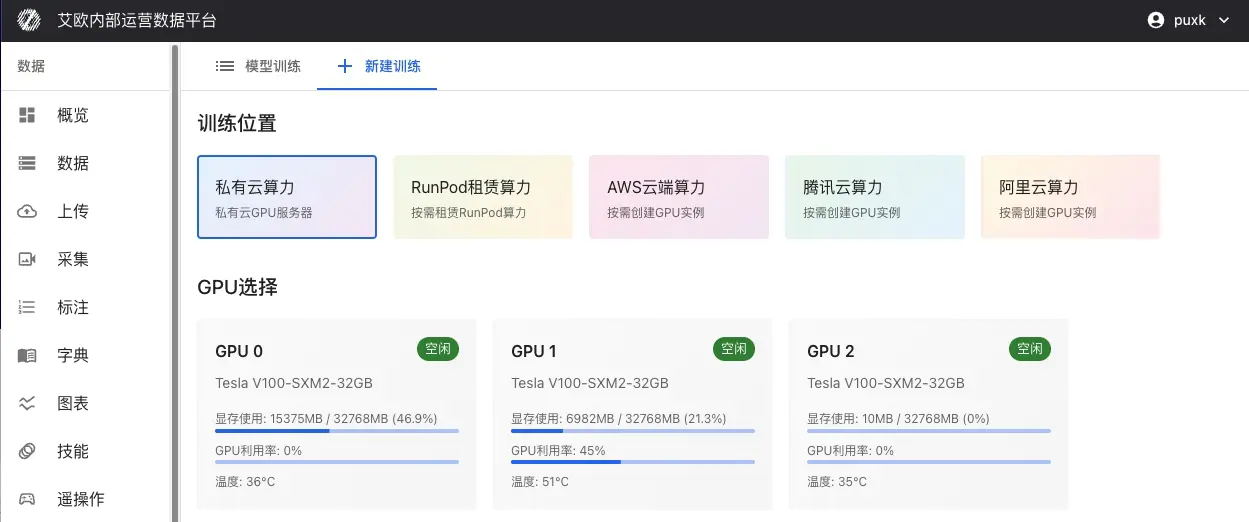
- Select the training location. To use a local GPU server, select the GPUs that take part in training.
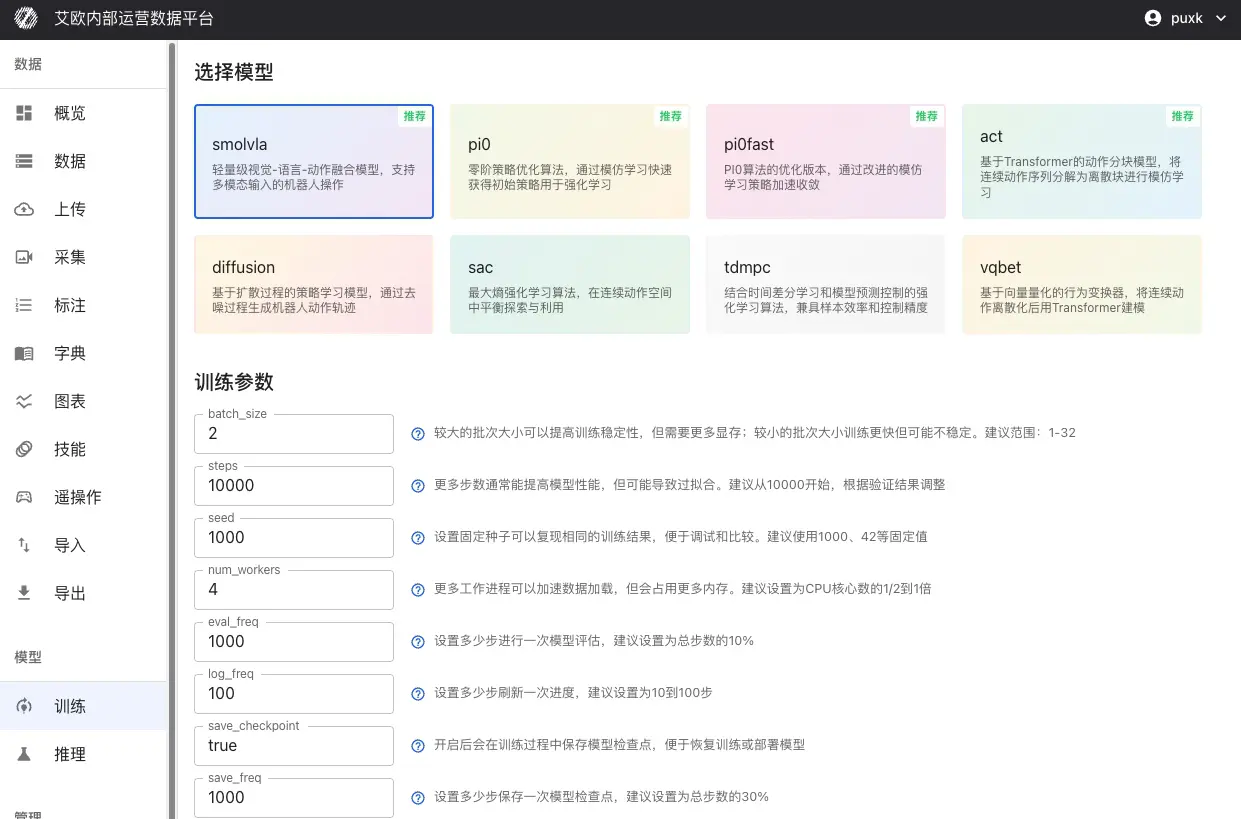
- Select a model, then select a training framework among those the model supports.
- Fill in the training parameters. The first training job can use the defaults.
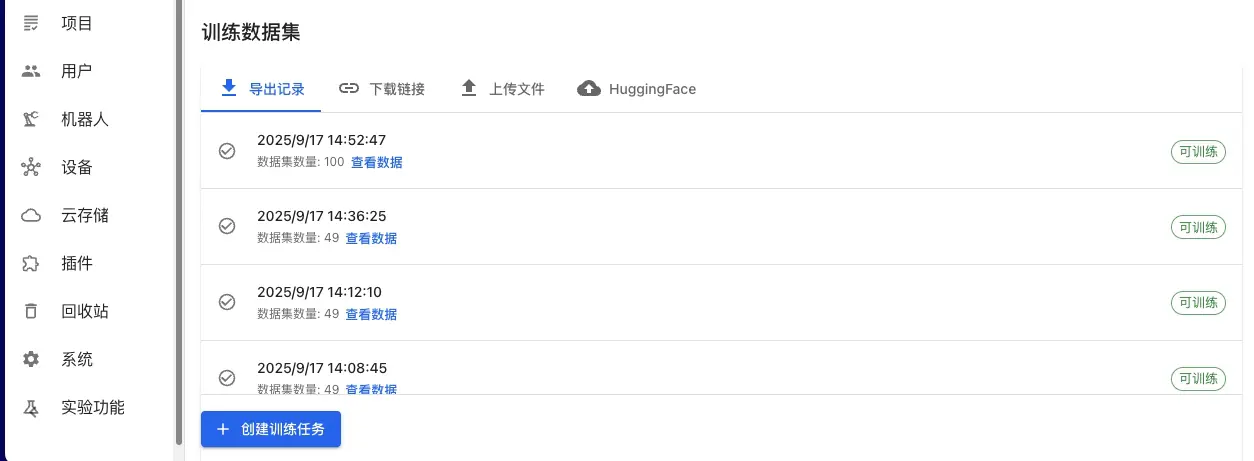
- Select the training dataset. The sources are listed below.
- Optional: under Resume from an existing training job, select the source training job and checkpoint weights.
- Select Project; when none is selected, the job is private and visible only to its creator.
- Click Create Training Job.
The training dataset has four sources.
| Source | Data location | Description |
|---|---|---|
| Export LeRobot | Platform export records | Select a record from the export history |
| Uploaded LeRobot | Platform datasets | Select an uploaded LeRobot dataset |
| Download link | External address | Supports LeRobot datasets in .tar.gz or .zip format |
| HuggingFace | HuggingFace Hub | Enter the dataset name, such as io-intelligence/piper_uncap_pen |
Training Parameters
General Parameters
| Parameter | Type | Default | Description |
|---|---|---|---|
batch_size | int | 1 | Number of samples used per training step; adjust for GPU memory |
steps | int | 10000 | Total training steps |
seed | int | 1000 | Random seed for reproducing results |
num_workers | int | 4 | Number of data loader worker processes |
eval_freq | int | 1000 | Evaluate every N steps |
log_freq | int | 100 | Emit logs every N steps |
save_checkpoint | bool | Yes | Whether to save checkpoints |
save_freq | int | 5000 | Save a checkpoint every N steps |
Model-specific Parameters
The Training page shows the parameters for the selected model. The defaults for commonly used models are listed below.
| Model | Parameter | Default | Description |
|---|---|---|---|
act | chunk_size | 100 | Length of the action sequence predicted at once |
act | n_action_steps | 100 | Number of action steps executed per call |
act | vision_backbone | resnet18 | Vision backbone; options are resnet18/34/50/101/152 |
act | kl_weight | 10.0 | Weight of the KL divergence loss |
diffusion | horizon | 16 | Time span of action prediction |
diffusion | n_action_steps | 8 | Number of action steps executed per call |
diffusion | num_inference_steps | Empty | Number of reverse diffusion sampling steps |
groot | image_size | 224×224 | Image resolution for the vision tower input |
groot | max_state_dim | 64 | Maximum state-vector dimension, zero-padded when smaller |
groot | max_action_dim | 32 | Maximum action-vector dimension, zero-padded when smaller |
pi0, pi05 | chunk_size | 50 | Length of the action sequence predicted at once |
pi0, pi05 | num_inference_steps | 10 | Number of denoising sampling steps |
pi0, pi05 | max_state_dim | 32 | Maximum state-vector dimension |
smolvla | chunk_size | 50 | Length of the action sequence predicted at once |
smolvla | num_steps | 10 | Number of decoding steps |
smolvla | max_state_dim | 32 | Maximum state-vector dimension |
sac | discount | 0.99 | Discount factor |
sac | actor_lr | 3e-4 | Learning rate of the policy network |
tdmpc | horizon | 5 | Prediction time span |
tdmpc | discount | 0.9 | Discount factor |
Verification
Training Progress Monitoring
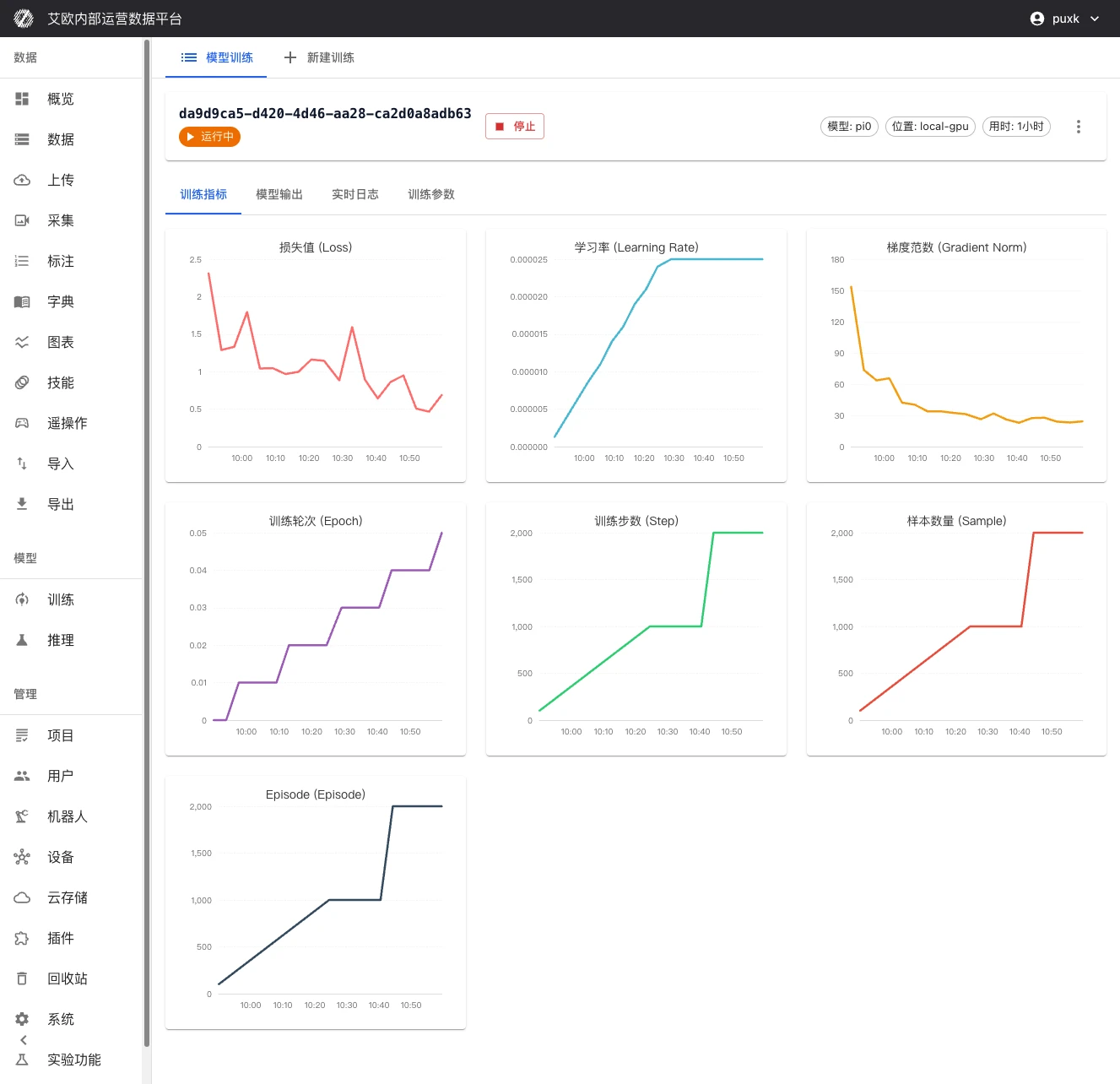
The training detail page has four tabs.
| Tab | Content |
|---|---|
| Training Metrics | Loss curves, validation metrics, learning rate, and training progress |
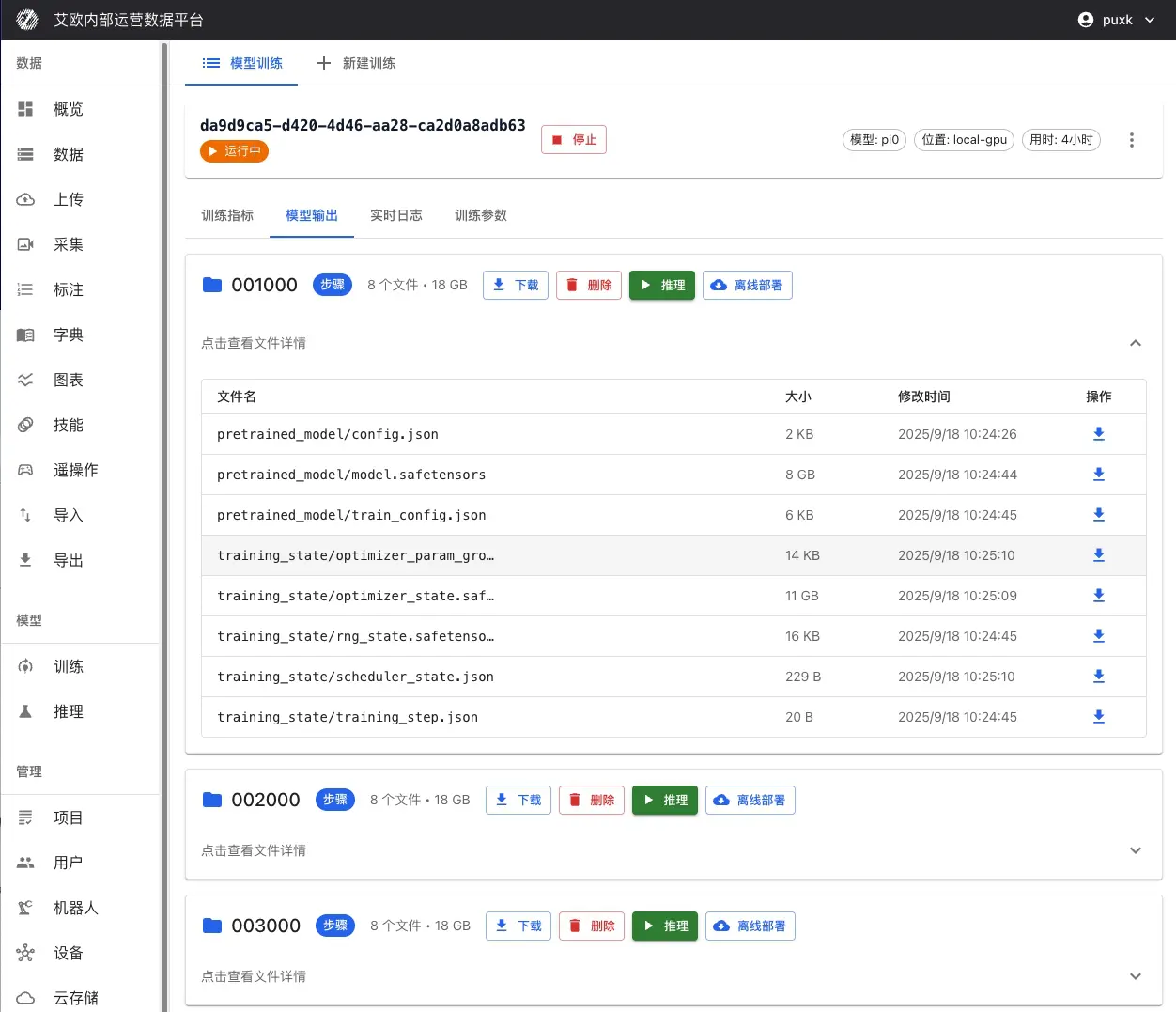
| Checkpoints | Checkpoint list and artifact files |
| Real-time Logs | Streaming output of training logs |
| Training Parameters | Parameters used by this job |
Status and progress come from fields reported by the training service: progress percentage, current step, total steps, loss value, learning rate, and GPU memory usage.
Training job statuses are listed below.
| Status | Meaning | Available actions |
|---|---|---|
| Pending | Created and waiting to be scheduled | Delete |
| Running | Training in progress | Stop, Delete |
| Success | Training completed | Deploy inference, Delete |
| Failed | Training ended with an error | Resume from checkpoint, Delete |
| Stopped by user | Manually stopped by a user | Resume from checkpoint, Delete |
| Paused | Training paused | Stop, Delete |
Checkpoints and Artifacts
Checkpoints are saved by training step, and are either final checkpoints or step checkpoints.
| Action | Effect | Constraint |
|---|---|---|
| Download | Download a checkpoint file or a full archive | A large checkpoint can be synced to object storage before download |
| Delete | Delete the checkpoint | Cannot be undone |
| Inference | Deploy an inference service from the checkpoint | See Model Inference |
| Offline deployment | Generate an offline deployment package | See Model Inference |
Resume from an existing training job is used for fine-tuning or continued training: select the source training job and checkpoint weights, then create a new job.
| Constraint | Description |
|---|---|
| Same training location | The source training job must be on the same training node as the target training location |
| Checkpoint exists | Only checkpoints that actually exist in the source job can be selected |
The Training Parameters tab provides Edit parameters and retrain: after the parameters change, the system creates a new training job based on the current one, and the original job stays unchanged.
Error Handling
| Symptom | Possible cause | Resolution |
|---|---|---|
| Cannot create a training job | Training quota exhausted, no dataset selected, or no checkpoint selected | Request quota; complete the dataset and checkpoint selection |
| Training job failed | Insufficient GPU memory, malformed data, or wrong parameters | Lower batch_size; fix the data format; adjust parameters and retrain |
| Local GPU unavailable | No GPU available | The system reports that it fell back to CPU training; check the GPU configuration |
groot cannot select a GPU | The GPU model is not Nvidia Ampere or later | Switch to an A100, RTX 4090, or similar model |
| Training interrupted | Training node failure | Resume training from the last saved checkpoint |
| Training takes longer than expected | Large dataset, high model parameter count, or slow GPU | Reduce training steps or data volume; switch to a faster GPU |
Related Pages
| Page | Purpose |
|---|---|
| Model Inference | Deploy a checkpoint as an inference service |
| Dataset Export | Export training data in LeRobot format |
| Data QC | Automatic quality check rules for ROS recordings |
| Quota Management | Grant and view training count and duration quotas |
| LeRobot Datasets and Training | Import, visualize, and train on LeRobot datasets |