Data QC
Data QC scans the structured report of each MCAP recording against rules, returns a pass or fail verdict for the dataset, and aggregates the conclusion on the dataset. Rules come in two levels, project and global. A verdict can be overridden manually, and the conclusion drives system tags and export blocking.
Data QC targets ROS recordings, currently MCAP.
Prerequisites
| Item | Details |
|---|---|
| Menu entry | Data → Quality Control |
| Routes | Rule list /qc/rules; run logs /qc/logs; dataset QC detail /qc/dataset/{id} |
| Required permission | View QC |
| Related permissions | Run QC (writes back the run result), QC Rule Management, Dataset Compute / Preprocess (manual QC from the dataset side) |
| Dependencies | The dataset is MCAP; the algorithm selected by a rule is registered and declares a non-empty metric schema |
| Effective rules | Administrators are exempt from module permissions; other roles follow the default role template, and a user-level override takes precedence over the role default |
Module permissions are configured as described in Module Permissions. Default module levels by role:
| Role | View QC | Run QC | QC Rule Management |
|---|---|---|---|
| Project Manager | Read Only | Read & write | Read & write |
| Collector | Read Only | Read & write | Deny |
| Annotator | Deny | Deny | Deny |
| Auditor | Deny | Deny | Deny |
Rules and Metrics
Roles and Rule Maintenance Scope
| Operation | Administrator | Project Manager | Other roles |
|---|---|---|---|
| View rules and run logs | Allowed | Allowed, limited to the project data scope | Requires View QC |
| Maintain project rules | Allowed | Allowed, limited to own projects | Deny |
| Maintain global rules | Allowed | Deny | Deny |
| Override run results | Allowed | Allowed, limited to datasets in own projects | Deny |
Only administrators can create, edit, delete, and copy global rules. Non-administrators can see global rules in the list but cannot modify them.
QC Rules
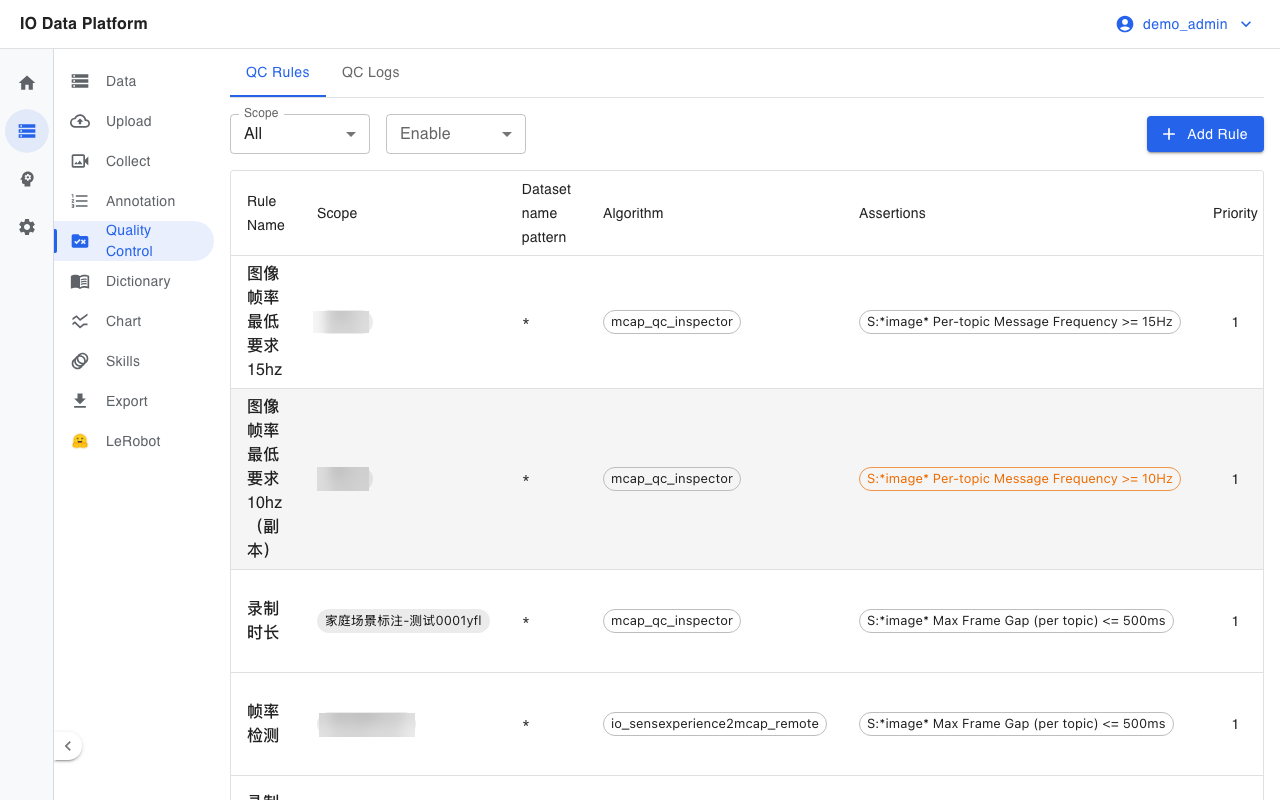
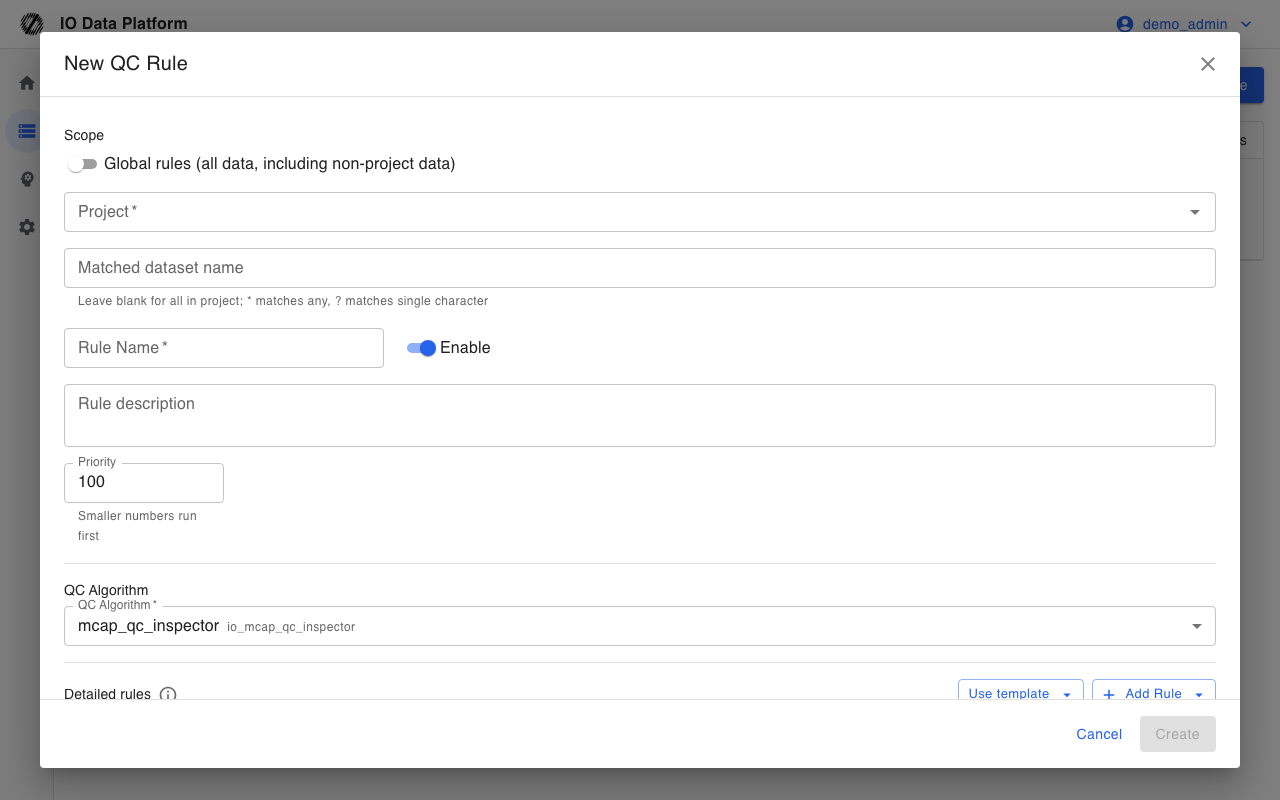
A rule binds one QC algorithm, one scope, and a set of assertions.
| Field | Type | Required | Default | Values | Notes |
|---|---|---|---|---|---|
| Rule Name | Text | Yes | — | Up to 200 characters | Rule identifier |
| Rule description | Text | No | Empty | Up to 500 characters | Note on the rule's purpose |
| Scope | Option | Yes | Project | Global, Project | A global rule applies to MCAP data platform-wide; a project rule applies only to the selected project |
| Match data name | Text | No | * | glob, supports * and ? | Matches the dataset name; leave empty to cover all data names in the scope |
| QC Algorithm | Option | Yes | — | Algorithms that are registered and declare a metric schema | Determines the source of the report metrics |
| Enable | Toggle | Yes | Enable | Enable, Inactive | An inactive rule takes no part in matching or automatic queuing |
| Priority | Integer | Yes | 100 | Integer; a smaller value ranks higher | Determines list and run order; matched rules are evaluated independently |
| Assertions | List | No | Empty | — | See "Assertions" |
A dataset that belongs to a project matches both global rules and its project's rules, and the two levels produce separate run records.
Assertions
An assertion is a condition inside a rule. There are three assertion types.
| Type | Evaluated against | Rule |
|---|---|---|
| Numeric threshold | Report metric | Compared with the threshold through an operator, such as frame_rate >= 20 |
| Required Topic | Topic list of the whole file | The report must contain the given Topic |
| Forbidden Topic | Topic list of the whole file | The report must not contain the given Topic |
A numeric assertion carries an operator, a threshold, severity, and a range:
| Attribute | Values | Notes |
|---|---|---|
| Operator | <=, >=, <, >, ==, != | Compared with the threshold |
| Severity | Blocking (error), Warning (warning) | If any blocking assertion fails, the run is marked failed; a warning is only recorded |
| Range | All, By topic (glob), By schema | A global metric supports only All; a per-topic metric requires By topic (glob) or By schema |
The range determines where the metric value comes from. With the All range, the platform reads the whole-file metric. With the By topic (glob) or By schema range, it compares each matched topic row independently, and the assertion fails if any row fails. Before a By schema comparison, the platform normalizes the message type name to lowercase and removes /msg/.
Global metrics and per-topic metrics do not share the same set of ranges. An invalid combination fails the assertion outright, and the failure detail marks a configuration error. When a By topic (glob) or By schema pattern matches no Topic, the assertion fails.
Detection Metrics
QC runs in two layers, the algorithm container and the platform. The container scans the MCAP file and emits a structured report, and the platform evaluates the report fields one by one against the assertions in the rule.
Global Metrics
Global metrics come from the whole-file scalars in the report. When a numeric assertion uses one, its range must be All.
| UI name (unit) | Metric key | Direction | What it detects | How it is computed | Suggested default |
|---|---|---|---|---|---|
| Recording duration (s) | record_duration_sec | Higher is better | Effective recording time is too short | The largest topic time span in the file minus the smallest | >= 3 |
| Timestamp regression count | timestamp_monotonic_violations | Lower is better | Timestamps are non-monotonic or written out of order | Sum over topics of the count of t[i] < t[i-1] | <= 0 |
| Reference topic frame rate (Hz) | frame_rate | Higher is better | The average publish rate of the main data stream is low | Message count on the reference topic divided by the file time span | >= 20 |
| Frame gap median (ms) | frame_gap_median_ms | Lower is better | The baseline gap of the main data stream is large | Median of the adjacent-time-difference series on the reference topic | <= 50 |
| Frame gap P95 (ms) | frame_gap_p95_ms | Lower is better | Intermittent publish delays | 95th percentile of the same series | <= 200 |
| Frame gap P99 (ms) | frame_gap_p99_ms | Lower is better | Occasional long gaps | 99th percentile of the same series | <= 500 |
| Frame gap max (ms) | frame_gap_max_ms | Lower is better | The single longest publish gap | Maximum of the same series | <= 1000 |
| Drop frame count | drop_frame_count | Lower is better | Gaps that are abnormally long relative to the normal rhythm | Number of adjacent gaps on the reference topic greater than 1.5 times the median gap | <= 0 |
| Cross-topic sync P95 (ms) | cross_topic_sync_p95_ms | Lower is better | Time-alignment error across channels | The maximum, over non-reference topics, of the P95 nearest-neighbor difference from the reference topic | <= 50 |
| Cross-topic sync P99 (ms) | cross_topic_sync_p99_ms | Lower is better | The tail of the cross-channel alignment error | 99th percentile of the pooled nearest-neighbor differences | <= 100 |
| Cross-topic sync max (ms) | cross_topic_sync_max_ms | Lower is better | The single largest alignment deviation | Maximum of the pooled nearest-neighbor differences | <= 200 |
| Leading joint still duration (s) | leading_joint_still_sec | Lower is better | No motion for a long time after the recording starts | Time from the file start until the first valid motion of any joint | <= 3 |
| Trailing joint still duration (s) | trailing_joint_still_sec | Lower is better | Recording continues long after the task ends | Time from the last valid motion to the file end | <= 3 |
| Image sharpness P90 | blur_score_p90 | Higher is better | Overall image sharpness is low | 90th percentile of the Laplacian variance of sampled frames | >= 40 |
| Exposure outlier ratio | exposure_outlier_ratio | Lower is better | The share of frames with abnormal brightness is high | Ratio of frames whose brightness deviates from the mean by 2 standard deviations to the sampled frames | <= 0.05 |
Reference topic: exclude topics whose names contain /tf, /tf_static, /rosout, /parameter_events, or /clock, then take the remaining topic with the most messages. Frame rate, frame gap, dropped frames, and cross-topic sync all use this topic as the baseline. Image and joint metrics are emitted only when the report contains the corresponding topic. When a rule references a missing field, the assertion fails because the actual value is empty.
Per-topic Metrics
Per-topic metrics come from each topic row in the report. When a numeric assertion uses one, its range must be By topic (glob) or By schema.
| UI name (unit) | Metric key | Direction | What it detects | How it is computed | Suggested default |
|---|---|---|---|---|---|
| Per-topic Message Frequency (Hz) | frequency_hz | Higher is better | The publish rate of a given channel is low | Message count divided by the span from first to last; 0 if there is at most 1 message or the span is 0 | >= 10 |
| Max Frame Gap (per topic) (ms) | topic_frame_gap_max_ms | Lower is better | The single longest publish gap of a given channel | Maximum adjacent-message time difference; 0 if fewer than 2 messages | <= 500 |
| Gaps over 50ms (per topic) | topic_frame_gap_over_50ms_count | Lower is better | Occasional drops are fine; too many should fail | Count of adjacent gaps strictly greater than 50ms; 0 if fewer than 2 messages | <= 5 |
| Gaps over 100ms (per topic) | topic_frame_gap_over_100ms_count | Lower is better | Longer gaps occurring too often | Count of adjacent gaps strictly greater than 100ms; 0 if fewer than 2 messages | <= 5 |
| Message Count (per topic) | message_count | Higher is better | A channel has no valid data | Total message count for the topic | >= 1 |
| Time Span (per topic) (s) | duration_sec | Higher is better | A channel drops out mid-stream or its valid window is too short | Difference between the last and first message times | >= 0.1 |
| First Message Time (per topic) (s) | first_ts_sec | Defined by the task | Whether a channel starts late | Seconds from recording start (earliest message in the file is 0) | Suggested <= 1 |
| Last Message Time (per topic) (s) | last_ts_sec | Defined by the task | When a channel ends | Last message time from recording start | Suggested <= 3600 |
The suggested defaults in the table come from the platform's built-in metric presets and must be adjusted to the on-site collection setup. Count metrics belong on high-rate streams such as images (for example schema *CompressedImage* with a limit of 5). A 10 Hz joint topic already has a 100ms nominal interval, so a “gaps over 50ms” rule would fire on almost every frame. A single 200ms gap increments both the 50ms and 100ms counters.
Runs and Results
Trigger Methods
| Trigger method | When it fires | Notes |
|---|---|---|
| Automatic run | After MCAP preprocessing succeeds | Datasets that match an enabled rule are queued automatically, with no need to start them one by one |
| Manual run | From the dataset QC detail or dataset operations | Queues the rules matched by the current dataset, optionally limited to a subset; requires Dataset Compute / Preprocess |
| Rule backfill | After a rule is created or enabled | Asynchronously reruns historical matches; datasets that already have a queued or running record are not queued again |
| Full backfill | Started by an administrator | Reruns all enabled rules; only an administrator can start it, and with a large volume the tasks run through the queue |
Both automatic queuing and backfill are scoped to MCAP data; non-MCAP data does not enter the QC queue.
Viewing Results
Run Status
Status values for a single run:
| Status | Meaning |
|---|---|
| Queued | Queued and waiting to run |
| Running | Running, with a progress percentage |
| Completed | The run finished and all assertions passed |
| Completed (with non-passing items) | The run finished and at least one blocking assertion failed |
| Runtime error | The run raised an error, with an error description |
| Canceled | The run was terminated |
| Not run | The rule has no run record yet |
Where to View
| Entry point | Contents |
|---|---|
QC Logs /qc/logs | Search run records by dataset, rule, status, effective result, override state, and time range; open the detail of a single run |
QC Detail /qc/dataset/{id} | Show the effective result, non-passing items, all metrics, topic list, and run information for each matched rule, and rerun one rule or all rules |
| Dataset list and detail | Show the number of rules the dataset matches and the totals for pass, fail, and running |
Aggregation Rules
The dataset summary counts matched rules, takes the latest run of each rule, and uses the effective result as the verdict:
| Count | Definition |
|---|---|
| Matched rules | Number of enabled rules the dataset matches |
| Pass | Number of rules whose effective result is pass |
| Fail | Number of rules whose effective result is fail |
| Running | Number of rules whose latest run is queued or running |
| Not started | Number of rules with no run record |
| Overridden | Number of rules with a manual override |
The effective result is effective_pass = override_pass ?? pass: when a manual override exists, it takes the override value, and otherwise it takes the run verdict. A failing rule also writes the system tag qc:failed, which is added or removed as the verdict changes.
Manual Override
The latest run of a rule can be overridden manually with a value of Pass, Fail, or Clear override. An override requires a reason of up to 500 characters; the reason, the person who overrode, and the override time appear in the QC detail and run history.
An override immediately affects the summary counts, the qc:failed system tag, and export blocking. Clearing the override restores the run verdict.
Relation to Export and Training
The pre-export quality gate is controlled by Block export for QC-failed datasets in System Settings and is enabled by default:
| Switch state | Behavior |
|---|---|
| Enabled | A dataset that matches a QC rule and whose effective result is fail cannot be selected in the export UI, and the backend rejects such export requests |
| Disabled | Datasets can be exported whether they passed or failed |
Rules that have not finished running (queued or running) do not block export on their own. For the export flow, see Data Export; for preparing training data, see Model Training.
Constraints and Limits
| Item | Value | Notes |
|---|---|---|
| Data format | MCAP | Non-MCAP data does not enter the QC queue |
| Global rule write access | Administrators only | A project manager cannot create, edit, or delete global rules |
| Override reason length | Up to 500 characters | Longer text is truncated |
| Rule priority | A smaller value ranks higher | Matched rules are judged independently and do not override each other |
| Backfill deduplication | Datasets that already have a queued or running record are not queued again | Deduplicated by rule and dataset |
| Per-topic metric range | By topic (glob) or By schema | Combining it with the All range fails the assertion |
| Missing metric | The field does not exist in the report | When a rule references a missing metric, the assertion fails because the actual value is empty |
| Result of a single run | Only the latest run is aggregated | History stays in QC Logs |
Troubleshooting
| Symptom | Possible cause | Resolution | Owner |
|---|---|---|---|
| The dataset does not enter the QC queue | The data is not MCAP, no enabled rule matches it, or preprocessing is not finished | Confirm the data format and the rule's match data name; retry after preprocessing finishes | Project Manager, Collector |
| The run status is Runtime error | The data is missing a download URL, the container failed, or the report was not generated | Check the error description in the run detail; confirm the file is downloadable and rerun | Project Manager, Administrator |
| An assertion fails with a configuration error | The metric and range combination does not match | Adjust the assertion range to the metric type | Project Manager, Administrator |
| An assertion fails with no matching Topic | The range pattern matched no Topic | Correct the Topic or schema pattern, or switch to a Required Topic assertion | Project Manager, Administrator |
| The rule cannot be saved | No project or algorithm is selected, or the algorithm declares no metric schema | Select a project and an algorithm usable for QC | Project Manager, Administrator |
| A global rule cannot be edited | The account is not an administrator | Have an administrator maintain global rules | Administrator |
| Export is rejected | The dataset's effective result is fail and export blocking is enabled | Fix the data and rerun QC, or make a manual override after review | Project Manager, Administrator |
| Historical data has no verdict after a rule change | The backfill has not finished | Wait for the backfill to run through the queue, or rerun from the dataset QC detail | Project Manager, Administrator |
Related Pages
| Page | Purpose |
|---|---|
| Data Management | Dataset search, preview, and batch operations |
| Data Export | Apply the QC gate before export |
| Model Training | Train on data that passed QC |
| Module Permissions | Configure permissions for the QC module |
| System Settings | System switches such as QC export blocking |