Dictionary Management
Dictionary Management keeps one source of truth for the wording of skills, objects, targets, adverbials, annotation tags, and data tags, so that the same data stays consistent across annotators and projects. Entries are grouped by ownership into global, project-internal shared, and project-specific, and each group limits editing by role and project membership.
Prerequisites
| Item | Details |
|---|---|
| Menu entry | Data → Dictionary |
| Route | /dicts |
| Page module permission | View Dictionaries |
| Required permission | Manage Dictionaries |
| Visible roles | Administrator, Project Manager, Auditor, Annotator |
| Prerequisite | None |
Browsing Dictionaries
Dictionary Types
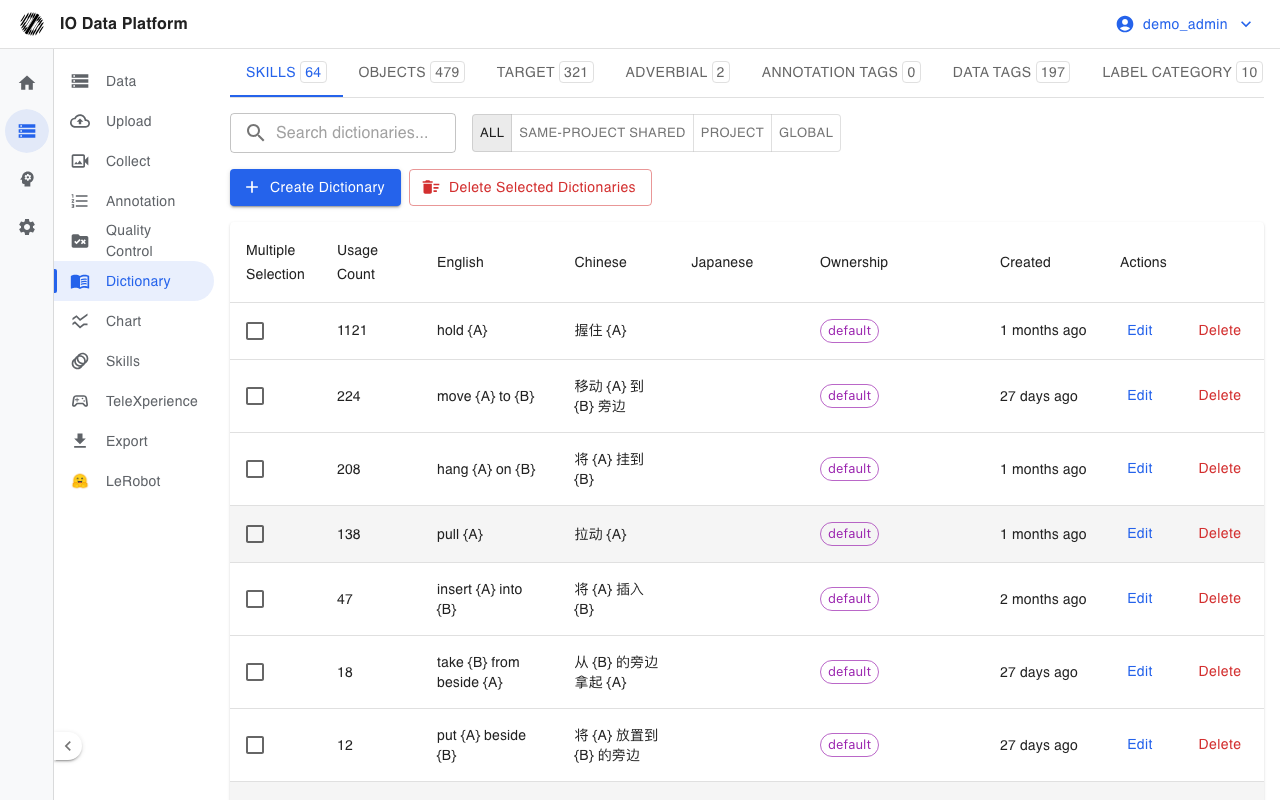
The tabs at the top of the page correspond to dictionary types. The number in parentheses after a tab name is the entry count for that type.
| Tab | Data model type | Contents |
|---|---|---|
| Skills | skill | Action skill names and descriptions |
| Objects | object | Objects the action acts on |
| Target | target | Target position or result of the action |
| Adverbial | adverbial | Manner or condition of the action |
| Annotation Tags | invalid | Annotation validity tags |
| Data Tags | tag | Dataset classification tags |
| Label category | tagCategory | Categories of data tags, visible to administrators only |
List Fields
| Field | Notes |
|---|---|
| Multi-select | Select to run a batch delete |
| Usage Count | Number of times the entry is used in data; sortable |
| English | English content; sortable |
| Chinese | Chinese content; sortable |
| Japanese | Japanese content; sortable, may be empty |
| Ownership | Global, same-project shared, or project-specific |
| Created | Entry creation time; sortable |
| Actions | Edit, Delete; buttons for entries without permission are grayed out |
The search box matches keywords in the English, Chinese, and Japanese content. The ownership filter is limited to All, Same-project shared, Project, or Global.
Ownership and Permissions
| Ownership | Visible scope | Create permission | Edit and delete permission |
|---|---|---|---|
| Global Dictionary | All projects | Administrators only | Administrators only |
| Project-internal shared dictionary | Same project space of the current account | All writable roles | The creator; administrators unrestricted |
| Project-specific dictionary | Members of the given project | Project members | The creator; a project manager can manage dictionaries of own projects; administrators unrestricted |
Global dictionaries are marked with a Global tag in the list, project-internal shared dictionaries with Same-project shared, and project-specific dictionaries with the project name.
Maintaining Entries
Creating and Editing
- On the tab of the target dictionary type, click Create Dictionary.
- Select the ownership; when the ownership is Project-specific dictionary, select a project.
- Fill in the English and Chinese content; the Japanese content is optional.
- After submission, the entry is written to the list.
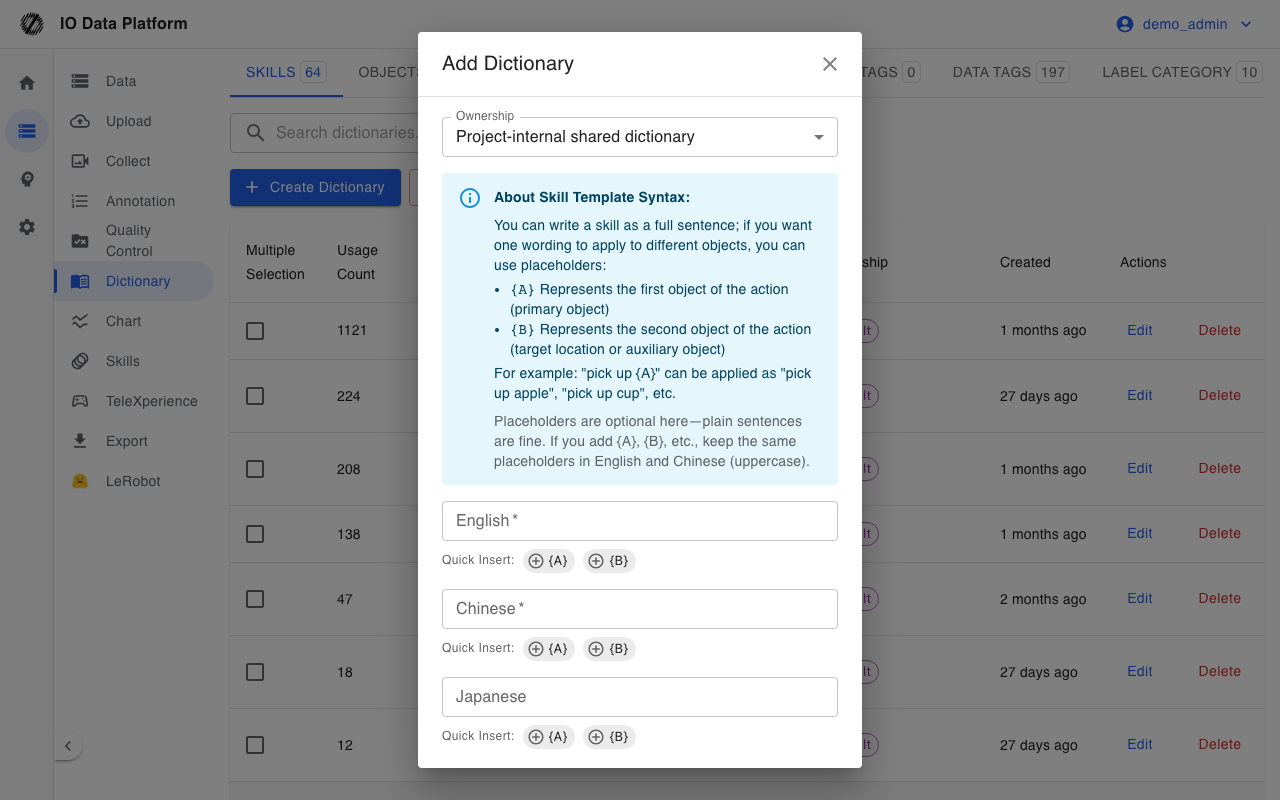
When adding an entry, switch to batch add to enter rows.
| Field | Type | Required | Values | Notes |
|---|---|---|---|---|
| Ownership | Radio | Yes | Global Dictionary, Project-internal shared dictionary, Project-specific dictionary | Global and project-specific are limited by role and membership |
| Project | Radio | Required when the ownership is project-specific | Projects the current account belongs to | Determines the project's visible scope |
| English | Text | Yes | Non-empty, must not contain Chinese characters | English must be unique within a type |
| Chinese | Text | Yes | Non-empty | None |
| Japanese | Text | No | May be empty | None |
Click Edit on an entry row to open the edit dialog, where the content and ownership can be changed; the ownership of a global dictionary cannot be changed.
Batch Add
Batch add is entered as text in the create dialog and does not support import from a file.
| Item | Value |
|---|---|
| Input format | One entry per line, with fields separated by a comma or tab |
| Field order | English, Chinese, Japanese |
| Separator requirement | Use the English half-width comma |
| Submission result | Entries are created one by one and the success count is reported |
Skill Placeholders
The skill dictionary supports placeholders in the content, so the same action sentence can be applied to different objects. A site can enable placeholder validation, after which the English and Chinese placeholders must match one to one.
| Placeholder | Meaning |
|---|---|
{A} | First object of the action, that is, the primary object |
{B} | Second object of the action, that is, the target position or an auxiliary object |
For example, pick up {A} can be applied as pick up apple and pick up cup. The create and edit dialogs provide shortcut buttons to insert placeholders.
Export and Delete
| Action | Location | Result |
|---|---|---|
| Export CSV | Upper right of the list | Export all entries of the current dictionary type as CSV |
| Delete selected dictionaries | Upper right of the list | Delete the selected entries one by one, skipping entries without permission |
| Delete a single dictionary | Actions column of an entry row | Delete that entry |
Export and delete follow the type and ownership permissions; only administrators can delete global dictionaries.
Constraints and Limits
| Item | Value | Applies to |
|---|---|---|
| English content | Must not contain Chinese characters | All types |
| English uniqueness | English must be unique within a type | Global dictionaries and the scope of one creator |
| Global dictionary creation | Administrators only | All types |
| Japanese content | May be empty | All types |
| Skill placeholder consistency | When validation is enabled, English and Chinese placeholders must match | Skills type |
| Batch add source | Text input only | Creating entries |
Troubleshooting
| Symptom | Possible cause | Resolution | Owner |
|---|---|---|---|
| "Dictionary cannot contain Chinese" is shown | The English content contains Chinese characters | Change it to English-only content | Operator |
| "A dictionary with the same English entry already exists" is shown | The English is duplicated within the same type | Use a different English entry, or edit the existing one | Operator |
| "Please use English comma to separate languages" is shown | The batch input used a Chinese comma | Switch to the English half-width comma | Operator |
| "Keep placeholders aligned in English and Chinese" is shown | The Chinese and English placeholders do not match | Align the placeholders or remove them all | Operator |
| "Only admins can modify the global dictionary" is shown | A non-administrator created or edited a global dictionary | Switch to project-internal shared or project-specific ownership | Operator |
| "Project dictionary requires specifying a project" is shown | The ownership is project-specific but no project was selected | Select a project | Operator |
| A no-permission message is shown for edit or delete | The entry ownership is outside the current account's scope | Contact the creator or an administrator | Operator, Administrator |
| "No delete permission" is shown | The entry is protected | Contact an administrator | Administrator |
Related Pages
| Page | Purpose |
|---|---|
| Annotation Tasks | Reference dictionaries during annotation |
| Data Management | Entry point for using data tags |
| Project Management | Project and member scope |
| Module Permissions | Configure View Dictionaries and Manage Dictionaries |