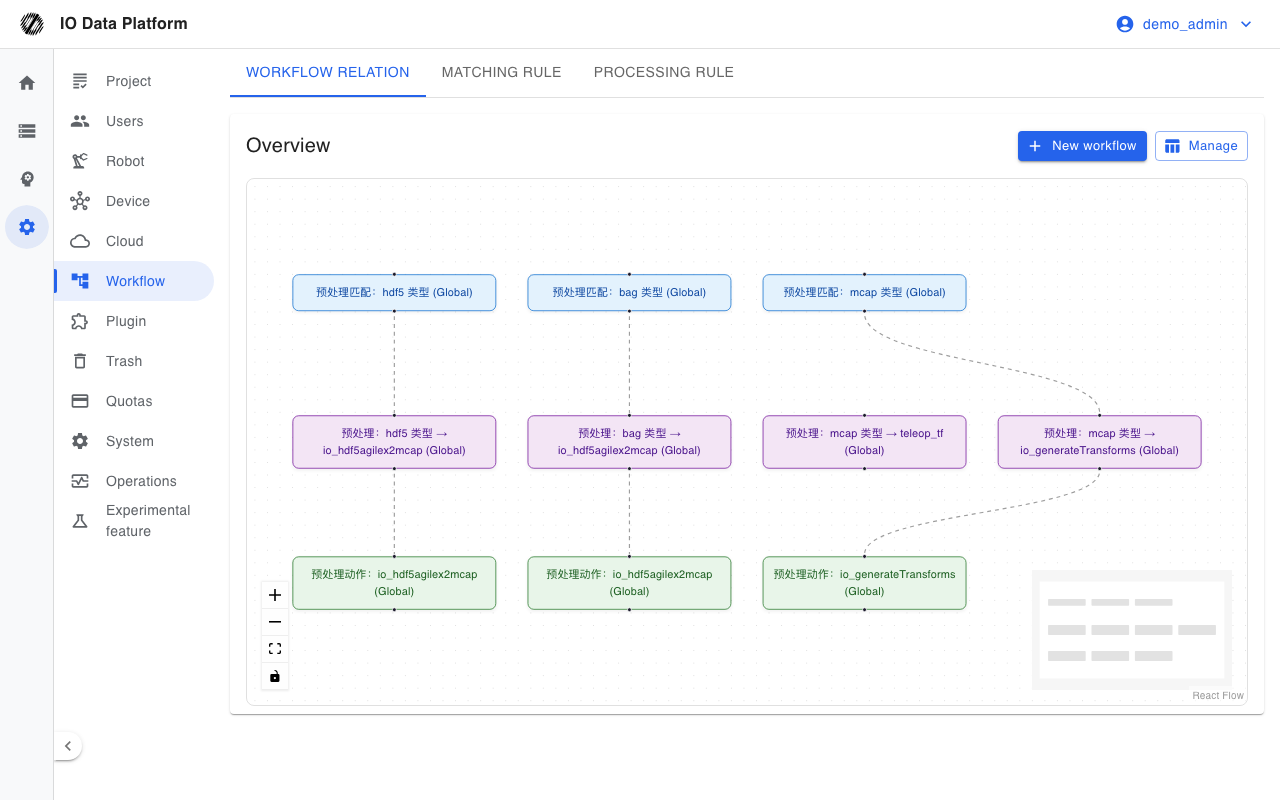
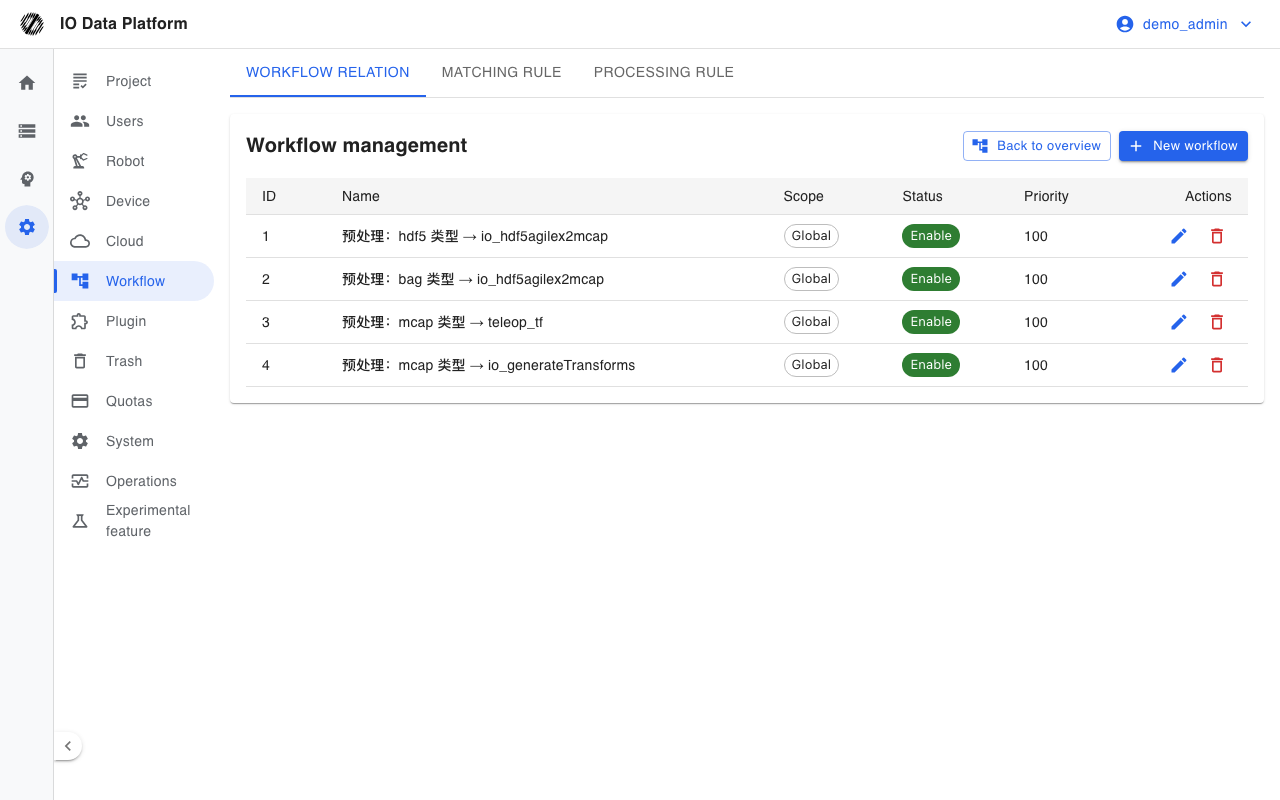
Workflow management combines dataset matching conditions with processing steps into pipelines. A pipeline runs automatically when a dataset is stored or its status changes, and performs operations such as format conversion, project import, quality control, annotation, and export. A pipeline is built from three reusable definition types: matching rules, processing rules, and workflows. A workflow references the first two and forms an executable directed graph.
Prerequisites
| Item | Content |
|---|
| Menu entry | Manage → Workflow |
| Route | /workflows (redirects to /workflows/overview by default) |
| Page permissions | View Workflows; the edit pages require Manage Workflows |
| API permissions | View Workflows (read), Manage Workflows (create, edit, delete, test) |
| Writable scope | Only administrators can write global definitions; project definitions require a Project Manager with write permission on the target project |
| Dependencies | At least one matching rule and one processing rule; execution requires the background task service and execution nodes to be available |
The matching rule and processing rule pages are open to users with View Workflows. Pipeline Map, Project Settings, Run Center, Templates, Workflow Management, Quality Standards, Annotation Config, and Export Config are accessible to administrators and Project Managers only; other roles are redirected to Annotation when they open them.
Pipeline Configuration and Runs
Tabs and Pipeline Stages
| Tab | Route | Purpose |
|---|
| Pipeline Map | /workflows/overview | Entry points for pipeline stages and blueprint preview |
| Project Settings | /workflows/project | Project-level pipeline switches and parameters |
| Run Center | /workflows/runs | Pipeline run records, status, duration, and details |
| Templates | /workflows/templates | Preview, trial run, and copy of platform standard templates to a project |
| Workflow Management | /workflows/manage | Workflow list, create, edit, delete |
| Matching rule | /workflows/match-rules | Definition and testing of dataset matching conditions |
| Processing rule | /workflows/action-rules | Arrangement and parameter configuration of processing steps |
| Quality Standards | /workflows/qc-rubrics | QC rating standards (strictness and metric thresholds) |
| Annotation Config | /workflows/label-configs | Models and review policies for automatic annotation |
| Export Config | /workflows/export-profiles | Export format, filter conditions, and directory structure |
| Stage | Capability |
|---|
| Collection and storage | Matching rules, cloud storage rules |
| Data normalization | Format conversion and coordinate system handling |
| Post-processing | Runs of custom algorithm templates |
| Quality assessment | QC rules and rating standards |
| Annotation and review | Automatic annotation and manual review |
| Delivery and reporting | Export rules and quality assurance reports |
Matching Rules
| Field | Type | Required | Default | Description |
|---|
| Name | Text | Yes | None | Up to 200 characters |
| Description | Text | No | Empty | Up to 500 characters |
| Scope | Enum | Yes | Global | Global or project |
| Priority | Integer | No | 100 | Lower numbers are evaluated first |
| Enable | Switch | No | On | Disabled rules no longer take part in matching |
| Logic | Enum | Yes | And | And (all conditions met) or Or (any condition met) |
| Condition | List | Yes | Empty | Each condition consists of a field, an operator, and a value |
Matching conditions support the following fields, operators, and values.
| Item | Value | Description |
|---|
| Available fields | name, extension_name, robot_type, sizemb, source_url, remote_url, local_url | Read from the corresponding dataset attributes |
| Operators | eq, contains, regex, gt, lt, gte, lte, is_null, is_not_null | Null checks do not need a value |
| Regex flags | i, m, s, u, y, d | g is ignored |
| Size comparison | gt, lt, gte, lte | Used for numeric fields such as sizemb |
A matching test runs the same matcher on dataset samples and returns the match count, scanned count, and matched samples.
Processing Rules
A processing rule consists of ordered steps. The edit page offers two input modes: graphical steps and an advanced JSON mode.
| Action | Identifier | Description |
|---|
| Auto rename | autoRename | Rewrites the dataset name by a regex pattern and target format, with a test dialog |
| Auto import project | autoImportProject | Imports the dataset into a specified project |
| HDF5 → MCAP | io_hdf5agilex2mcap, io_hdf5realman2mcap, io_hdf5dobot2mcap, io_hdf5limx2mcap, io_hdf5unix2mcap | Converts HDF5 data from Agilex, Realman, Dobot, Limx, and Unix by collection source |
| LeRobot → MCAP | io_lerobot2mcap | Converts a LeRobot dataset to MCAP |
| AgiBot → MCAP | io_agibot2mcap | Converts AgiBot data to MCAP |
| Meituan → MCAP | io_meituan2mcap | Converts Meituan data to MCAP |
| Lumos FastUMI → MCAP | io_lumos2mcap | Converts Lumos FastUMI data to MCAP |
| zc0touch → MCAP | io_zc0touch2mcap | Converts zc0touch data to MCAP |
| Lwlab → MCAP | io_lwlab2mcap | Converts lwlab teleop HDF5+MP4 to MCAP |
| Lightwheel → MCAP | io_lightwheel2mcap | Appends unified joint topics to Lightwheel EgoSuite MCAP |
| SenseXperience → MCAP | io_sensexperience2mcap | Converts SenseXperience data to MCAP |
| BVH → MCAP | io_bvh2mcap | Converts BVH motion data to MCAP |
| Generate 3D animation | io_generateTransforms | Generates a 3D animation artifact from the data |
| Galbot Proto data to ROS2 | io_galbotproto2mcap | Converts Galbot Proto data to ROS2 data |
| Run Custom Algorithm | runAlgorithm | Calls an algorithm template registered in Algorithm Management |
Workflows and Configuration Objects
| Field | Type | Required | Default | Description |
|---|
| Name | Text | Yes | None | Up to 200 characters |
| Description | Text | No | Empty | Up to 500 characters |
| Scope | Enum | Yes | Global | Global or project |
| Priority | Integer | No | 100 | Lower numbers run first |
| Enable | Switch | No | On | Disabled workflows no longer trigger runs |
| Graph | Directed graph | Yes | Empty | Composed of matching rule nodes and processing rule nodes |
Quality Standards, Annotation Config, and Export Config hold the rating, annotation, and export parameters used when a pipeline runs.
| Tab | Main fields | Values |
|---|
| Quality Standards | Strictness | LOW, MEDIUM, HIGH |
| Quality Standards | Metric rules | Metric, condition, threshold, severity (WARNING, CRITICAL) |
| Annotation Config | Model | Model identifier, confidence threshold, service endpoint |
| Annotation Config | Review policy | random, all, low_confidence, sampling rate 0–100%, minimum number of reviewers |
| Export Config | Format | mcap, hdf5_lerobot, hdf5_robomimic, mp4, rosbag2 |
| Export Config | Filter and structure | QC status, minimum duration; path template and compression method (gzip, none) |
Run Center
The Run Center lists pipeline runs in reverse chronological order.
| Field | Description |
|---|
| ID | Run number |
| Dataset | Dataset that triggered the run |
| Stage | Data processing stage |
| Status | Run status; a running run shows the progress percentage |
| Start time | Run start time |
| Duration | Time from start to completion |
| Actions | View run details |
| Status | Meaning |
|---|
| Pending | Queued and waiting to run |
| Running | Executing, with a progress percentage |
| Completed | All steps finished |
| Failed | A step raised an error; the details include the error message |
Constraints and Limits
| Item | Value | Description |
|---|
| Name length | ≤ 200 characters | Saving is rejected when exceeded |
| Description length | ≤ 500 characters | Saving is rejected when exceeded |
| Priority | Integer, default 100 | Lower numbers take precedence |
| Global definitions | Only administrators can write | Project definitions require a Project Manager with write permission on the project |
| Matching test | Non-administrators must specify a project | Scans up to 20000 datasets per run and returns up to 50 samples |
| Deletion | Soft delete | Deleted items no longer trigger runs; historical run records are retained |
| Tab access | Pipeline Map, Project Settings, Run Center, Templates, Workflow Management, Quality Standards, Annotation Config, Export Config | Accessible to administrators and Project Managers only |
Troubleshooting
| Symptom | Possible cause | Action | Owner |
|---|
| The workflow does not run | The workflow is disabled, the matching rule is not satisfied, or the priority is lower than another workflow | Check the enable state, verify matches with Test, and adjust the priority | Project Manager, Administrator |
| The matching test returns no matches | Wrong project scope, overly strict conditions, or a field and operator mismatch | Loosen the conditions, or test within the target project | Project Manager |
| The run stays Pending | The background task queue is congested or execution nodes are unavailable | Check the queue and node status in Operations Monitoring | Platform Operations |
| A processing step fails | The source format is unsupported, an action parameter is missing, or the algorithm run failed | Check the failed step and logs in the run details, fix the issue, and rerun | Project Manager, Administrator |
| Auto rename does not match | The regex pattern does not match, or the no-match action is set to skip | Check the result in the rename test dialog and adjust the pattern or action | Project Manager |
| Access to a tab redirects away | The current role does not meet the access conditions for that tab | Ask an administrator to assign permissions, or use the matching rule and processing rule pages | Administrator |
Related Pages