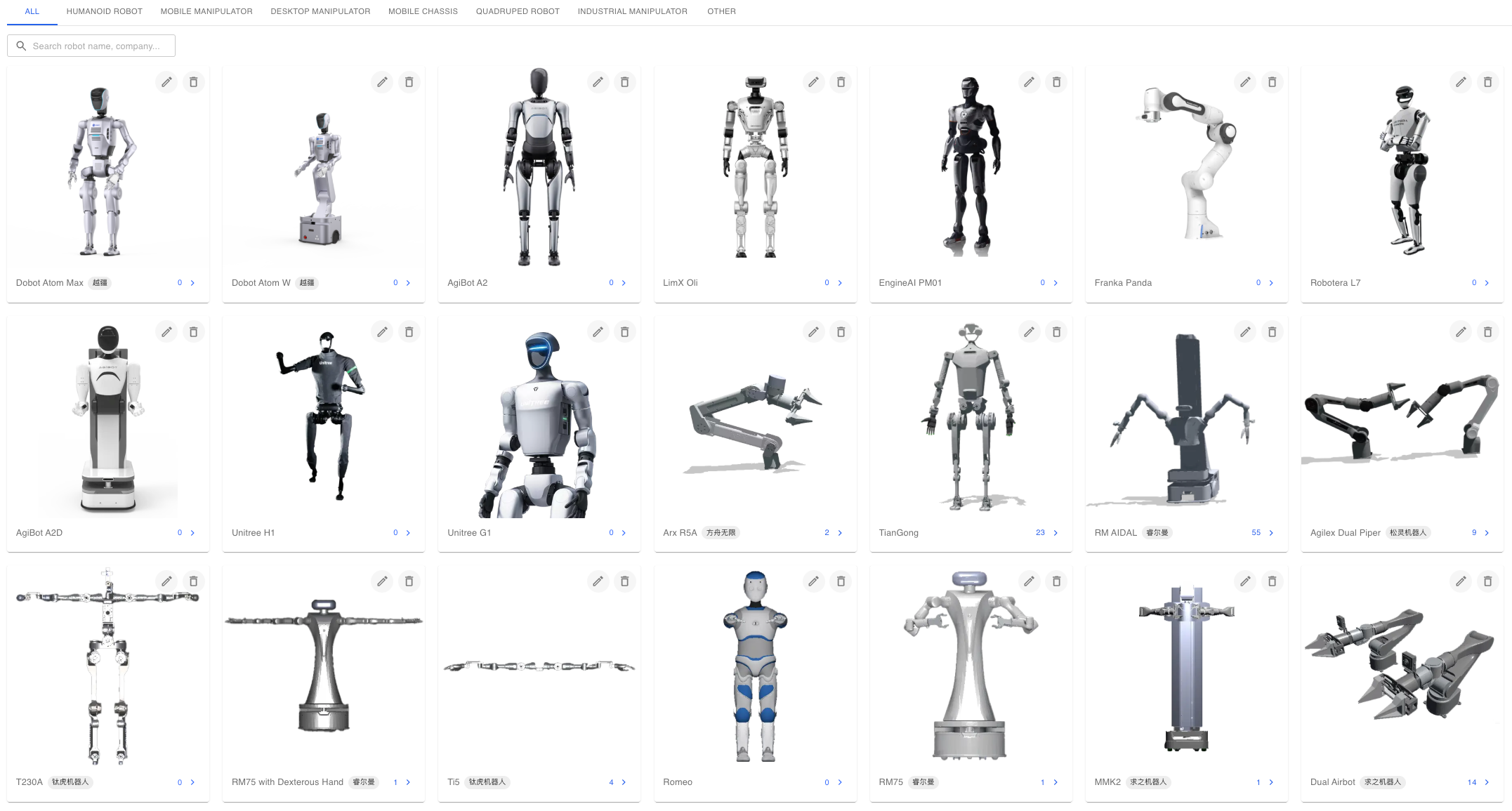
The Robots page maintains the model catalog and shows the number of datasets linked to each model. It also provides the basis for dataset filtering and visualization models. The platform ships with 23 models. Robot-side devices are registered on the Device Management page.
Prerequisites
| Item | Content |
|---|
| Menu entry | Manage → Robot |
| Route | /robots |
| Required permission | View Robots (model list and model datasets) |
| Related permissions | Manage Robots (link datasets to models), View Teleoperation (read the model list when registering devices) |
| Visible roles | Administrator, Project Manager |
| Write restriction | Only administrators can create, edit, and delete models; not exposed as a configurable module permission key |
Model Browsing
Model Types
| Type | Label |
|---|
| HUMANOID | Humanoid Robot |
| MOBILE_MANIPULATOR | Mobile Manipulator |
| DESKTOP_ARM | Desktop Manipulator |
| MOBILE_BASE | Mobile Chassis |
| QUADRUPED | Quadruped Robot |
| INDUSTRIAL_ARM | Industrial Manipulator |
| OTHER | Other |
Type tabs switch at the top of the list. When a tab other than All is selected, the backend filters by model type.
Model List
| Element | Description |
|---|
| Card icon | Visualization model image of the model |
| Display name | Chinese Title or English Title based on the interface language; falls back to Name when both are empty |
| Manufacturer | Models with a manufacturer show a company tag |
| Dataset count | Number of datasets linked to the model; select to open the dataset list |
| Add robot | Visible to administrators only |
| Edit and delete | Visible to administrators only on the card |
The search box matches loaded models by name, Chinese title, English title, manufacturer, and introduction.
Model Maintenance
Model Fields
| Field | Type | Required | Values and description |
|---|
| Robot name | Text | Yes | Unique identifier, up to 255 characters; cannot be changed when editing |
| Robot icon | Image | Yes | Required when creating; used for the card and the visualization model |
| Chinese Title | Text | No | Up to 255 characters; Name is shown when empty |
| English Title | Text | No | Up to 255 characters; Name is shown when empty |
| Robot Type | Enum | No | Defaults to Other |
| Action mapping supported | Enum | No | Supported, Coming soon, Not supported; defaults to Not supported |
| Robot Introduction | Text | No | Model description |
| Robot Manufacturer | Text | No | Up to 100 characters |
| Introduction link | URL | No | Up to 1000 characters |
Dataset Association
| Entry | Behavior |
|---|
| Card icon and dataset count | Jump to the data management page and filter data for the model by robot=<model name> |
| Model dataset API | Returns datasets linked to the model; fields include file name, size, duration, uploader, upload time, and annotation count |
Constraints and Limits
| Item | Value | Description |
|---|
| Built-in models | 23 | Match the visualization models |
| Model name length | Up to 255 | Globally unique |
| Manufacturer length | Up to 100 | |
| Icon and introduction link length | Up to 1000 | |
| Deletion method | Soft delete | Returns a conflict message when the name matches a deactivated model |
| Write role | Administrator | Create, edit, delete |
Troubleshooting
| Symptom | Possible cause | Action | Owner |
|---|
| Adding a model reports that the name already exists | The name matches an active or deactivated model | Change the name, or restore the deactivated model | Administrator |
| Model list is empty | The type filter returned nothing, or the keyword matched nothing | Switch the type tab or clear the keyword | Administrator, Project Manager |
| Dataset count is 0 | No data is linked to the model, or linked data is in a project that the current account cannot see | Check the model field and project visibility of the data in data management | Project Manager, Administrator |
| The name is still taken after deletion | Deletion is a soft delete | Restore the model or use another name | Administrator |
Related Pages