Collection Tasks
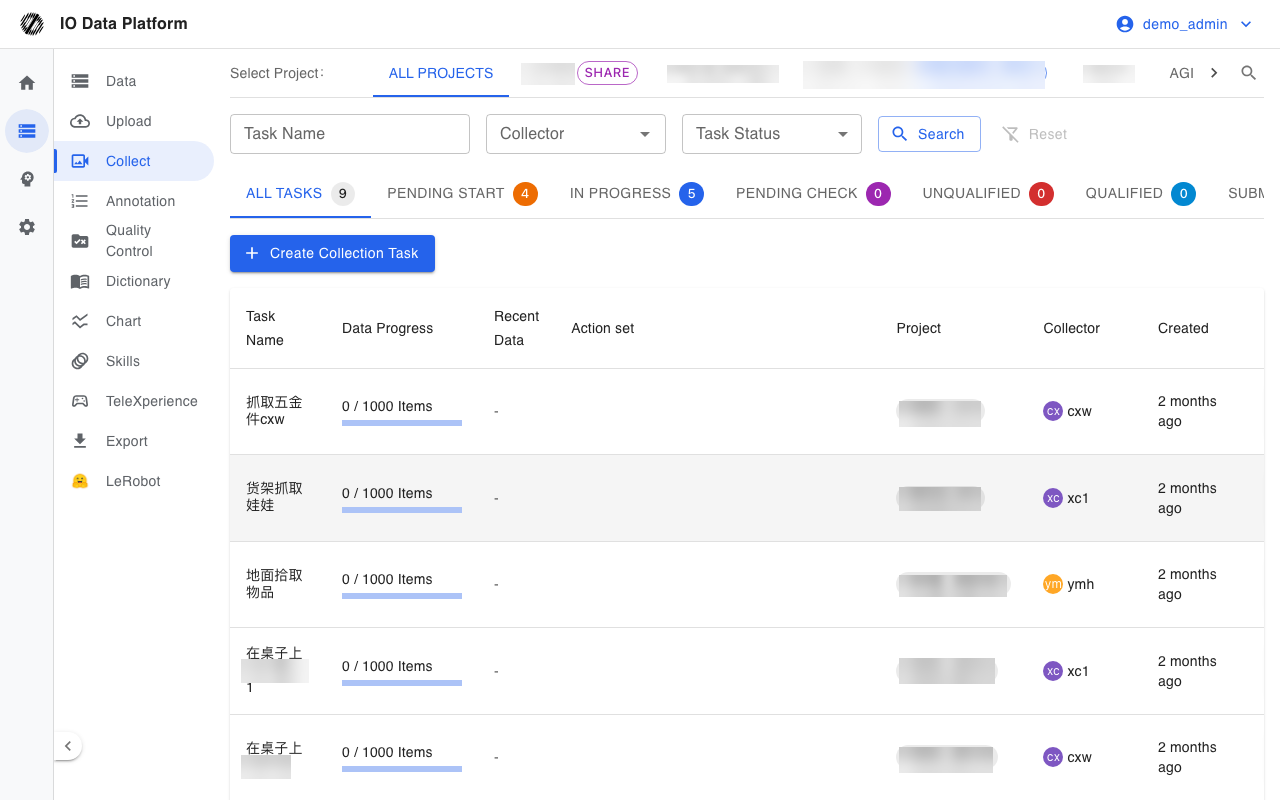
Collection tasks dispatch collection plans to collectors and robot devices and track the data progress and status transitions of each task. Collected data links to the corresponding task automatically after upload.
Prerequisites
| Item | Description |
|---|---|
| Menu entry | Data → Collect |
| Route | /collections; task details /collections/{id}/datasets |
| Required permission | “View Collection Tasks”; the page is guarded by this permission |
| Related permissions | “Manage Collection Tasks” (create, edit, and delete tasks, change status, unlink data and devices), “View Teleoperation” (robot device candidates in the task dialog) |
| Visible roles | Administrator, Project Manager, Auditor, Annotator, Collector |
| Role default | Collector, Annotator, Auditor, and Project Manager all include “Manage Collection Tasks” (Read & write) |
| Dependencies | An editable project exists; collector accounts are created; devices are registered in the teleoperation console |
See Module Permissions for how to configure module permissions.
Task List
List and Filtering
Filter conditions are written to URL query parameters, so a link that carries filters can be shared directly; the reset button clears every condition.
| Filter | Description |
|---|---|
| Task name | Fuzzy matching; press Enter or click search to apply |
| Collector | Filters by collector account |
| Task Status | All states, or one of the six states |
| Reset | Clears all filter conditions |
Tabs above the list group tasks by status, and each tab shows the task count for that status; “All Tasks” shows the combined count.
List Fields
| Field | Description |
|---|---|
| Task Name | Task name; click to open the task details |
| Data Progress | Linked data count / target count, with a completion progress bar |
| Recent Data | Name and time of the most recent linked data |
| Action set | Skills involved in the task's collection steps |
| Project | Owning project |
| Collector | Assigned collector account |
| Created | Task creation time |
| Task Status | Current status; can switch to a next status the role can set |
The default page size is 50; the pagination control at the bottom shows the total count and lets the page size be changed.
Task Operations
Status and Transitions
The interface filters the selectable next statuses by the current role's role list, and the source status itself does not restrict viewing.
| Current status | Can transition to | Roles that can act |
|---|---|---|
| Pending Start | In Progress | Administrator, Project Manager, Auditor, Annotator, Collector |
| In Progress | Pending Check | Administrator, Project Manager, Auditor, Annotator, Collector |
| Pending Check | Qualified, Unqualified, In Progress | Qualified and Unqualified are limited to Administrator, Project Manager, and Auditor; In Progress is open to the five roles above |
| Unqualified | Pending Check, Qualified | Pending Check is open to the five roles above; Qualified is limited to Administrator, Project Manager, and Auditor |
| Qualified | Unqualified, Submit Data | Unqualified is limited to Administrator, Project Manager, and Auditor; Submit Data is limited to Administrator and Project Manager |
| Submit Data | None | Terminal state, with no further transitions |
Creating and Editing Tasks
Creating a task requires a task name, a project, and a collector. The edit entry point is in the task detail sidebar; permission is limited to administrators, or to a project manager who is the creator.
| Field | Type | Required | Default | Range | Description |
|---|---|---|---|---|---|
| Task Name | Text | Yes | Empty | Non-empty, globally unique | Shows “Task name already exists” on a duplicate |
| Project | Project selector | Yes | Empty | Projects with edit permission | Sets the task owner and visibility scope |
| Collector | Multi-select | Yes | Empty | Collector accounts in the project | Shows “Please select a collector” when none is selected |
| Robot device | Multi-select | No | Empty | Devices registered in the teleoperation console | Prompts to register a device in the teleoperation console when there are no candidates |
| Enable Remote Teleoperation | Checkbox | No | Unchecked | Checked / unchecked | When checked, pushes remote-control devices; returns “Project has not enabled remote control” when the project has no TRRO configuration |
| Collection quantity | Number | Yes | 1 | At least 1, unit: items | Target count for Data Progress |
| Average Duration | Number | Yes | 60 | At least 1, unit: seconds | Average duration per data item |
| Task notes | Text | No | Empty | None | Supplementary task description |
| Initial scene | Text | No | Empty | None | Description of the collection scene |
| Collection steps | Composite entries | No | Empty | Collection Action, Object Manipulation, Operation Targets, Notes | Object Manipulation is selectable only when the chosen action contains {A}, and Operation Targets only when it contains {B}; at least one of action or notes must be filled |
Task Details
| Tab | Content | Actions |
|---|---|---|
| Collect Data | List of linked data: Filename, Size, Upload Time, Status | Export this task's data and filter on the Data page; administrators and project managers can unlink |
| Device | List of robot devices linked to the task | Unlink devices |
| Overview | Order and requirements of the collection steps (task notes, initial scene, quantity requirements) | Read-only |
The sidebar provides a status button (with a next-status menu), view-all-on-the-Data-page, export this task's data, edit task, and delete task. When the task status is “Submit Data”, the sidebar prompts to complete the data upload on the upload page; a successful upload links to this task automatically.
Constraints and Limits
| Item | Value / Condition | Notes |
|---|---|---|
| Items Per Page | 50 by default | Adjustable in the pagination control |
| Task name | Globally unique | Saving is rejected on a duplicate |
| Status transitions | Limited by role | The interface shows only the next statuses the current role can set |
| Delete | Logical delete | The task goes to Trash and can be restored |
| Enable Remote Teleoperation | Requires a TRRO configuration on the project and a selected device | Returns “Device list cannot be empty” when no device is selected |
| Unlink data | Administrator, Project Manager | Unlinking does not delete the data itself |
| Data linking | Automatic once the upload step writes the task identifier | Prompts to go to the upload page when the task status is “Submit Data” |
Troubleshooting
| Symptom | Possible cause | Action | Owner |
|---|---|---|---|
| The list is empty | The account lacks “View Collection Tasks”, filters are too narrow, or the account has no related projects | Check module permissions and filters | Administrator, Project Manager |
| Creation shows “Please select a collector” | No collector is selected | Select at least 1 collector | Project Manager, Administrator |
| Creation shows “Task name already exists” | The task name duplicates an existing task | Use a different task name | Project Manager, Administrator |
| Creation shows “Project does not exist or has been deleted” or “You do not have permission to create a collection task in this project.” | The project was deleted, or the account is not a project member | Select a project with edit permission, or request to join the project | Administrator |
| No device candidates | No registered device exists in the project | Register a device in the teleoperation console | Collector, Administrator |
| Enable Remote Teleoperation returns “Project has not enabled remote control” | The project has no trro.project_id configuration | An administrator enables remote control in the project configuration | Administrator |
| No next status is selectable | The current role lacks the corresponding transition permission | A role with permission performs the transition | Auditor, Project Manager, Administrator |
| Task progress drops after unlinking | Unlinking removes only the task-data link, not the data itself | To restore progress, re-link by task on the Data page | Project Manager |
Related Pages
| Page | Purpose |
|---|---|
| Data Management | View the data linked to a task |
| Data Upload | Upload collected data and link it to a task |
| Dataset Export | Export this task's data |
| Devices | Device registration and activation records |
| Projects | Project members and remote teleoperation configuration |
| Module Permissions | How to configure module permissions |
| Collector Guide | How collectors receive and execute tasks |