Cloud Storage
How to provide secure and reliable target storage for data upload, import, backup and other operations?
Typical scenarios:
- Need to connect to cloud storage services to store platform data
- Need to choose the most suitable storage solution based on business requirements
- Need to monitor storage usage to optimize storage costs
- Need to ensure data security and accessibility
Cloud storage management is designed to solve these problems. By supporting connection and configuration of multiple mainstream cloud storage services, it provides secure and reliable target storage for data upload, import, backup and other operations.
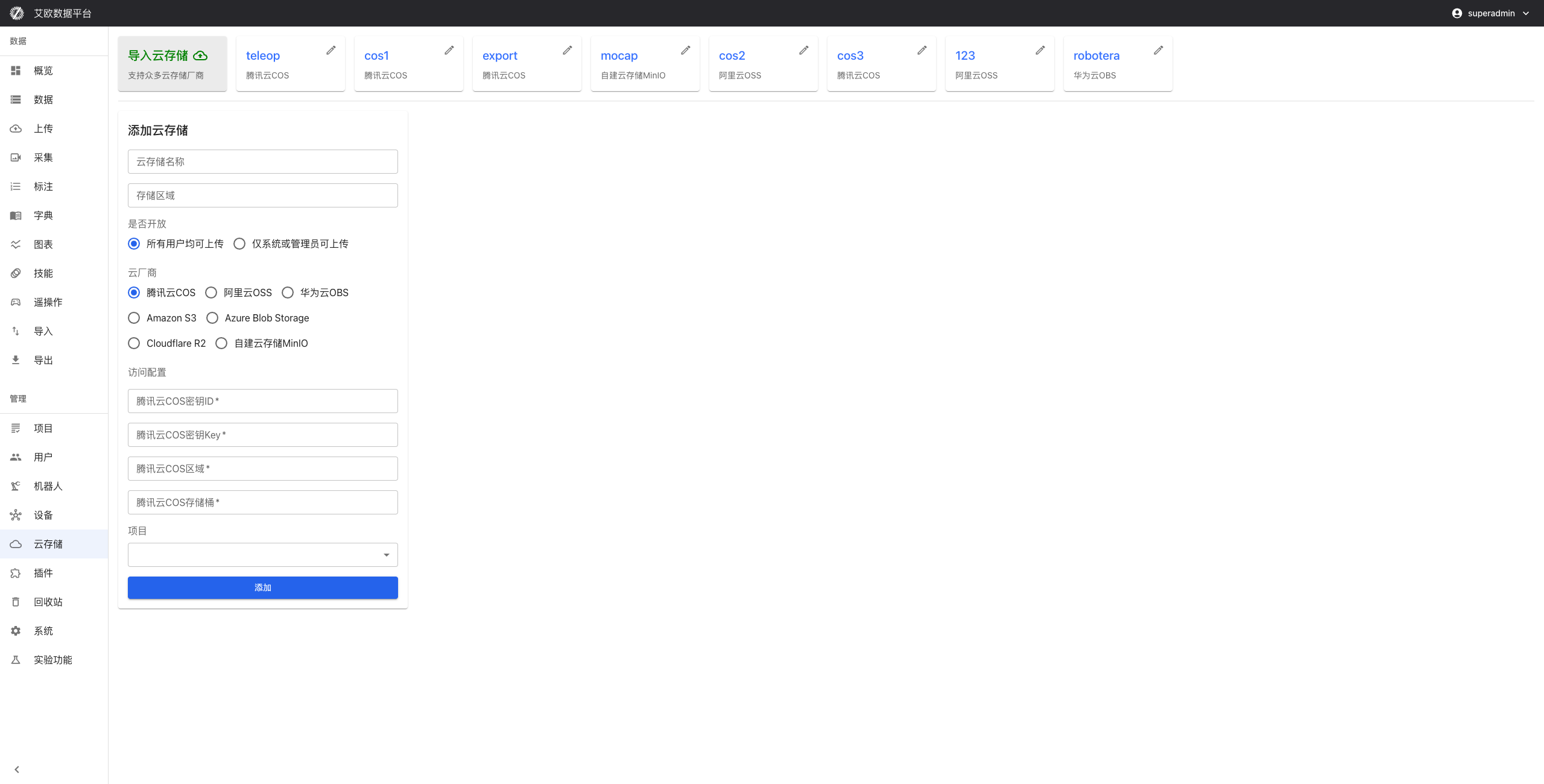
Quick Start: Configure Your First Cloud Storage
Step 1: Select Cloud Storage Service
- Go to the Cloud Storage Management page and click "New Cloud Storage"
- Select cloud storage service type:
- Domestic cloud providers: Tencent Cloud COS, Alibaba Cloud OSS, Huawei Cloud OBS, Volcano Engine TOS
- International cloud providers: Amazon S3, Azure Blob Storage, Cloudflare R2
- Self-hosted deployment: MinIO
Step 2: Configure Connection Information
- Fill in connection configuration:
- Access Key: Access key for cloud storage
- Secret Key: Secret key for cloud storage
- Endpoint: Service endpoint for cloud storage
- Region: Select storage region
- Test connection to ensure configuration is correct
- Save configuration
Step 3: Configure Permissions and Policies
- Set access policies for storage buckets
- Configure permission management
- Set backup policies (if needed)
- Complete configuration
Multi-Cloud Storage Support
Supported Cloud Storage Services
Domestic cloud providers:
- Tencent Cloud COS: Tencent Cloud Object Storage Service
- Alibaba Cloud OSS: Alibaba Cloud Object Storage Service
- Huawei Cloud OBS: Huawei Cloud Object Storage Service
- Volcano Engine TOS: Volcano Engine Object Storage Service (new in 3.3.0)
International cloud providers:
- Amazon S3: Amazon Cloud Object Storage Service
- Azure Blob Storage: Microsoft Cloud Storage Service
- Cloudflare R2: Cloudflare Object Storage Service
Self-hosted deployment:
- MinIO: Open-source object storage service supporting self-hosted deployment
How to Choose a Cloud Storage Service?
Selection considerations:
- Business requirements: Choose a suitable storage solution based on business needs
- Geographic location: Select the optimal storage region based on user geographic location
- Cost factors: Compare costs of different cloud storage services and choose the most economical solution
- Data security: Consider data security and compliance requirements
Usage recommendations:
- Domestic users should prioritize domestic cloud providers
- Choose self-hosted deployment when complete data control is needed
- Can mix multiple cloud storage services to optimize cost and performance
Storage Configuration Management
How to Configure Cloud Storage Connection?
Configuration steps:
- Go to the Cloud Storage Management page
- Click "New Cloud Storage"
- Select cloud storage service type
- Fill in connection configuration:
- Access Key
- Secret Key
- Endpoint
- Region
- Test connection
- Save configuration
Configuration points:
- Ensure Access Key and Secret Key are correct
- Select correct Endpoint and region
- Test connection to ensure configuration is correct
How to Manage Permissions?
Permission management:
- Support fine-grained permission control
- Can set different users' access permissions for different storage buckets
- Ensure data security and prevent unauthorized access
Management method:
- Set permissions in cloud storage configuration
- Configure access permissions for users and roles
- Set access policies for storage buckets
- Regularly check and update permissions
How to Select Storage Region?
Region selection:
- Support selection of different storage regions
- Can select optimal storage region based on user geographic location and business requirements
- Improve data access speed
Selection recommendations:
- Select region based on primary user geographic location
- Consider data compliance requirements
- Compare cost and performance of different regions
Storage Monitoring
How to View Usage Statistics?
Statistics content:
- Storage capacity: Storage capacity usage of each cloud storage
- Access count: Access count statistics for storage
- Traffic statistics: Data transfer traffic statistics
Viewing method:
- View usage statistics on the Cloud Storage Management page
- Select the cloud storage to view
- View detailed statistics
- Analyze storage usage trends
How to Perform Cost Analysis?
Cost analysis:
- Cost statistics for each cloud storage
- Cost trend analysis
- Storage cost optimization suggestions
Analysis method:
- View cost statistics for each cloud storage
- Analyze cost trends
- Compare costs of different cloud storage services
- Develop optimization strategies
How to Monitor Performance?
Performance monitoring:
- Access latency: Monitor storage access latency
- Throughput: Monitor storage throughput
- Availability: Monitor storage service availability
Monitoring method:
- View performance metrics on the Cloud Storage Management page
- Set performance alerts
- Timely discover and resolve performance issues
- Optimize storage configuration
Data Management
How to Manage Storage Buckets?
Storage bucket management:
- Create, delete, and configure storage buckets
- Set access policies for storage buckets
- Configure lifecycle rules
Management method:
- Select storage bucket on the Cloud Storage Management page
- Create or configure storage bucket
- Set access policies and lifecycle rules
- Manage data in storage buckets
How to Manage Files?
File management:
- File upload, download, delete, move
- Support batch operations
- Support resumable upload
Management method:
- View file list in storage bucket
- Upload, download, or delete files
- Use batch operations to improve efficiency
- Use resumable upload for large files
How to Set Backup Policies?
Backup policies:
- Set automatic backup policies
- Configure backup frequency, retention time, backup region
- Ensure data security and recoverability
Setting method:
- Set backup policies in cloud storage configuration
- Configure backup frequency and retention time
- Select backup region
- Enable automatic backup
Common Questions
How to Test Cloud Storage Connection?
Testing method:
- Click "Test Connection" when configuring cloud storage
- System will automatically test the connection
- View test results
- Adjust configuration based on results
How to Switch Cloud Storage Service?
Switching method:
- Configure new cloud storage service
- Migrate data to new cloud storage
- Update platform configuration
- Verify data access is normal
How to Optimize Storage Costs?
Optimization methods:
- Analyze storage usage
- Compare costs of different cloud storage services
- Choose the most economical storage solution
- Set lifecycle rules to automatically clean up unnecessary data
Applicable Roles
Administrator
You can:
- Add and maintain cloud storage connections
- Configure permissions and region settings
- Monitor storage usage
- Develop storage strategies
Related Features
After completing cloud storage configuration, you may also need:
- Data Upload: Use cloud storage to upload data
- Data Import: Import data from cloud storage
- System Settings: Configure storage-related settings