Dashboard Overview
How to quickly understand the overall situation when opening the platform every day?
Typical scenarios:
- Need to quickly understand platform's total data volume and annotation progress
- Need to view data distribution across projects to identify key projects
- Need to monitor task completion status to discover work bottlenecks
- Need to evaluate annotation quality to provide basis for team improvement
- Need to prepare weekly reports or meetings, need to summarize data
Dashboard overview is designed to solve these problems. Through key metrics, data distribution charts, and trend analysis, it helps administrators and project managers quickly grasp the overall health of projects.
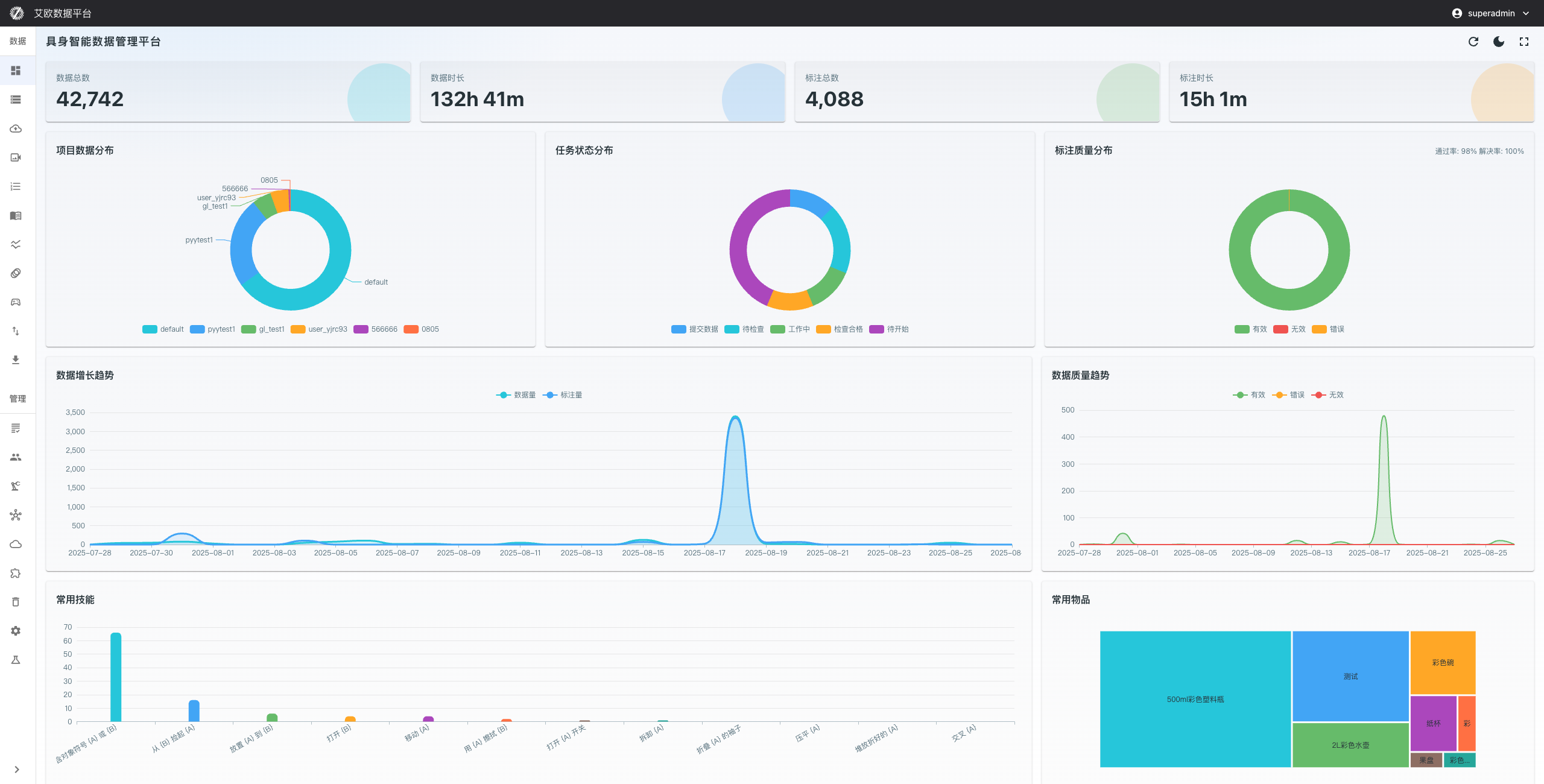
Core Data Metrics
The top of the dashboard displays four key metric cards, allowing you to understand the platform's core data at a glance:
- Total Data: Total number of all data files in the platform, reflecting data accumulation scale
- Data Duration: Total duration of accumulated data (hours and minutes), convenient for evaluating data value
- Total Annotations: Number of data items that have been annotated, reflecting team workload
- Annotation Duration: Total time consumed by annotation work, used for efficiency analysis
These metrics are automatically updated every 5 minutes to ensure data real-time performance.
Data Distribution Charts
Project Data Distribution
Use case: Understand data volume proportion of each project to identify key projects.
How to view:
- Find the "Project Data Distribution" pie chart on the dashboard
- View data volume proportion of each project
- Click project to view specific project details
Analysis points:
- Which projects are data-heavy and need more attention
- Which projects have less data and may need to strengthen collection
- Whether data distribution is reasonable and matches project priorities
Task Status Distribution
Use case: Monitor annotation task completion progress to discover work bottlenecks.
How to view:
- Find the "Task Status Distribution" chart on the dashboard
- View number of tasks in each status:
- Pending: Tasks not yet started
- In Progress: Tasks currently in progress
- Pending Review: Tasks waiting for review
- Review Passed: Tasks that have passed review
- Data Submitted: Completed tasks
Analysis points:
- Whether there are many tasks stuck in a certain status
- Whether task flow is smooth
- Whether personnel allocation needs adjustment
Annotation Quality Distribution
Use case: Evaluate annotator work quality to provide basis for training and improvement.
Key metrics:
- Pass Rate: Proportion of annotations passing on first try, reflecting annotation quality
- Resolution Rate: Proportion of annotations ultimately passing review, reflecting problem-solving ability
How to view:
- Find the "Annotation Quality Distribution" chart on the dashboard
- View pass rate and resolution rate data
- Compare quality changes across different time periods
Analysis points:
- Whether quality is stable or has fluctuations
- Which annotators need training
- Whether annotation standards need adjustment
Trend Analysis Charts
Data Growth Trend
Use case: Predict future storage needs and plan resources in advance.
How to view:
- Find the "Data Growth Trend" chart on the dashboard
- Select time range (day, week, month)
- View data volume growth
Analysis points:
- Whether data growth rate is stable
- Whether there are abnormal growth or decline
- Whether storage capacity needs to be increased
Data Quality Trend
Use case: Identify quality fluctuations and anomalies to take improvement measures in time.
How to view:
- Find the "Data Quality Trend" chart on the dashboard
- View annotation quality changes over time
- Identify time points of quality decline
Analysis points:
- Whether quality is continuously improving
- Whether there are periods of quality decline
- What are the reasons for quality fluctuations
Quick Access to Common Features
Common Skills
Use case: Quickly understand project focus and annotation patterns.
How to view:
- Find the "Common Skills" area on the dashboard
- View most frequently used annotation skill tags
- Click skill tags to enter detailed skill management page
Analysis points:
- Which skills are used most frequently
- Whether training for related skills needs to be increased
- Whether skill usage matches project requirements
Common Objects
Use case: Understand data collection focus to optimize annotation processes and resource allocation.
How to view:
- Find the "Common Objects" area on the dashboard
- View objects with highest frequency in annotations
- Understand data collection focus
Analysis points:
- Which objects appear most frequently
- Whether collection strategies need adjustment
- Whether resource allocation is reasonable
Real-time Monitoring Features
The system provides comprehensive real-time monitoring capabilities:
- Data Metrics: Automatically updated every 5 minutes
- Task Status: Changes reflected in real time
- Quality Anomalies: Proactive alerts
- Progress Delays: Timely notifications
Ensuring you can respond to various situations in time.
Common Questions
How to Refresh Dashboard Data?
Refresh method:
- Click the refresh button in the top right corner of the page
- Or wait for automatic system update (every 5 minutes)
How to View Detailed Data for a Specific Project?
Viewing method:
- Click project in the "Project Data Distribution" chart
- Or go to Project Management page to view details
How to Export Dashboard Data?
Export method:
- Use browser's screenshot function
- Or go to corresponding detailed page to export data
Applicable Roles
Administrator
You can:
- Comprehensively grasp system operation status
- Plan resources based on data growth trends
- Monitor overall annotation quality and develop improvement strategies
- Evaluate team work efficiency and optimize personnel allocation
Project Manager
You can:
- Quickly understand overall status of responsible projects
- Monitor task completion progress in real time
- Adjust strategies in time through quality evaluation
- Prepare sufficient data support for upper-level reports
Related Features
After completing dashboard overview, you may also need:
- Data Management: View detailed data lists
- Annotation Tasks: Manage annotation tasks
- Project Management: View project details