Skill Library
In data annotation work, teams often encounter these problems:
- Different annotators name the same action inconsistently ("grasp" vs "grasp object" vs "pick")
- Skill definitions change with projects, making historical data difficult to reuse
- New projects need to redefine all skills, wasting time
- Cannot track change history of skill definitions
Skill library is designed to solve these problems. It's like a "standard dictionary", allowing the entire team to use unified skill definitions, and supports evolution over time.
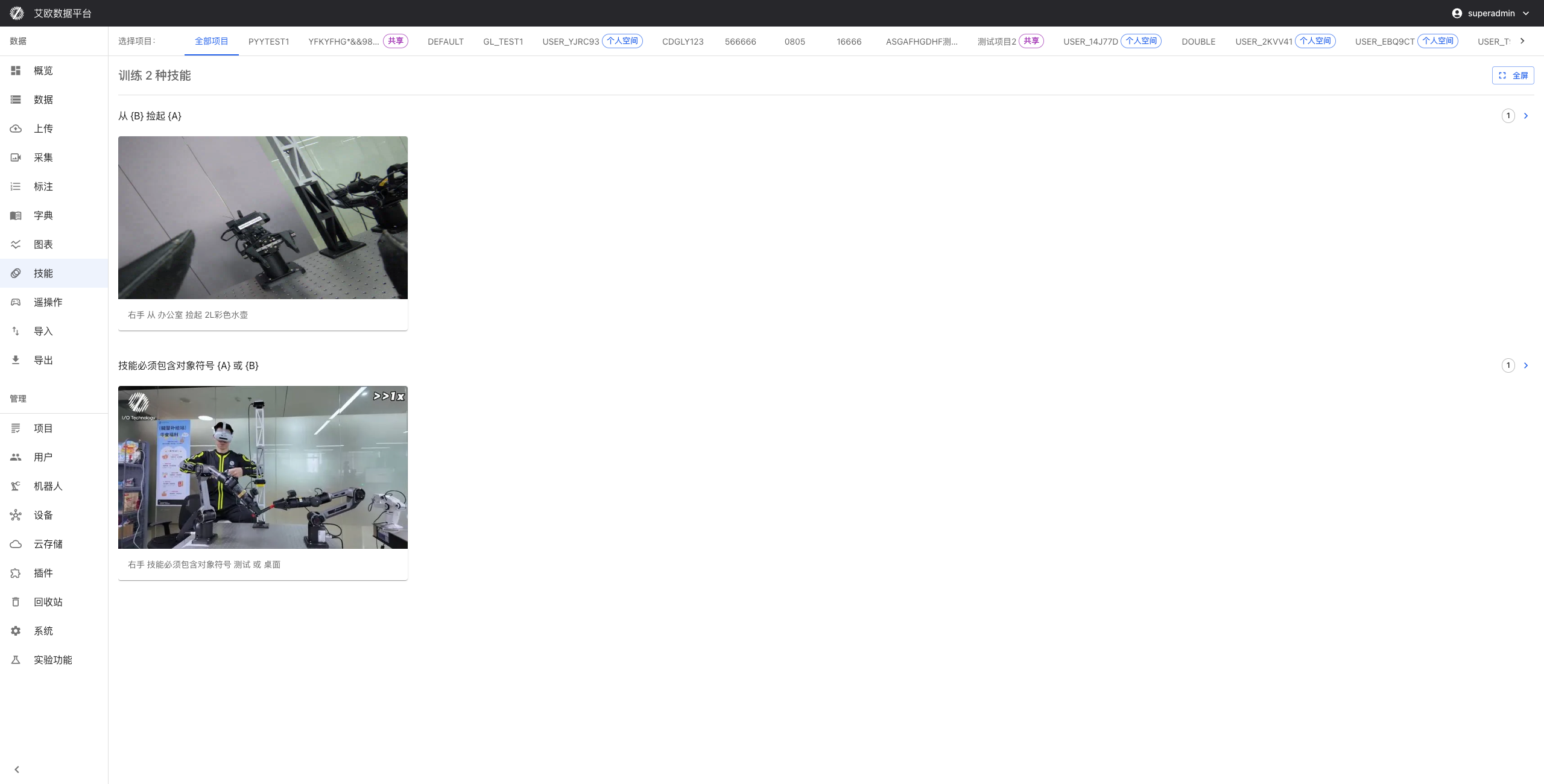
Quick Start: Create Your First Skill
Step 1: Create Skill Category
Before creating specific skills, first establish a classification system. Click "New Category", enter category name:
- Basic Actions: Grasp, place, push, pull and other atomic operations
- Daily Scenarios: Wipe table, pour water, organize items and other combined skills
- Industrial Scenarios: Assembly, inspection, transportation and other professional skills
💡 Tip: Categories shouldn't be too detailed, generally 3-5 categories are enough.
Step 2: Add Skill
Select a category, click "New Skill", fill in:
- Skill Name: Use team's unified naming convention (e.g., "grasp_object")
- Skill Description: Detailed explanation of this skill's definition and boundaries
- Tags (Optional): Add tags like "difficulty: simple", "scene: kitchen", etc.
Step 3: Use in Annotation Tasks
When creating annotation tasks, system automatically loads skill library. Annotators select from skill library during annotation, rather than manually entering.
Advanced Usage
How to Manage Skill Versions?
Why Do We Need Version Management?
Suppose your team has already annotated 1000 pieces of data with "grasp" skill, now need to change skill definition to "grasp_object" (more explicit). Direct modification would cause confusion in historical data associations, this is when version management is needed.
Operation Steps:
-
Create New Version
- Click "Create New Version" on skill details page
- Modify name and description
- Version number automatically increments (v1 → v2)
-
Historical Data Remains Unchanged
- The 1000 annotated data pieces still associate with v1
- Data integrity is guaranteed
-
New Tasks Use New Version
- Newly created annotation tasks automatically use v2
- Maintain latest annotation standards
-
Flexible Selection During Export
- Can export only specific versions
- Can merge statistics from multiple versions
When Do We Need Rollback?
If new version definition has issues, can select old version in "Version History", click "Set as Current Version". Ongoing tasks will continue using old version.
How to Set Skill Dependencies?
When Do We Need Dependency Management?
If your skill definitions have these characteristics, dependency management is needed:
✅ A skill must be executed after another skill (e.g., "place" depends on "grasp")
✅ A skill is a prerequisite for another skill (e.g., "open door" needs "approach door" first)
✅ Multiple skills form a complex process (e.g., "make coffee" includes multiple sub-skills)
❌ If skills are completely independent, no need to set dependencies
Set Dependencies:
- Go to skill details page
- Click "Dependencies" tab
- Click "Add Dependency", select prerequisite skill
- After saving, system will automatically validate dependencies during annotation and export
Dependency Visualization:
When annotators annotate "push open door", system will prompt that the first three steps need to be completed first.
How to Reuse Skill Templates?
Scenario: Quick Start New Project
When new projects start, usually there are some common skills needed by every project. Rather than recreating each time, use skill templates.
Create Template:
- Select multiple commonly used skills
- Click "Save as Template"
- Enter template name (e.g., "Universal Robotic Arm Operations")
Use Template:
When creating new project, select "Import from Template", one-click import all skill definitions.
Built-in Templates:
Platform provides some common templates:
| Template Name | Skill Count | Use Cases |
|---|---|---|
| Universal Robotic Arm Operations | 12 | Industrial robotic arms, collaborative robots |
| Mobile Robot Navigation | 8 | Mobile chassis, delivery robots |
| Humanoid Robot Basics | 20 | Bipedal, dual-arm humanoid robots |
| Home Service Scenarios | 15 | Cleaning, organizing, picking and placing items |
How to View Skill Usage Statistics?
Statistics Dimensions:
Skill library provides multi-dimensional usage statistics:
Usage Frequency
- Display number of times each skill is used
- Help identify core skills and rarely used skills
Usage Trends
- Display skill usage changes on timeline
- Identify newly popular skills
Quality Metrics
- Annotation Consistency: Consistency level of different annotators annotating the same skill
- Review Pass Rate: Annotation review pass rate for this skill
Project Distribution
- Which projects are using this skill
- Cross-project skill reuse situation
How to Use Statistics?
- Optimize Skill Definitions: If a skill's consistency is very low (e.g., 60%), definition may not be clear enough, needs refinement
- Guide Training: Skills with low pass rates need to strengthen annotator training
- Identify Deprecated Skills: Long-unused skills can be archived to simplify skill library
Team Collaboration Best Practices
Role Division Recommendations
Responsibilities of different roles in skill library management:
Administrator
- Maintain overall structure of skill library
- Establish skill naming conventions
- Approve skill additions and modifications
- Regularly clean up deprecated skills
Project Manager
- Select or create skills for projects
- Monitor skill usage
- Provide feedback on skill definition issues
Annotator
- Use skill library for annotation
- Provide feedback on unclear skill definitions
- Suggest new skills
Skill Naming Convention Recommendations
Unified naming conventions can significantly improve collaboration efficiency:
Recommended Format: verb_object_[modifier]
✅ Good Names:
grasp_bottleplace_desktop_lightlypush_door_forward
❌ Bad Names:
operation1(unclear)pick(language mixing)grasp_bottle_and_place_on_table(too complex, should split)
Naming Principles:
- Use team's unified language (Chinese or English)
- Verb first, object second
- Avoid too long, generally no more than 15 characters
- Add modifiers when necessary to distinguish subtle differences
Skill Definition Template
When writing skill descriptions, you can refer to this template:
**Skill Name**: grasp_bottle

**Definition**:
Use robotic arm end effector to grasp bottle from stationary state and maintain stable grip.

**Specific Actions**:
1. Robotic arm moves above bottle
2. End effector descends to grasping height
3. Gripper closes, grips bottle
4. Maintain grip force, avoid bottle slipping

**Boundary Conditions**:
- Bottle must be in graspable area
- Bottle is stationary or low-speed moving
- Grasp force is moderate, cannot damage bottle

**Does Not Include**:
- Moving bottle to other location (belongs to "place" skill)
- Unscrewing bottle cap (belongs to "rotate" skill)

**Example Video**:
[Upload example video link]
Common Questions
What's the Difference Between Skills and Action Annotations?
Skills are high-level semantic descriptions, action annotations are specific trajectory data:
- Skill: "Grasp bottle" — tells model "what to do"
- Action Annotation: Robotic arm trajectory, joint angles, gripper open/close — tells model "how to do"
One skill may correspond to multiple action trajectories (different grasping methods).
Can I Delete Skills That Are Already Used?
Not recommended to directly delete. If a skill is no longer used:
- Archive: Mark skill as "deprecated", no longer appears in selection list
- Retain: Historical annotation data still associates with this skill, can view during export
- Merge: If merging into other skill, use "Merge Skills" function
⚠️ Note: Force deletion will cause associated annotation data to lose skill information, affecting data integrity.
How to Import External Skill Definitions?
If you already have a skill list in Excel or CSV format:
-
Prepare file, format requirements:
- First column: Skill name
- Second column: Skill category
- Third column: Skill description
-
Go to Skill Library page, click "Import"
-
Select file, map column correspondences
-
Preview import results, import after confirming no issues
Does Skill Library Support Multiple Languages?
Yes. You can add multilingual names and descriptions for each skill:
- Chinese: 抓取_瓶子
- English: pick_bottle
- 日本語: ボトル_つかむ
Annotators switch interface language based on their language preference, skill names will automatically display corresponding language version.
⚠️ Note: When exporting data, skills will use the primary language version from creation time to ensure data consistency.
Related Features
After completing skill library setup, you may also need:
- Annotation Tasks: Create annotation tasks using skills from skill library
- Data Export: Export training data with skill tags
- System Settings: Configure global parameters for skill library