Teleoperation
How to view and manage multimodal data collected by teleoperation systems?
Typical scenarios:
- Need to view video, audio, sensor and other multimodal data collected by teleoperation systems
- Need to playback teleoperation process, reproduce operation scenarios
- Need to count and analyze data collection status, understand data quality
- Need to configure data upload process, ensure data uploaded in time
Teleoperation is designed to solve these problems. Through supporting data playback, statistical analysis and upload configuration, it helps administrators and project managers verify device status, data volume and upload process, and evaluate data quality through sampling playback.
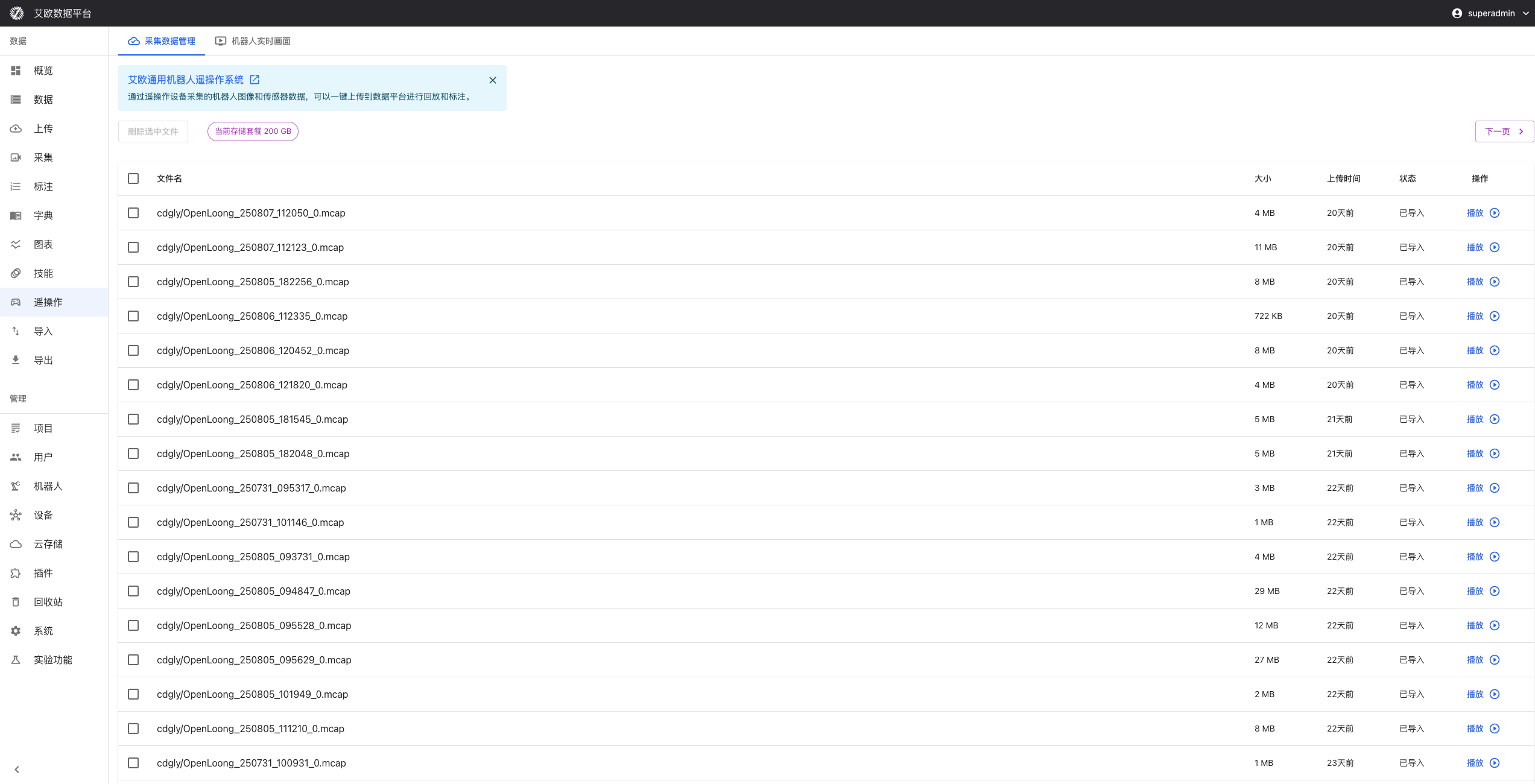
Multimodal Data Viewing
How to View Data Overview?
Data Overview:
- Total Data Volume: View total volume of teleoperation data
- Data Type Distribution: View distribution of different data types
- Collection Time Range: View time range of data collection
Viewing Method:
- Go to Teleoperation page
- View data overview cards
- Understand overall teleoperation data situation
- Filter and view detailed data as needed
How to View Multimodal Data?
Multimodal Support:
- Video Data: View video records during teleoperation process
- Audio Data: View audio records
- Sensor Data: View data collected by sensors
- Robot Status Data: View robot status information
Viewing Method:
- Select data type to view
- View data list
- Click data to view detailed information
- Use data preview function to quickly understand content
How to Preview Data?
Preview Functions:
- Thumbnail Display: Quickly view data thumbnails
- Basic Information View: View data's basic information
- Quick Playback: Quickly playback data content
Preview Method:
- Click data in data list
- View data preview
- Use quick playback function
- Decide whether to view detailed content
Data Playback Functions
How to Playback Teleoperation Data?
Playback Functions:
- Real-Time Playback: Reproduce teleoperation process
- Playback Control: Play, pause, fast forward, slow motion, loop playback
- Multi-View Playback: Simultaneously playback data from multiple views
Playback Method:
- Select data to playback
- Click "Playback" button
- Use playback control functions
- View teleoperation process
How to Perform Multi-View Playback?
Multi-View Playback:
- Simultaneously playback multiple camera views
- Synchronously display different sensor data
- Comprehensively understand teleoperation process
Playback Method:
- Select data to playback
- Select multiple views
- Start multi-view playback
- Synchronously view data from different views
Statistical Analysis Functions
How to View Data Statistics?
Statistics Content:
- Data Volume Statistics: Count number of each type of data
- Quality Statistics: Count data quality status
- Time Statistics: Count time distribution of data collection
Viewing Method:
- Go to Statistical Analysis page
- Select data type to count
- View statistics results
- Analyze data collection status
How to View Trend Analysis?
Trend Analysis:
- Data Volume Change Trends: View data volume changes over time
- Quality Change Trends: View data quality changes over time
- Device Usage Trends: View changes in device usage
Viewing Method:
- Select time range to analyze
- View trend charts
- Analyze data collection patterns
- Predict future trends
How to Perform Quality Assessment?
Quality Assessment:
- Quality Metric Calculation: Calculate various quality metrics
- Quality Report Generation: Generate quality assessment reports
- Issue Identification: Identify data quality issues
Assessment Method:
- Select data to assess
- Execute quality assessment
- View quality metrics and reports
- Improve data quality based on assessment results
Upload Configuration Management
How to Configure Data Upload?
Upload Settings:
- Upload Frequency: Set frequency of data upload
- Upload Format: Select format for data upload
- Compression Settings: Configure data compression parameters
Configuration Method:
- Go to Upload Configuration page
- Set upload parameters
- Test upload function
- Save configuration
How to Configure Devices?
Device Configuration:
- Device Type: Select device type
- Connection Method: Configure device connection method
- Collection Parameters: Set data collection parameters
Configuration Method:
- Select device to configure
- Set device parameters
- Configure collection settings
- Save configuration
How to Configure Storage?
Storage Configuration:
- Storage Location: Select data storage location
- Storage Format: Select data storage format
- Backup Strategy: Set data backup strategy
Configuration Method:
- Go to Storage Configuration page
- Set storage parameters
- Configure backup strategy
- Save configuration
Device Management
How to Monitor Device Status?
Device Monitoring:
- Online Status: View if device is online
- Battery: Monitor device battery
- Storage Space: View storage space usage
- Network Connection: Check network connection status
Monitoring Method:
- View device status in device list
- Click device to view detailed status
- Set status monitoring alerts
- Handle abnormal status in time
How to Perform Device Maintenance?
Maintenance Management:
- Maintenance Plan: Develop device maintenance plan
- Fault Records: Record device fault situations
- Maintenance History: View device maintenance history
Maintenance Method:
- Develop maintenance plan
- Regularly check device status
- Record faults and maintenance situations
- Ensure device stable operation
Quality Control
How to Perform Quality Checks?
Quality Checks:
- Data Integrity: Check if data is complete
- Format Correctness: Check if data format is correct
- Content Accuracy: Check if data content is accurate
Check Method:
- Select data to check
- Execute quality check
- View check results
- Handle discovered issues
How to Identify Quality Issues?
Issue Identification:
- Anomalous Data: Identify anomalous data
- Missing Data: Identify missing data
- Format Errors: Identify format errors
Identification Method:
- System automatically identifies quality issues
- View issue list
- Analyze issue causes
- Take handling measures
How to Generate Quality Reports?
Quality Reports:
- Quality Statistics: Count quality metrics
- Issue Analysis: Analyze quality issues
- Improvement Suggestions: Provide improvement suggestions
Generation Method:
- Select data range to report
- Generate quality report
- View report content
- Improve data quality based on report
Common Questions
How to View Data from a Specific Time Period?
Viewing Method:
- Use time filter in data list
- Select time range to view
- View data from that time period
- Perform data analysis and playback
How to Export Teleoperation Data?
Export Method:
- Select data to export
- Select export format
- Click export button
- Download exported file
How to Configure Automatic Upload?
Configuration Method:
- Go to Upload Configuration page
- Set automatic upload parameters
- Configure upload frequency and conditions
- Enable automatic upload function
Applicable Roles
Administrator
You can:
- Verify devices, data volume and upload process
- Sample playback to assess quality
- Monitor teleoperation data collection status
- Develop data management strategies
Project Manager
You can:
- Manage project-related teleoperation data
- Monitor data collection progress
- Evaluate data quality
- Coordinate teleoperation work
Collector
You can:
- View your own teleoperation data
- Playback operation process
- Analyze operation quality
- Improve operation skills
Related Features
After completing teleoperation management, you may also need:
- Data Management: View teleoperation data
- Device Management: Manage teleoperation devices
- Project Management: View project details