Analytics Charts
How to gain deep insights into data structure, annotation patterns, and work efficiency?
Typical scenarios:
- Need to analyze robot action execution sequences to optimize behavior planning
- Need to understand dependencies between actions to optimize execution strategies
- Need to analyze action execution time to identify performance bottlenecks
- Need to evaluate annotation work efficiency to optimize resource allocation
- Need to prepare project review reports with detailed data analysis
Analytics charts are designed to solve these problems. Through various visualization charts, they help administrators and project managers gain deep insights into data structure, annotation patterns, and work efficiency, providing data support for decision-making.
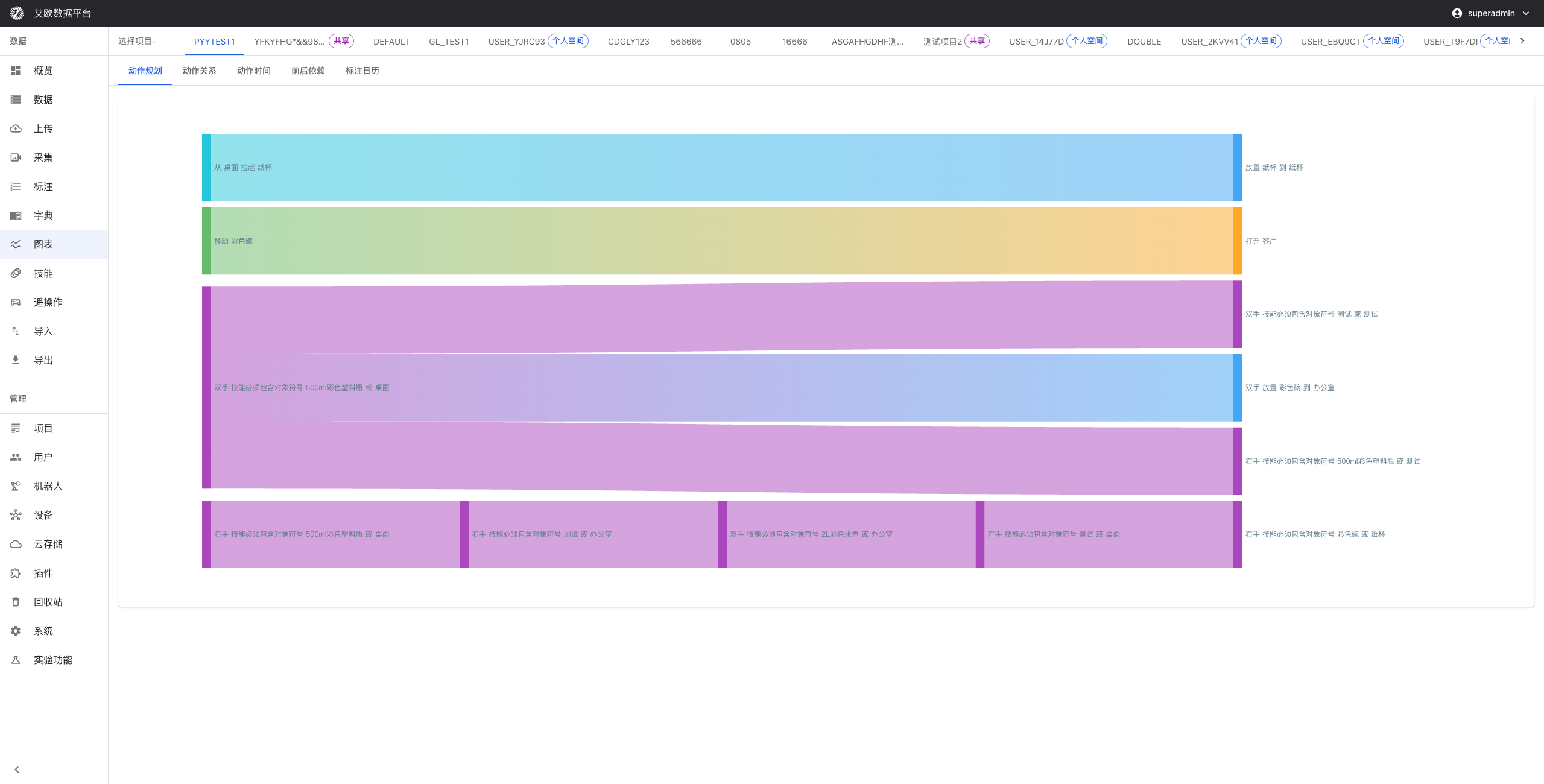
Action Planning Analysis
Action Flow Diagram
Use case: Visually see the complete sequence of robot actions to optimize behavior planning.
How to view:
- Go to the Analytics Charts page
- Select "Action Planning Analysis" > "Action Flow Diagram"
- View the complete sequence of actions and key nodes
- Analyze logical relationships between actions
Analysis points:
- Whether the action sequence is reasonable
- Whether there are redundant actions
- Whether the action path can be optimized
Action Complexity Analysis
Use case: Understand the difficulty level of actions to provide basis for training and optimization.
How to view:
- Select "Action Planning Analysis" > "Action Complexity Analysis"
- View the complexity scores of actions
- Analyze the distribution of actions with different difficulty levels
- View changes in action learning difficulty
Analysis points:
- Which actions have higher difficulty and need more training
- Whether the action difficulty distribution is reasonable
- Whether action design needs adjustment
Action Relationship Analysis
Action Dependency Graph
Use case: Understand logical relationships between actions to optimize execution strategies.
How to view:
- Select "Action Relationship Analysis" > "Action Dependency Graph"
- View dependencies between actions
- Analyze causal relationships of actions
- Identify actions that can be executed in parallel
Analysis points:
- Whether action dependencies are clear
- Whether there are circular dependencies
- Whether certain actions can be executed in parallel
Action Similarity Analysis
Use case: Discover patterns and anomalies in actions.
How to view:
- Select "Action Relationship Analysis" > "Action Similarity Analysis"
- View clustering results of similar actions
- Identify common action patterns
- Discover abnormal action combinations
Analysis points:
- Which action patterns are most common
- Whether there are abnormal action combinations
- Whether similar actions can be reused
Action Time Analysis
Time Distribution Chart
Use case: Understand temporal characteristics of actions to optimize execution efficiency.
How to view:
- Select "Action Time Analysis" > "Time Distribution Chart"
- View action execution time distribution
- Statistics on waiting time between actions
- Analyze action execution efficiency
Analysis points:
- Which actions take longer to execute
- Whether waiting time is reasonable
- Whether execution efficiency can be optimized
Time Trend Analysis
Use case: Identify performance bottlenecks and continuously improve action execution efficiency.
How to view:
- Select "Action Time Analysis" > "Time Trend Analysis"
- View trends in action time changes
- Identify performance bottlenecks
- Predict future execution time
Analysis points:
- Whether action execution time is continuously improving
- Whether there are performance bottlenecks
- Whether execution strategies need adjustment
Forward-Backward Dependency Analysis
Dependency Graph
Use case: Understand dependencies between actions to avoid execution conflicts.
How to view:
- Select "Forward-Backward Dependency Analysis" > "Dependency Graph"
- View prerequisites of actions
- Analyze subsequent impacts of actions
- Detect circular dependencies
Analysis points:
- Whether dependencies are reasonable
- Whether there are circular dependencies
- Whether dependencies can be simplified
Dependency Optimization
Use case: Improve overall execution efficiency.
Optimization methods:
- Simplify complex dependencies
- Optimize parallel execution strategies
- Adjust action execution order
- Identify bottlenecks in dependencies
Annotation Calendar Analysis
Timeline View
Use case: Get a comprehensive understanding of annotation work scheduling.
How to view:
- Select "Annotation Calendar Analysis" > "Timeline View"
- View the time progress of annotation work
- View task distribution on the timeline
- Mark important time nodes
Analysis points:
- Whether task scheduling is reasonable
- Whether there are time conflicts
- Whether time scheduling can be optimized
Work Efficiency Analysis
Use case: Understand team work efficiency to optimize resource allocation.
How to view:
- Select "Annotation Calendar Analysis" > "Work Efficiency Analysis"
- Analyze daily annotation workload
- Statistics on weekly work completion
- Evaluate monthly work results
Analysis points:
- Whether work efficiency is stable
- Whether there are efficiency fluctuations
- Whether resource allocation needs adjustment
Data Quality Analysis
Quality Distribution Chart
Use case: Get a comprehensive understanding of data quality status.
How to view:
- Select "Data Quality Analysis" > "Quality Distribution Chart"
- View data distribution by quality level
- Analyze quality changes over time
- Statistics on various quality issues
Analysis points:
- Whether data quality is stable
- Whether there are quality issues
- Whether quality control needs improvement
Annotator Performance Analysis
Use case: Improve overall team capabilities.
How to view:
- Select "Data Quality Analysis" > "Annotator Performance Analysis"
- Analyze individual annotator work performance
- Compare performance of different annotators
- Evaluate annotator skill levels
Analysis points:
- Which annotators perform excellently
- Which annotators need training
- Whether task allocation needs adjustment
Project Progress Analysis
Progress Dashboard
Use case: Provide comprehensive progress information for project management.
How to view:
- Select "Project Progress Analysis" > "Progress Dashboard"
- View overall project completion progress
- View completion status of each task
- Track key milestone progress
Analysis points:
- Whether project progress meets expectations
- Whether there are progress risks
- Whether plans need adjustment
Resource Usage Analysis
Use case: Optimize resource allocation and control project costs.
How to view:
- Select "Project Progress Analysis" > "Resource Usage Analysis"
- Analyze personnel resource utilization
- Statistics on equipment usage
- Monitor storage resource usage
Analysis points:
- Whether resource allocation is reasonable
- Whether there is resource waste
- Whether resource allocation needs adjustment
Common Questions
How to export analytics charts?
Export method:
- Click the export button on the chart page
- Select export format (image, PDF, etc.)
- Save to local
How to customize analytics charts?
Customization method:
- Select dimensions and metrics to analyze
- Set time range
- Adjust chart type and style
- Save custom configuration
Applicable Roles
Administrator
You can:
- Monitor overall platform operation status
- Optimize resource allocation and usage
- Control overall data quality
- Provide data support for management decisions
Project Manager
You can:
- Conduct in-depth analysis of project progress
- Identify problems and bottlenecks in projects
- Provide project optimization suggestions
- Prepare analysis data for upper-level reports
Related Features
After completing analytics charts, you may also need:
- Data Management: View detailed data lists
- Annotation Tasks: Manage annotation tasks
- Project Management: View project details