Dictionary Management
How to ensure different projects follow consistent naming and standards?
Typical scenarios:
- Different annotators name the same action inconsistently ("grasp" vs "grasp object" vs "pick")
- Different projects use different tag systems, making data difficult to reuse
- Need to support multilingual projects, ensure dictionary content consistency across different language versions
- Need to batch maintain dictionaries, improve maintenance efficiency
Dictionary management is designed to solve these problems. By uniformly maintaining dictionaries for skills, objects, targets, adverbials, annotation tags, data tags, etc., it ensures different projects follow consistent naming and standards, supporting multilingual and batch operations.
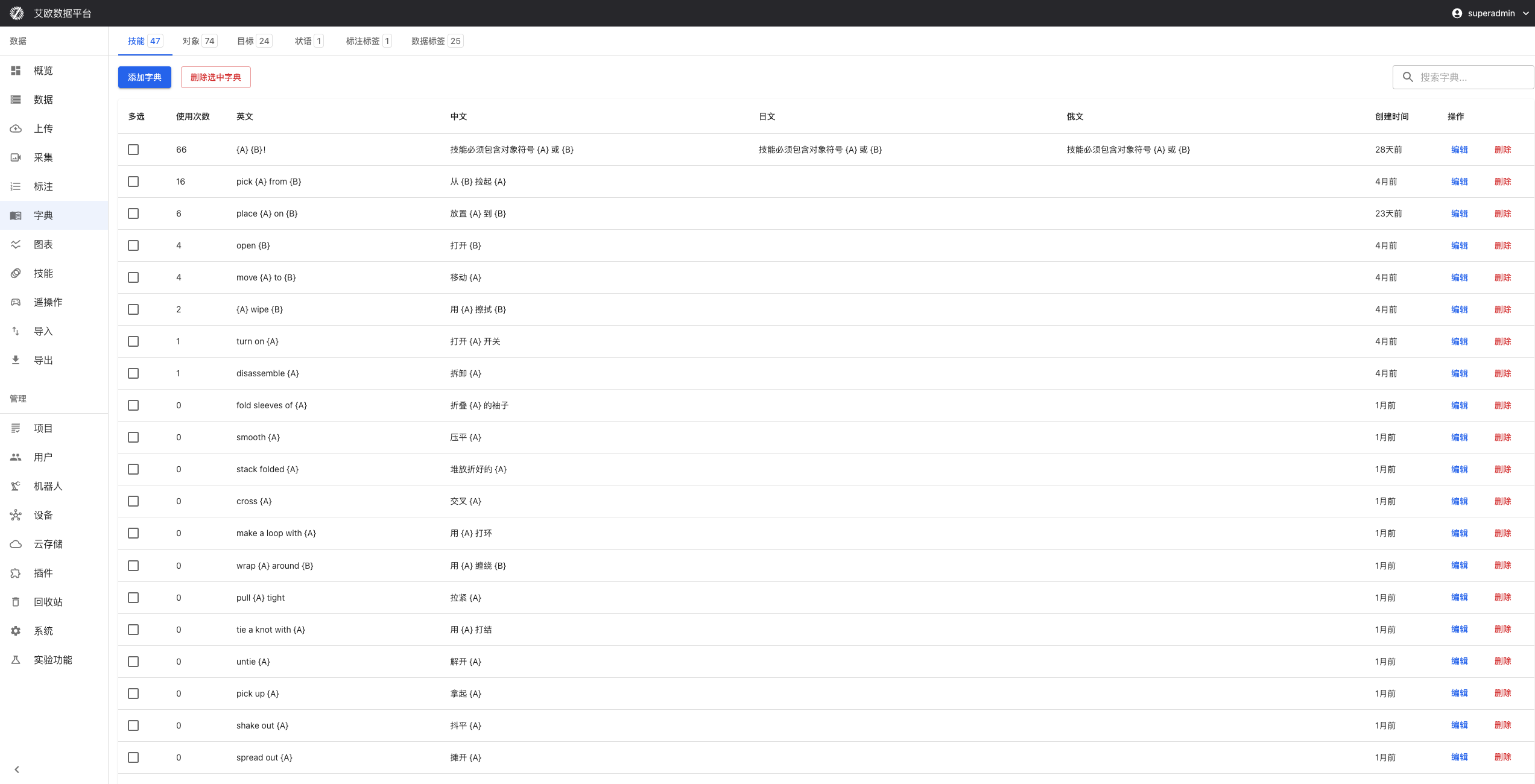
Dictionary Type Management
Skill Dictionary
Use Case: Ensure team members have consistent understanding of skills, reduce ambiguity during annotation.
Management Content:
- Skill names and descriptions
- Use cases
- Difficulty levels
- Classification information
Management Method:
- Go to Dictionary Management page
- Select "Skill Dictionary"
- Add, edit or delete skills
- Set skill classification and attributes
Object Dictionary
Use Case: Help annotators quickly identify and classify different annotation targets, improve annotation efficiency and accuracy.
Management Content:
- Object types (items, people, scenes, etc.)
- Object attributes
- Object classification
Management Method:
- Select "Object Dictionary"
- Maintain various object types involved in annotation
- Set object attributes and classification
- Ensure object definitions are clear and explicit
Tag Dictionary
Use Case: Ensure consistency and standardization of tag usage.
Management Content:
- Tag names
- Tag colors
- Hierarchy relationships
Management Method:
- Select "Tag Dictionary"
- Uniformly manage annotation tags and data tags
- Set tag colors and hierarchy relationships
- Ensure tag usage standards
Multilingual Support
How to Configure Multilingual Dictionaries?
Configuration Method:
- Select "Multilingual Support" on Dictionary Management page
- Select language to configure (Chinese, English, etc.)
- Configure corresponding dictionary content for different language environments
- Ensure dictionary content is accurate and consistent across different language versions
Use Cases:
- International projects need to support multiple languages
- Need to ensure dictionary content consistency across different language versions
- Need to provide localized dictionaries for different language environments
How to Perform Translation Management?
Translation Features:
- Batch Translation: Support batch translation of dictionary content
- Manual Review: Provide manual review functionality to ensure translation accuracy
- Translation History: Record translation history and versions
Translation Method:
- Select dictionary content to translate
- Use translation function for batch translation
- Manually review translation results
- Save translated dictionary content
Batch Operation Functions
How to Batch Import Dictionaries?
Import Features:
- Support batch import of dictionary data from Excel, CSV and other files
- Automatically perform data validation during import
- Ensure data accuracy
Import Method:
- Prepare dictionary data file (Excel or CSV format)
- Select "Batch Import" on Dictionary Management page
- Upload data file
- System automatically validates and imports data
Import Format:
- Excel files: Support standard Excel format
- CSV files: Support comma-separated CSV format
- Need to include necessary fields (name, description, etc.)
How to Batch Edit Dictionaries?
Edit Features:
- Can modify multiple dictionary items simultaneously
- Support find and replace
- Support batch updates
Edit Method:
- Select dictionary items to edit
- Use batch edit function
- Perform find and replace or batch updates
- Save changes
How to Batch Export Dictionaries?
Export Features:
- Support exporting dictionary data to various formats
- Convenient for backup, sharing or integration with other systems
- Exported data maintains complete structure and format
Export Method:
- Select dictionary type to export
- Select export format (Excel, CSV, etc.)
- Click export button
- Download exported file
Version Control
How to View Change History?
Change History:
- Record all change history of dictionaries
- Include modification time, modifier, modification content, etc.
- Can track dictionary evolution process
Viewing Method:
- Select "Change History" on Dictionary Management page
- View dictionary change records
- Understand dictionary evolution process
- Analyze change trends
How to Rollback to Historical Version?
Version Rollback:
- Support rolling back dictionaries to historical versions
- When current version has issues, can quickly restore to previous stable version
Rollback Method:
- Select version to rollback in change history
- Click "Rollback" button
- Confirm rollback operation
- Dictionary restored to selected historical version
⚠️ Note: Rollback operation will overwrite current version, please operate with caution.
How to Perform Change Approval?
Change Approval:
- Important dictionary modifications need approval before taking effect
- Ensure standardization and security of dictionary changes
Approval Process:
- Submit dictionary change application
- Wait for approval
- Changes take effect after approval
- Record approval history
Common Questions
How to Ensure Dictionary Consistency?
Consistency Management:
- Establish unified dictionary standards
- Regularly check and update dictionaries
- Use version control to manage changes
- Perform change approval
How to Quickly Find Dictionary Items?
Search Method:
- Use search function to find by name
- Filter dictionary items by type
- Use tags for quick location
- View commonly used dictionaries
How to Share Dictionaries with Other Projects?
Sharing Method:
- Export dictionary data
- Import dictionary in other projects
- Or use dictionary template function
- Ensure dictionary format compatibility
Applicable Roles
Administrator
You can:
- Establish and maintain dictionary standards
- Manage all types of dictionary content
- Configure multilingual support
- Monitor dictionary usage
Project Manager
You can:
- Manage project-related dictionary content
- Ensure project team uses unified annotation standards
- Adjust dictionary configuration based on project needs
Annotator
You can:
- Reference unified dictionaries during annotation
- Reduce annotation ambiguity
- Improve annotation efficiency
Reviewer
You can:
- Review based on unified dictionary standards
- Ensure annotation results meet standard requirements
- Improve review efficiency and accuracy
Related Features
After completing dictionary management, you may also need:
- Skill Library: Manage annotation skills
- Annotation Tasks: Use dictionaries for annotation
- Project Management: Configure project dictionaries