Function Overview

Quality inspection management is the core defense line of the IO-AI Data Platform for ensuring data quality, helping users accurately control the accuracy and standardization of raw data through multi-level audit mechanisms. The platform provides flexible quality inspection strategies and refined scoring systems, significantly reducing rework costs and providing high-quality foundations for model training.


Main Functions

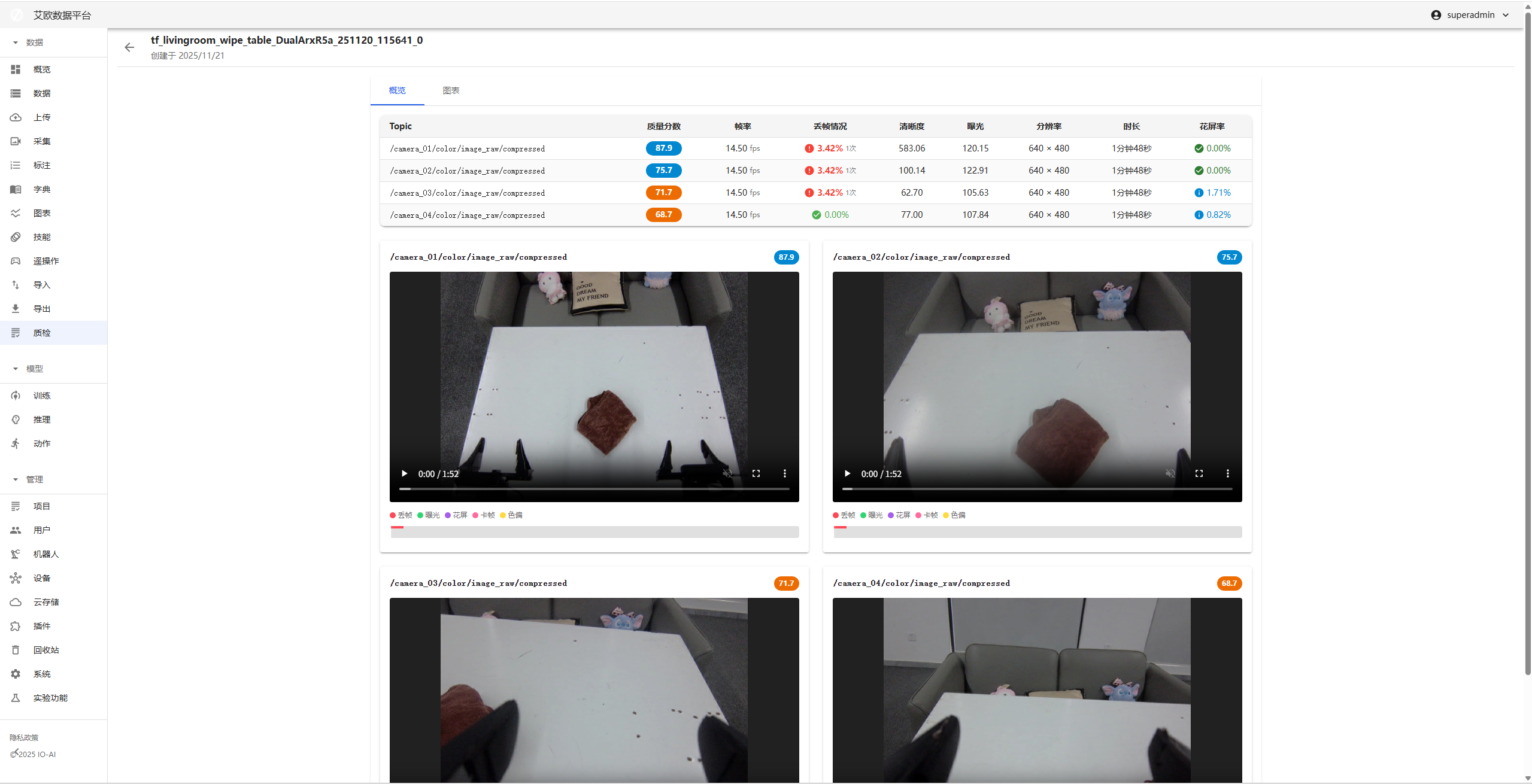
The quality inspection module provides video detection functionality to help teams efficiently locate video faults and ensure delivery quality.
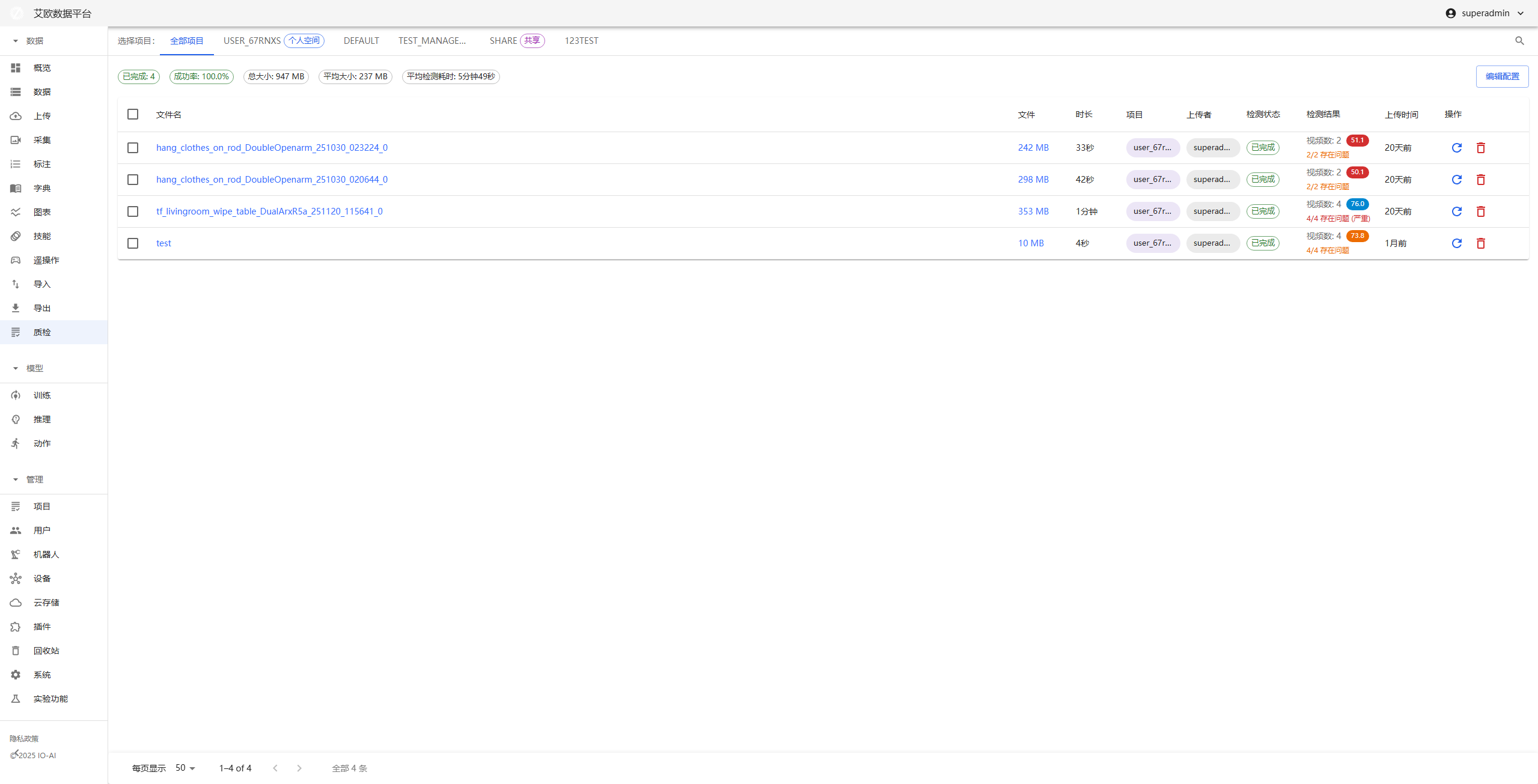
Detection Process

1. Intelligent Detection

Built-in multiple detection algorithms, comprehensively scanning video streams for abnormalities:

  • Smoothness and integrity: Automatically identify frame drops (jumps), freezes (static frames) and screen freezes (mosaic/tear/green screen).
  • Visual visibility: Precisely detect blurriness (defocus), over-dark/over-bright (brightness abnormalities), etc., that affect viewing.
  • Color and picture quality assessment: Monitor color deviation (e.g., overall reddish/greenish) and human-eye perception-based no-reference picture quality scoring (BRISQUE), quantifying video quality.

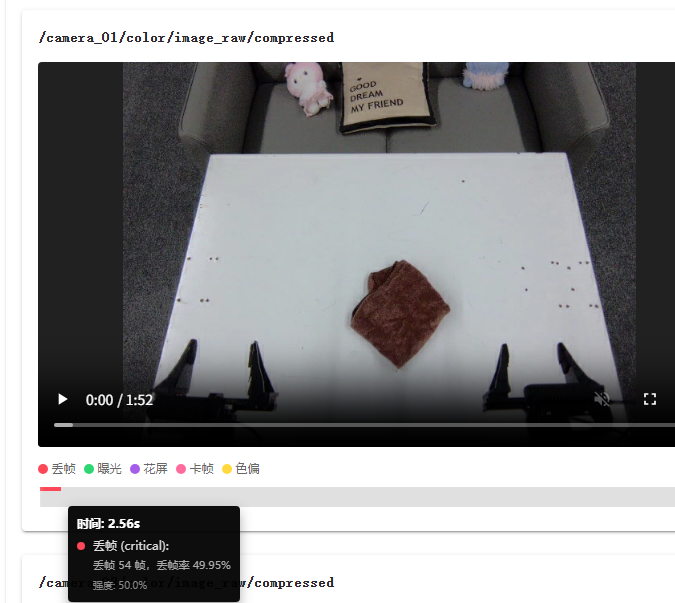
2. Interactive Media Playback

Provide "what you see is what you get" verification experience, converting abstract error codes into intuitive visual evidence:

  • Abnormal event visualization: Directly mark frame drop, screen freeze, etc., abnormal occurrence time periods in the timeline with color blocks.
  • Precise positioning and verification: Support click abnormal marker to directly jump to the fault occurrence moment, with frame-by-frame advance/retreat function, helping users quickly confirm whether it's algorithm misjudgment or real fault, no need to watch the entire video from the beginning.

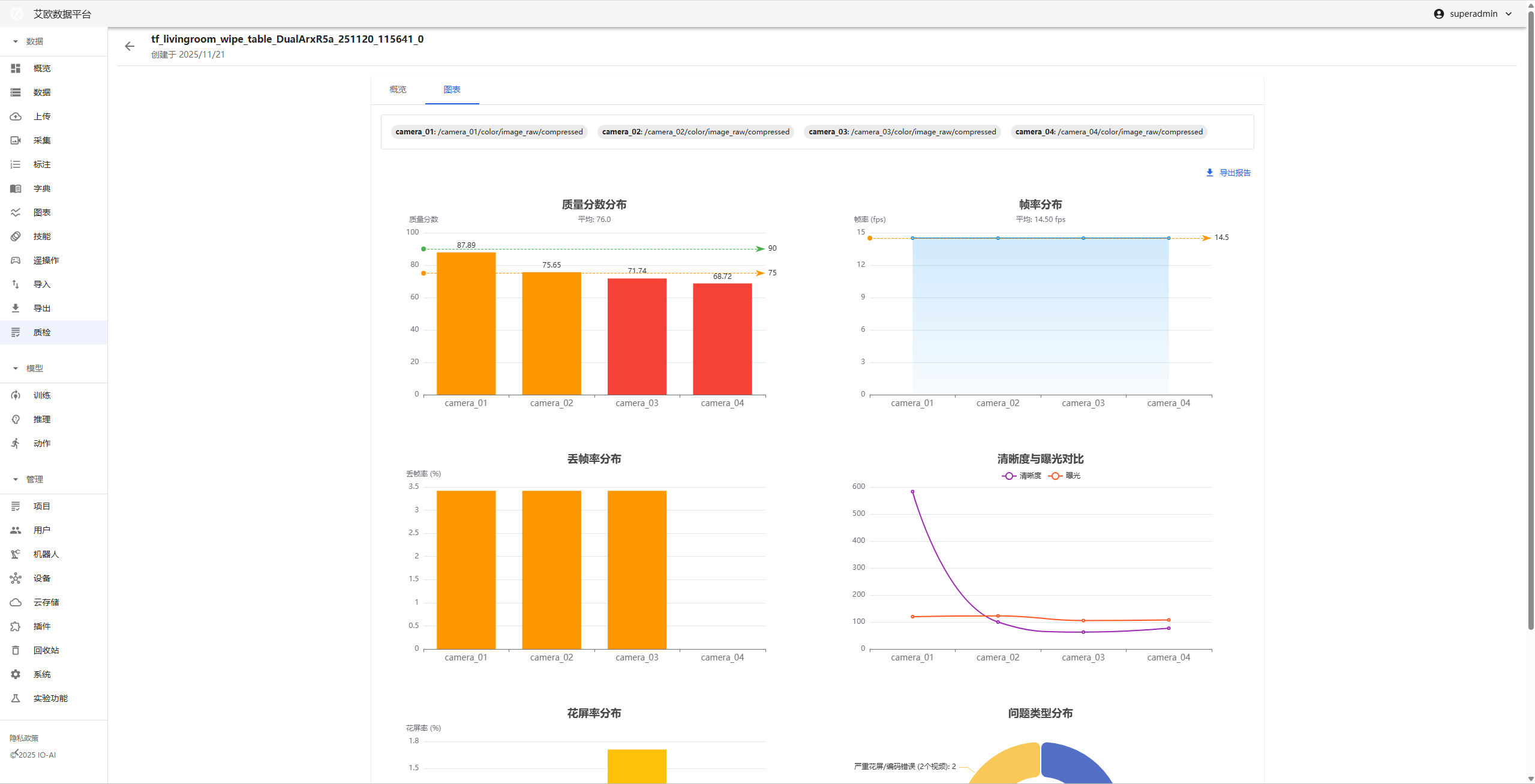
3. Visualized Data Analysis

Convert complex detection data into readable charts for decision support:

  • Multi-dimensional data dashboard: Provide clear trend and distribution charts, intuitively showing picture quality fluctuations and fault density.
  • Standardized report export: Support one-click generation and export of PDF quality inspection reports, including key indicator snapshots and fault summaries, facilitating team circulation, delivery acceptance, and problem archiving.

4. Standardized Data Contract

  • Unified data format: All detection results are output in standard JSON format, facilitating system cross-task data aggregation, sampling analysis, and audit traceability, eliminating data silos.

Quality Inspection Details Page

The quality inspection details page is a diagnostic workbench for a single video sample, integrating playback, data, and operation functions, supporting in-depth troubleshooting of problems.

Main function areas:

  • Frame-level playback workspace

    • Abnormal one-click jump: Click the mark in the bottom timeline, the player immediately jumps to the problem frame.
  • Multi-dimensional indicator synchronization dashboard

    • Detector raw data: Display the numerical values of various indicators of the video.
    • Visualized trend chart: Display the overall quality trend of the entire video through line charts, quickly identify quality mutation points.
  • Result delivery

    • One-click report: Integrate the current video's diagnostic list and data charts, instantly export as PDF report.

Frame Drop Detection

  1. Method Principle

Target: Detect whether the time interval between adjacent frames in the video stream exceeds expectations, thereby identifying frame drops.

Method:

  • The program calculates the time stamp difference between adjacent frames: current frame time stamp - previous frame time stamp, if this difference is far greater than the expected frame interval (for example, the standard time interval for 30FPS video is 33 milliseconds), then frame drop or time stamp abnormal jump is determined.

  • Use a two-step verification mechanism to detect whether frame drop occurs:

    1. Parse time stamps and detect whether time stamps are continuous.
    2. If time stamps are abnormal, extract frame content features and verify through image comparison whether frame drop occurs.

Through this approach, video interruptions caused by missing frames can be effectively identified.

  1. Parameter Impact
Configuration ParameterImpactHow to Adjust
jitter_toleranceControls the allowable fluctuation range of time stamps, the larger the more tolerant time difference.Increase this value to tolerate more time fluctuations, avoid misjudging frame drops.
min_drop_durationControls the minimum duration for frame drop determination, only when the missing time exceeds this value is it considered frame drop.Adjust to a smaller value to detect frame drops within short periods.
similarity_thresholdControls the verification threshold of frame similarity, the higher the more similar frame content is required to be considered duplicate frames.Adjust to a higher value to avoid misjudging frames as frame drops.
ssim_threshold_stuckSSIM threshold for freeze detection, the higher the stricter the freeze detection.Adjust to a lower value to tolerate more freeze changes.
ssim_threshold_flowerSSIM threshold for screen freeze detection, the lower the higher the sensitivity of screen freeze detection.Adjust to a lower value to more easily identify screen freeze phenomena.

Screen Freeze Detection

  1. Method Principle

Target: Evaluate whether there is an unexpected or severe change between adjacent frames, thereby judging whether screen freeze occurs.

Method:

  • Structural Similarity Index (SSIM): Assess the degree of similarity between two images in brightness, contrast, and structure. The closer the value is to 1, the more similar the two frames.

    • Detection types: Structural screen freeze, severe structural damage
    • Applicable scenarios: Frame tearing, encoding errors, mosaic
  • Content feature difference: Comprehensive judgment through multiple image features

    1. Color histogram difference: Detect color distribution changes, identify color distortion
    2. Edge density difference: Detect structural detail changes, identify detail loss or noise
    3. HSV color space difference: Detect hue, saturation, brightness abnormalities
    4. Brightness and contrast difference: Detect exposure abnormalities (overexposure/underexposure), contrast abnormalities

Screen freeze types detected:

  • structural_glitch: Structural screen freeze (medium)
  • severe_structural_corruption: Severe structural damage (high)
  • color_distortion: Color distortion (medium)
  • severe_color_distortion: Severe color distortion (high)
  • brightness_spike: Brightness mutation (medium/low)
  • contrast_anomaly: Contrast abnormality (low)
  • color_space_anomaly: Color space abnormality (medium)
  • detail_loss_or_noise: Detail loss/noise (low)

Through multi-dimensional combination, various types of screen freeze phenomena can be more comprehensively and accurately detected.

  1. Parameter Impact
Configuration ParameterImpactHow to Adjust
ssim_threshold_stuckSSIM threshold for freeze detection, the higher the stricter the freeze determination.Adjust to lower value for more lenient freeze identification.
GLITCH_HISTOGRAM_THRESHOLDColor histogram difference threshold (default 0.3), controls color distortion detection sensitivity.Adjust this value to balance color abnormality detection accuracy.
GLITCH_EDGE_THRESHOLDEdge density difference threshold (default 0.2), controls detail change detection sensitivity.Lower this value to detect more subtle detail loss.
GLITCH_HSV_THRESHOLDHSV color space difference threshold (default 0.25), controls color abnormality detection.Adjust this value to control color distortion detection range.
GLITCH_BRIGHTNESS_THRESHOLDBrightness difference threshold (default 0.3), controls exposure abnormality detection.Adjust this value to control brightness mutation sensitivity.
GLITCH_CONTRAST_THRESHOLDContrast difference threshold (default 0.25), controls contrast abnormality detection.Adjust this value to control contrast change detection.

Configuration Suggestions:

  • For high-quality video streams: Appropriately increase various thresholds to reduce false positives
  • For low-quality video streams: Appropriately lower various thresholds to improve detection rate
  • It is recommended to adjust various parameters based on actual test results to find the best balance

Clarity Detection

  1. Method Principle

Target: Objectively assess picture clarity and focusing situation, detect blurred frames.

Method:

  • Laplacian Variance Algorithm:

    • Use Laplacian operator to convolve the image and calculate the variance of the result
    • Laplacian operator is very sensitive to high-frequency information in the image (such as edges, details)
    • Clear images: Rich details, much high-frequency information, large Laplacian variance (typical value > 100)
    • Blurred images: Lost details, little high-frequency information, small Laplacian variance (typical value < 50)
  • Detection Logic:

    • Convert BGR image to grayscale image
    • Calculate Laplacian variance as clarity score (blur_score)
    • If blur_score < blur_threshold, determine as blurred frame
    • Create BlurEvent record abnormal frame
  1. Parameter Impact
Configuration ParameterImpactHow to Adjust
blur_thresholdBlur threshold (Laplacian variance, default: 50). Below this value is considered blurred.Lower this value for more lenient blur determination, raise this value for stricter blur detection.
frame_skipFrame sampling interval for improving processing speed.Increase this value to reduce processed frames, improve processing speed, but may miss some blurred frames.

Configuration Suggestions:

  • For high-quality video streams: Appropriately raise blur_threshold (such as 60-80) to reduce false positives
  • For low-quality video streams: Appropriately lower blur_threshold (such as 30-40) to improve detection rate
  • Typical value reference:
    • Very clear images: Laplacian variance > 200
    • Clear images: Laplacian variance 100-200
    • Medium clarity: Laplacian variance 50-100
    • Blurred images: Laplacian variance < 50

Brightness Detection

  1. Method Principle

Target: Objectively assess picture brightness, detect abnormal frames that are too dark (underexposed) and too bright (overexposed).

Method:

  • Grayscale image average brightness:

    • Convert BGR image to grayscale image
    • Calculate the average value of all pixels in the grayscale image as brightness value (range 0-255)
    • The larger the value, the brighter the image; the smaller the value, the darker the image
  • Detection Logic:

    • Calculate the average brightness value of each frame (mean_brightness)
    • If mean_brightness < brightness_low, determine as too dark (under_exposed)
    • If mean_brightness > brightness_high, determine as too bright/overexposed (over_exposed)
    • Create ExposureEvent record abnormal frame
  • Brightness Range:

    • Normal brightness: Usually between 80-180
    • Too dark: < 40 (default threshold)
    • Too bright/overexposed: > 220 (default threshold)
  1. Parameter Impact
Configuration ParameterImpactHow to Adjust
brightness_lowLow brightness threshold (default: 40.0, range 0-255). Below this value is considered too dark.Raise this value for more sensitive dark detection, lower this value to tolerate darker pictures.
brightness_highHigh brightness threshold (default: 220.0, range 0-255). Above this value is considered too bright/overexposed.Lower this value for more sensitive overexposure detection, raise this value to tolerate brighter pictures.
frame_skipFrame sampling interval for improving processing speed.Increase this value to reduce processed frames, improve processing speed, but may miss some abnormal frames.

Configuration Suggestions:

  • For indoor scenes: Appropriately lower brightness_low (such as 30), raise brightness_high (such as 230)
  • For outdoor scenes: Appropriately raise brightness_low (such as 50), lower brightness_high (such as 210)
  • For night scenes: Significantly lower brightness_low (such as 20-30) to avoid false positives
  • For high-light scenes: Appropriately raise brightness_high (such as 240-250) to avoid false positives
  • Typical brightness value reference:
    • Normal indoor: 80-150
    • Normal outdoor: 120-200
    • Too dark scenes: < 40
    • Too bright scenes: > 220

Color Cast Detection

  1. Method Principle

Target: Detect whether the picture has unexpected global color bias, identify reddish, greenish, yellowish, bluish, etc., color abnormalities.

Method:

  • LAB Color Space Analysis:

    • L Channel: Luminosity (Luminosity), range 0-255
    • A Channel: Green-Red axis (Green-Red axis), positive values bias red, negative values bias green
    • B Channel: Blue-Yellow axis (Blue-Yellow axis), positive values bias yellow, negative values bias blue
  • Detection Algorithm:

    1. Color space conversion: Convert BGR image to LAB color space
    2. Pixel filtering: Filter over-dark/over-bright pixels (L channel between 15-240), exclude noise and overexposure areas
    3. Calculate average offset:
      • Calculate A channel average offset: da = mean(A_valid) - 128
      • Calculate B channel average offset: db = mean(B_valid) - 128
      • Calculate total offset distance: D = sqrt(da² + db²)
    4. Calculate standard deviation:
      • A channel standard deviation: Ma = std(A_valid)
      • B channel standard deviation: Mb = std(B_valid)
      • Total standard deviation: M = sqrt(Ma² + Mb²)
    5. Calculate color bias intensity: cast = D / M (average offset ratio relative to standard deviation)
      • The larger the value, the more severe the color bias
      • The smaller the value, the more normal the color
    6. Color bias direction judgment:
      • Reddish: da > 0 (A channel positive offset)
      • Greenish: da < 0 (A channel negative offset)
      • Yellowish: db > 0 (B channel positive offset)
      • Bluish: db < 0 (B channel negative offset)
  • Detection Logic:

    • If cast > color_cast_threshold, determine as color bias frame
    • Create ColorCastEvent record abnormal frame
    • Count color bias direction and frequency
  1. Parameter Impact
Configuration ParameterImpactHow to Adjust
color_cast_thresholdColor bias intensity threshold (default: 1.0). Above this value is considered color bias.Lower this value for more sensitive color bias detection, raise this value to reduce false positives.
frame_skipFrame sampling interval for improving processing speed.Increase this value to reduce processed frames, improve processing speed, but may miss some color bias frames.

Configuration Suggestions:

  • For high-quality video streams: Appropriately raise color_cast_threshold (such as 1.5-2.0) to reduce false positives
  • For low-quality video streams: Appropriately lower color_cast_threshold (such as 0.7-0.8) to improve detection rate
  • Typical color bias intensity value reference:
    • Normal pictures: cast < 1.0
    • Slight color bias: cast 1.0-2.0
    • Obvious color bias: cast 2.0-5.0
    • Severe color bias: cast > 5.0

Notes:

  • The algorithm automatically filters over-dark (L < 15) and over-bright (L > 240) pixels to avoid noise interference
  • If valid pixels are too few (< 100 or < 10% of total pixels), detection will be skipped and normal values returned
  • Color bias detection is applicable to global color bias, not suitable for local color changes (such as specific object colors)

Image Quality Assessment (IQA - Image Quality Assessment)

No-Reference Image Quality Assessment

  1. Method Principle

Target: Use No-Reference Image Quality Assessment (No-Reference IQA) method to simulate human eye perception of video picture quality, assess image quality after compression, denoising, distortion processing.

Method:

  • BRISQUE Algorithm (Blind/Referenceless Image Spatial Quality Evaluator):

    • Analyze the deviation of natural scene statistical features in the image
    • Assess image quality without reference images
    • Can detect compression artifacts, blur, noise, distortion and other quality problems
  • Score System:

    • LIG Score (Lower Is Good): BRISQUE algorithm original output, the lower the score the better the quality
    • HIG Score (Higher Is Good): Converted score, range 0-100, the higher the score the better the quality
    • Conversion formula: HIG = 100 * (1 - LIG / BRISQUE_MAX_SCORE)
      • When LIG = 0, HIG = 100 (highest quality)
      • When LIG = BRISQUE_MAX_SCORE, HIG = 0 (lowest quality)
  • Detection Logic:

    1. Input image into BRISQUE evaluator
    2. Calculate BRISQUE LIG score
    3. Convert to HIG score (0-100)
    4. If HIG < normalized_threshold, determine as low-quality frame
    5. Record average BRISQUE HIG score
  • Applicable Scenarios:

    • Assess image quality after compression (JPEG, H.264, etc.)
    • Detect quality loss after denoising processing
    • Evaluate distortion during transmission
    • More comprehensive reflection of picture defects than Laplacian variance
  1. Parameter Impact
Configuration ParameterImpactHow to Adjust
normalized_thresholdHIG score threshold (default: 50, range 0-100). Below this value is considered low-quality image.Lower this value for stricter low-quality determination, raise this value to tolerate more quality loss.
frame_skip_iqaFrame sampling interval (default: 30). BRISQUE calculation is time-consuming, use larger sampling interval.Increase this value to reduce processed frames, improve processing speed, but may miss some low-quality frames.

Configuration Suggestions:

  • For high-quality video streams: Appropriately raise normalized_threshold (such as 60-70) to reduce false positives
  • For low-quality video streams: Appropriately lower normalized_threshold (such as 40-45) to improve detection rate
  • Typical HIG score reference:
    • High-quality images: HIG > 70
    • Medium-quality images: HIG 50-70
    • Low-quality images: HIG 30-50
    • Very low-quality images: HIG < 30

Notes:

  • BRISQUE algorithm calculation is time-consuming, it is recommended to use larger frame_skip_iqa (such as 30-60)
  • BRISQUE assesses overall perceptual quality, not specific types of defects (such as blur, color bias, etc.)
  • Complement clarity detection (Laplacian variance) and color bias detection, providing more comprehensive quality assessment